# CWIS Information Management System (CWIS IMS)

CWISIMS is a vital module of the IMIS that provides tools to generate CWIS indicators for the city and Key Performance Indicators (KPIs) to monitor the performance of sanitation service providers for a specified year. The CWISIMS is a part of the UMDSS which allows municipalities to set targets for each indicator in alignment with city policies and standards, and it includes a dashboard for the visualization of these indicators. The generated indicator data is maintained in a database, enabling easy access and review when needed, ensuring effective monitoring and planning.

# CWIS IMIS Introduction

CWISIMS is a vital module of the IMIS that provides tools to generate CWIS indicators for the city and Key Performance Indicators (KPIs) to monitor the performance of sanitation service providers for a specified year. The CWISIMS is a part of the UMDSS which allows municipalities to set targets for each indicator in alignment with city policies and standards, and it includes a dashboard for the visualization of these indicators. The generated indicator data is maintained in a database, enabling easy access and review when needed, ensuring effective monitoring and planning.

<span style="mso-fareast-font-family: 'Times New Roman'; mso-bidi-font-family: 'Times New Roman';"><span style="mso-list: Ignore;"><span style="font: 7.0pt 'Times New Roman';"> </span>i.<span style="font: 7.0pt 'Times New Roman';"> </span></span></span>CWIS Dashboard - The CWIS Dashboard tracks 22 sanitation indicators (Annex 1), which are generated annually. The indicators are based on the CWIS framework developed by Athena Informatics, ensuring consistency with globally recognized standards for inclusive sanitation monitoring. This dashboard provides municipalities with a centralized platform for tracking sanitation progress and assessing the effectiveness of implemented policies and services.

<span style="mso-fareast-font-family: 'Times New Roman'; mso-bidi-font-family: 'Times New Roman';"><span style="mso-list: Ignore;"><span style="font: 7.0pt 'Times New Roman';"> </span>ii.<span style="font: 7.0pt 'Times New Roman';"> </span></span></span>KPI Dashboard – The KPI Dashboard complements the CWIS Dashboard by focusing on the performance of sanitation service providers. It monitors seven critical KPIs (1. Application Response Efficiency, 2. Customer Satisfaction, 3. PPE Compliance, 4. Safe Desludging, 5. Faecal Sludge Collection Ration, 6. Response Time, 7. Inclusion), which are also generated annually, using sanitation service data related to faecal sludge management (FSM) service delivery. These KPIs are designed to evaluate the efficiency and quality of services provided by sanitation operators, based on metrics developed by SNV Bangladesh. By leveraging this dashboard, municipalities can benchmark service provider performance and identify areas for operational improvement within their sanitation systems.

CWISIMS, through its dual focus on CWIS indicators and KPIs, provides municipalities with robust tools for monitoring and improving their sanitation systems. By aligning indicator and KPI tracking with international standards and municipal goals, it ensures data-driven decision-making and continuous improvement in sanitation service delivery and management.

# 13.1 CWIS Dashboard

13.1.1 Navigation to CWIS Dashboard

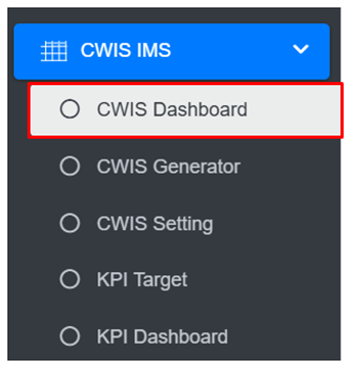
<span style="font-family: Symbol; mso-fareast-font-family: Symbol; mso-bidi-font-family: Symbol;"><span style="mso-list: Ignore;">·<span style="font: 7.0pt 'Times New Roman';"> </span></span></span><span class="normaltextrun">Open the sidebar and click on ***CWIS IMS*** to expand.</span><span class="eop"> </span>

<span class="eop"><span style="font-family: Symbol; mso-fareast-font-family: Symbol; mso-bidi-font-family: Symbol;"><span style="mso-list: Ignore;">·<span style="font: 7.0pt 'Times New Roman';"> </span></span></span></span><span class="normaltextrun">Select the ***CWIS Dashboard.***</span><span class="eop"> </span>

<span class="eop">![](http://152.42.244.158/knowledge-product/uploads/images/gallery/2025-02/embedded-image-p1oo8lpk.png)</span>

<span class="normaltextrun">**Overview:**</span>

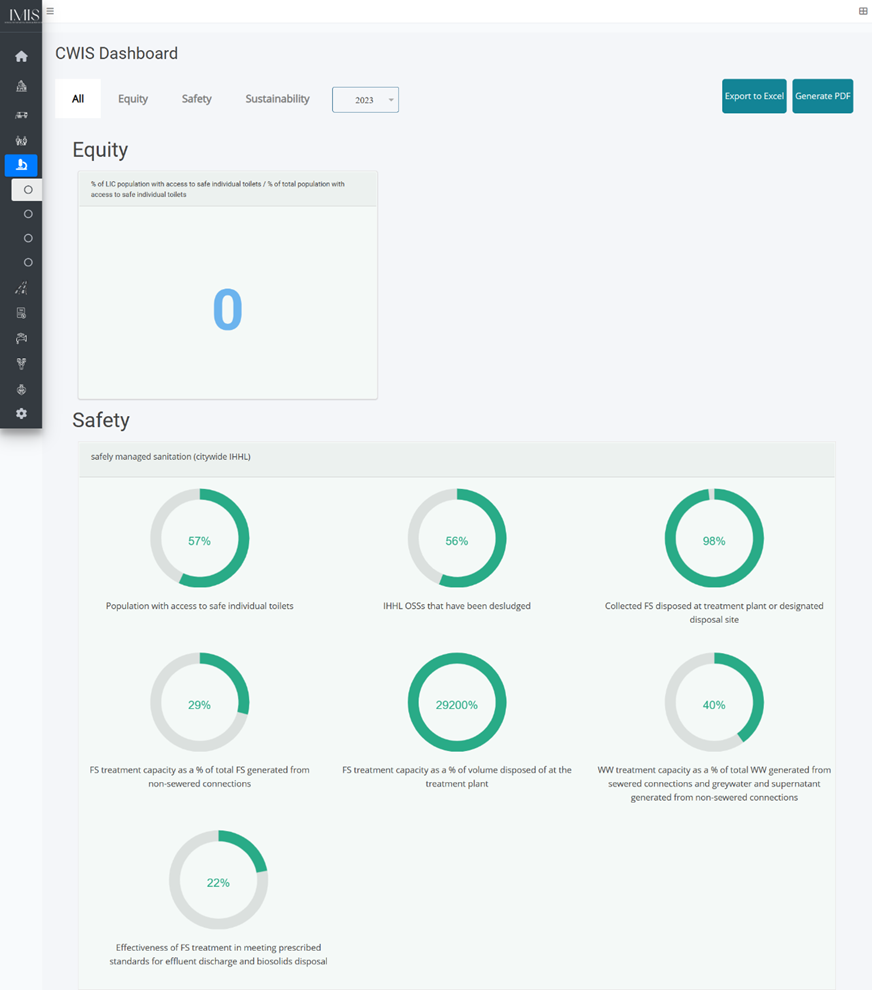
<span class="normaltextrun"><span style="font-family: Symbol; mso-fareast-font-family: Symbol; mso-bidi-font-family: Symbol;"><span style="mso-list: Ignore;">·<span style="font: 7.0pt 'Times New Roman';"> </span></span></span></span><span class="normaltextrun">The ***CWIS Dashboard*** provides the CWIS indicators of the city.</span>

<span class="normaltextrun">![](http://152.42.244.158/knowledge-product/uploads/images/gallery/2025-02/embedded-image-en7tvysa.png)</span>

<span class="normaltextrun"><span style="font-size: 11.0pt; line-height: 107%; font-family: 'Calibri',sans-serif; mso-ascii-theme-font: minor-latin; mso-fareast-font-family: Calibri; mso-fareast-theme-font: minor-latin; mso-hansi-theme-font: minor-latin; mso-bidi-font-family: Mangal; mso-bidi-theme-font: minor-bidi; mso-ansi-language: EN-US; mso-fareast-language: EN-US; mso-bidi-language: AR-SA;">Figure 13‑</span><span style="font-size: 11.0pt; line-height: 107%; font-family: 'Calibri',sans-serif; mso-ascii-theme-font: minor-latin; mso-fareast-font-family: Calibri; mso-fareast-theme-font: minor-latin; mso-hansi-theme-font: minor-latin; mso-bidi-font-family: Mangal; mso-bidi-theme-font: minor-bidi; mso-ansi-language: EN-US; mso-fareast-language: EN-US; mso-bidi-language: AR-SA;"><span style="mso-no-proof: yes;">1</span></span><span style="font-size: 11.0pt; line-height: 107%; font-family: 'Calibri',sans-serif; mso-ascii-theme-font: minor-latin; mso-fareast-font-family: Calibri; mso-fareast-theme-font: minor-latin; mso-hansi-theme-font: minor-latin; mso-bidi-font-family: Mangal; mso-bidi-theme-font: minor-bidi; mso-ansi-language: EN-US; mso-fareast-language: EN-US; mso-bidi-language: AR-SA;"> CWIS Dashboard</span></span>

# 13.2 CWIS Generator

CWIS can be generated through the addition of data on a yearly basis. The system is also capable of generating and compiling the yearly data.

13.2.1 Navigation to CWIS Generator

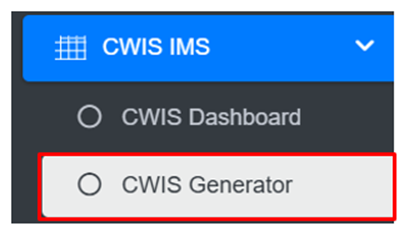
<span style="font-family: Symbol; mso-fareast-font-family: Symbol; mso-bidi-font-family: Symbol;"><span style="mso-list: Ignore;">·<span style="font: 7.0pt 'Times New Roman';"> </span></span></span>Open the sidebar and click on ‘***CWIS IMS’*** to expand.

<span style="font-family: Symbol; mso-fareast-font-family: Symbol; mso-bidi-font-family: Symbol;"><span style="mso-list: Ignore;">·<span style="font: 7.0pt 'Times New Roman';"> </span></span></span>Select the ***CWIS Generator***.

![](http://152.42.244.158/knowledge-product/uploads/images/gallery/2025-02/embedded-image-xxy8htxa.png)

**Overview:**

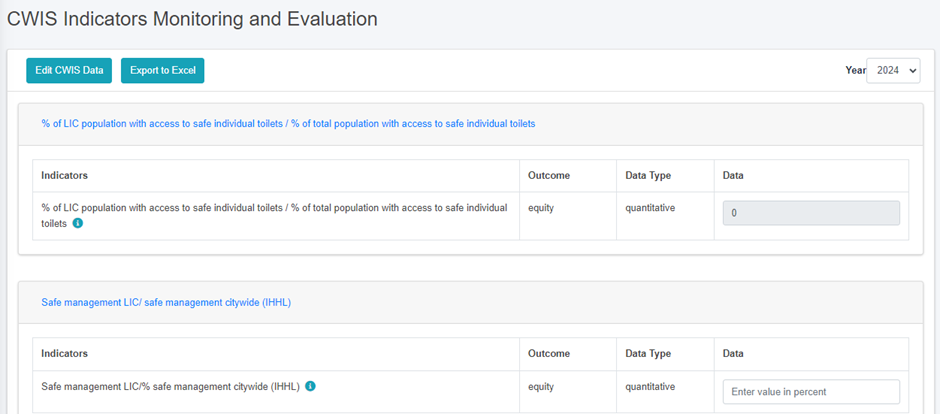
The CWIS Generator page lists all the attribute records stored in the module and provides Filters, and Tools that can be used according to the requirements. For more details (refer to section 5 Filters, and section 8 Tools).  
• Add CWIS Data (refer to section 13.2.2 Add CWIS Data)
![](http://152.42.244.158/knowledge-product/uploads/images/gallery/2025-02/embedded-image-d9tdpgs3.png)

Figure 13 2 CWIS Indicators Monitoring and Evaluation

**Note:**

- <span style="font-size: 11.0pt; line-height: 107%; font-family: 'Calibri',sans-serif; mso-ascii-theme-font: minor-latin; mso-fareast-font-family: Calibri; mso-fareast-theme-font: minor-latin; mso-hansi-theme-font: minor-latin; mso-bidi-font-family: Mangal; mso-bidi-theme-font: minor-bidi; mso-ansi-language: EN-US; mso-fareast-language: EN-US; mso-bidi-language: AR-SA;">The user must add the correct and accurate values in the CWIS Settings Page in order to display the accurate calculation of indicators. Refer to Section 13.2.2 Add CWIS Data for more details.</span>

<span style="font-size: 11.0pt; line-height: 107%; font-family: 'Calibri',sans-serif; mso-ascii-theme-font: minor-latin; mso-fareast-font-family: Calibri; mso-fareast-theme-font: minor-latin; mso-hansi-theme-font: minor-latin; mso-bidi-font-family: Mangal; mso-bidi-theme-font: minor-bidi; mso-ansi-language: EN-US; mso-fareast-language: EN-US; mso-bidi-language: AR-SA;">13.2.2 Add CWIS Data</span>

<span style="font-family: Symbol; mso-fareast-font-family: Symbol; mso-bidi-font-family: Symbol;"><span style="mso-list: Ignore;">·<span style="font: 7.0pt 'Times New Roman';"> </span></span></span>Click on the ***Add CWIS Data*** button to add new CWIS Data and it is also capable of generating the yearly data at the end of the year.

![](http://152.42.244.158/knowledge-product/uploads/images/gallery/2025-02/embedded-image-vxnf6ju4.png)

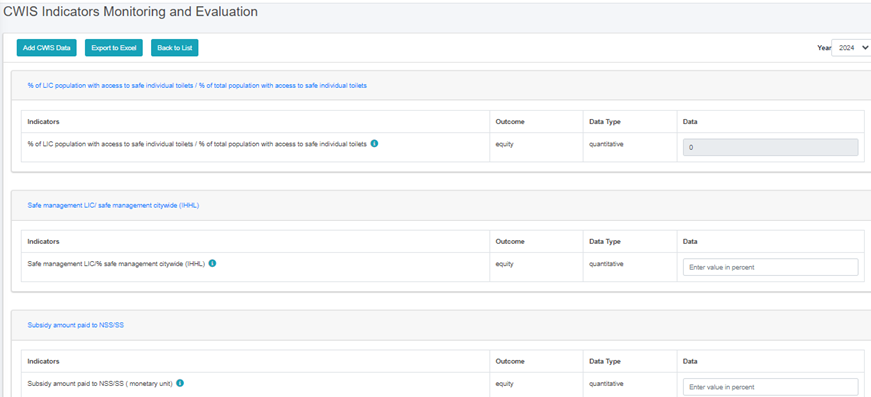
<span style="font-family: Symbol; mso-fareast-font-family: Symbol; mso-bidi-font-family: Symbol;"><span style="mso-list: Ignore;">·<span style="font: 7.0pt 'Times New Roman';"> </span></span></span>This redirects to the ***Data Framework for Monitoring and Evaluation*** form page.
![](http://152.42.244.158/knowledge-product/uploads/images/gallery/2025-02/embedded-image-nnsllm5n.png)

Figure 13‑<span style="mso-no-proof: yes;">3</span><span style="mso-spacerun: yes;"> </span>Add CWIS Data

<span style="font-size: 11.0pt; line-height: 107%; font-family: 'Calibri',sans-serif; mso-ascii-theme-font: minor-latin; mso-fareast-font-family: Calibri; mso-fareast-theme-font: minor-latin; mso-hansi-theme-font: minor-latin; mso-bidi-font-family: Mangal; mso-bidi-theme-font: minor-bidi; mso-ansi-language: EN-US; mso-fareast-language: EN-US; mso-bidi-language: AR-SA;">After filling out the form click ***Save*** <span class="wacimagecontainer"><span style="mso-no-proof: yes;">and make sure a pop-up message is displayed, refer to section 7.1 Save for more details</span></span><span class="normaltextrun"><span style="color: black; background: white;">.</span></span></span>

# 13.3 CWIS Settings

CWIS Setting sub-module also set the standard parameter for the module that is [<span style="color: windowtext;">CWIS Generator</span>](#CWIS_gen), when interacted the web-application. CWIS Generator displays the data of the module whereas CWIS Settings is the standard values which is used according to CWIS Indicator(SF\_1g).

13.3.1 Navigation to CWIS Settings

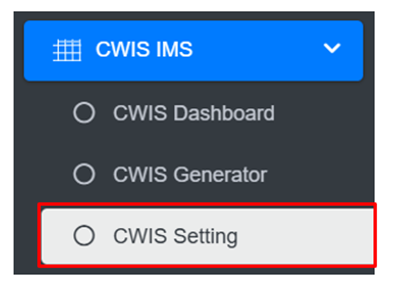
<span style="font-family: Symbol; mso-fareast-font-family: Symbol; mso-bidi-font-family: Symbol;"><span style="mso-list: Ignore;">·<span style="font: 7.0pt 'Times New Roman';"> </span></span></span>Open the sidebar and click on the **‘*Settings’*** to expand.

<span style="font-family: Symbol; mso-fareast-font-family: Symbol; mso-bidi-font-family: Symbol;"><span style="mso-list: Ignore;">·<span style="font: 7.0pt 'Times New Roman';"> </span></span></span>Select the ***CWIS Setting.***

![](http://152.42.244.158/knowledge-product/uploads/images/gallery/2025-02/embedded-image-kiijvylp.png)

- <span style="font-size: 11.0pt; line-height: 107%; font-family: 'Calibri',sans-serif; mso-ascii-theme-font: minor-latin; mso-fareast-font-family: Calibri; mso-fareast-theme-font: minor-latin; mso-hansi-theme-font: minor-latin; mso-bidi-font-family: Mangal; mso-bidi-theme-font: minor-bidi; mso-ansi-language: EN-US; mso-fareast-language: EN-US; mso-bidi-language: AR-SA;">T</span><span style="font-size: 11.0pt; line-height: 107%; font-family: 'Calibri',sans-serif; mso-ascii-theme-font: minor-latin; mso-fareast-font-family: Calibri; mso-fareast-theme-font: minor-latin; mso-hansi-theme-font: minor-latin; mso-bidi-font-family: Mangal; mso-bidi-theme-font: minor-bidi; mso-ansi-language: EN-US; mso-fareast-language: EN-US; mso-bidi-language: AR-SA;">his redirects to the </span><span style="font-size: 11.0pt; line-height: 107%; font-family: 'Calibri',sans-serif; mso-ascii-theme-font: minor-latin; mso-fareast-font-family: Calibri; mso-fareast-theme-font: minor-latin; mso-hansi-theme-font: minor-latin; mso-bidi-font-family: Mangal; mso-bidi-theme-font: minor-bidi; mso-ansi-language: EN-US; mso-fareast-language: EN-US; mso-bidi-language: AR-SA;">CWIS Settings page.</span>

**Overview**:

<span style="font-family: Symbol; mso-fareast-font-family: Symbol; mso-bidi-font-family: Symbol;"><span style="mso-list: Ignore;">·<span style="font: 7.0pt 'Times New Roman';"> </span></span></span>The user can view the general information maintained by the sub-module and carry out different processes as required.

<span style="font-family: Symbol; mso-fareast-font-family: Symbol; mso-bidi-font-family: Symbol;"><span style="mso-list: Ignore;">·<span style="font: 7.0pt 'Times New Roman';"> </span></span></span>The user can Edit the CWIS Setting.

![](http://152.42.244.158/knowledge-product/uploads/images/gallery/2025-02/embedded-image-rfisezqy.png)

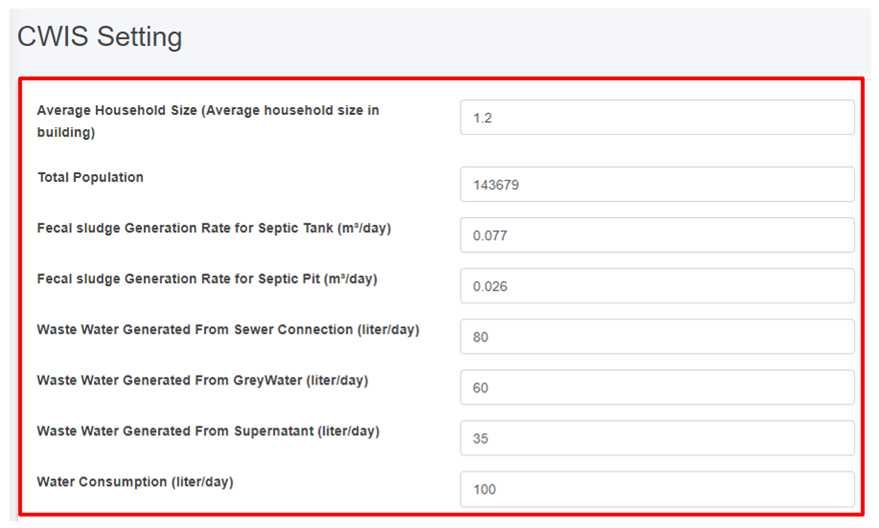
Figure 13- <span style="mso-no-proof: yes;">4</span> Edit CWIS Settings form page

<span style="font-size: 11.0pt; line-height: 107%; font-family: 'Calibri',sans-serif; mso-ascii-theme-font: minor-latin; mso-fareast-font-family: Calibri; mso-fareast-theme-font: minor-latin; mso-hansi-theme-font: minor-latin; mso-bidi-font-family: Mangal; mso-bidi-theme-font: minor-bidi; mso-ansi-language: EN-US; mso-fareast-language: EN-US; mso-bidi-language: AR-SA;">After Editing is completed click ***Save*** <span class="wacimagecontainer"><span style="mso-no-proof: yes;">and make sure a pop-up message is displayed, refer to section 7.1 Save for more details. </span></span></span>

The fields that are displayed while editing the form are mentioned below:

<span style="font-family: Symbol; mso-fareast-font-family: Symbol; mso-bidi-font-family: Symbol; mso-bidi-language: NE;"><span style="mso-list: Ignore;">·<span style="font: 7.0pt 'Times New Roman';"> </span></span></span><span style="mso-bidi-language: NE;">Average Water Consumption (LPCD): </span>

<span style="font-family: Symbol; mso-fareast-font-family: Symbol; mso-bidi-font-family: Symbol; mso-bidi-language: NE;"><span style="mso-list: Ignore;">·<span style="font: 7.0pt 'Times New Roman';"> </span></span></span><span style="mso-bidi-language: NE;">Waste Water Conversion Factor (%):</span>

<span style="font-family: Symbol; mso-fareast-font-family: Symbol; mso-bidi-font-family: Symbol; mso-bidi-language: NE;"><span style="mso-list: Ignore;">·<span style="font: 7.0pt 'Times New Roman';"> </span></span></span><span style="mso-bidi-language: NE;">Greywater Conversion Factor Connected To Sewer (%):</span>

<span style="font-family: Symbol; mso-fareast-font-family: Symbol; mso-bidi-font-family: Symbol; mso-bidi-language: NE;"><span style="mso-list: Ignore;">·<span style="font: 7.0pt 'Times New Roman';"> </span></span></span><span style="mso-bidi-language: NE;">Greywater Conversion Factor Not Connected To Sewer (%):</span>

# 13.4 KPI Dashboard

13.4.1 Navigation to KPI Dashboard

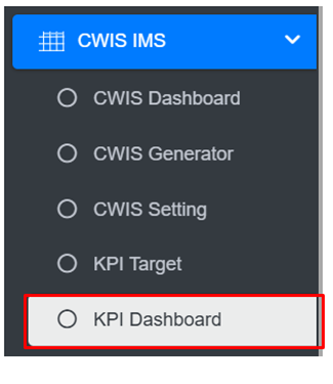
<span style="font-family: Symbol; mso-fareast-font-family: Symbol; mso-bidi-font-family: Symbol;"><span style="mso-list: Ignore;">·<span style="font: 7.0pt 'Times New Roman';"> </span></span></span>Open the sidebar and click on ‘***CWIS IMS’*** to expand.

<span style="font-family: Symbol; mso-fareast-font-family: Symbol; mso-bidi-font-family: Symbol;"><span style="mso-list: Ignore;">·<span style="font: 7.0pt 'Times New Roman';"> </span></span></span>Select the ***KPI Dashboard.***

![](http://152.42.244.158/knowledge-product/uploads/images/gallery/2025-02/embedded-image-esplfskl.png)

- <span style="font-size: 11.0pt; line-height: 107%; font-family: 'Calibri',sans-serif; mso-ascii-theme-font: minor-latin; mso-fareast-font-family: Calibri; mso-fareast-theme-font: minor-latin; mso-hansi-theme-font: minor-latin; mso-bidi-font-family: Mangal; mso-bidi-theme-font: minor-bidi; mso-ansi-language: EN-US; mso-fareast-language: EN-US; mso-bidi-language: AR-SA;">This redirects to the <span>KPI Dashboard </span>page.</span>

<span class="normaltextrun">**Overview:**</span>

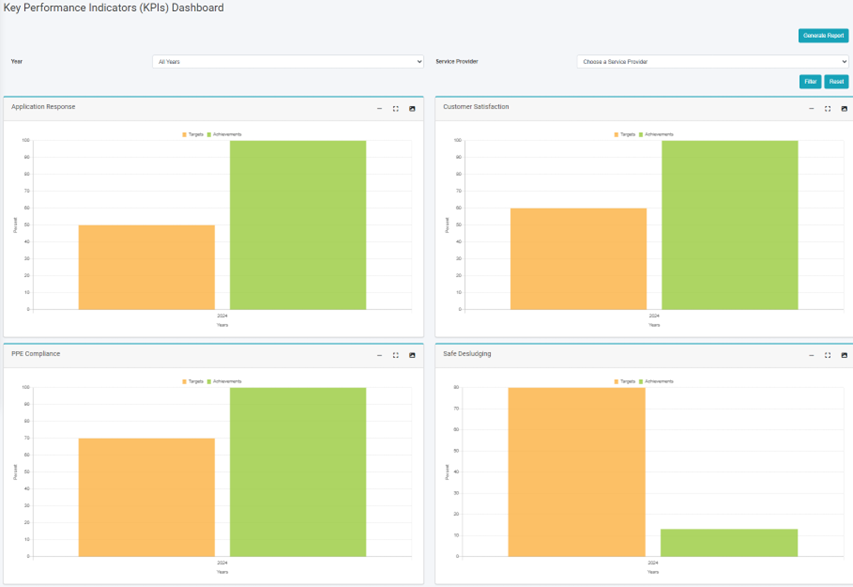
<span class="normaltextrun"><span style="font-family: Symbol; mso-fareast-font-family: Symbol; mso-bidi-font-family: Symbol;"><span style="mso-list: Ignore;">·<span style="font: 7.0pt 'Times New Roman';"> </span></span></span></span><span class="normaltextrun">The ***KPI <span style="mso-bidi-font-weight: bold; mso-bidi-font-style: italic;">D</span>ashboard*** contains different indicators under the KPI Target.</span>

<span style="font-family: Symbol; mso-fareast-font-family: Symbol; mso-bidi-font-family: Symbol;"><span style="mso-list: Ignore;">·<span style="font: 7.0pt 'Times New Roman';"> </span></span></span>The user can interact with the chart tools (refer to section 6.8).

<span style="font-family: Symbol; mso-fareast-font-family: Symbol; mso-bidi-font-family: Symbol;"><span style="mso-list: Ignore;">·<span style="font: 7.0pt 'Times New Roman';"> </span></span></span>User can hover over the chart to get percentage information.
![](http://152.42.244.158/knowledge-product/uploads/images/gallery/2025-02/embedded-image-rm6sbiwb.png)

Figure 13- <span style="mso-no-proof: yes;">5</span> KPI Dashboard

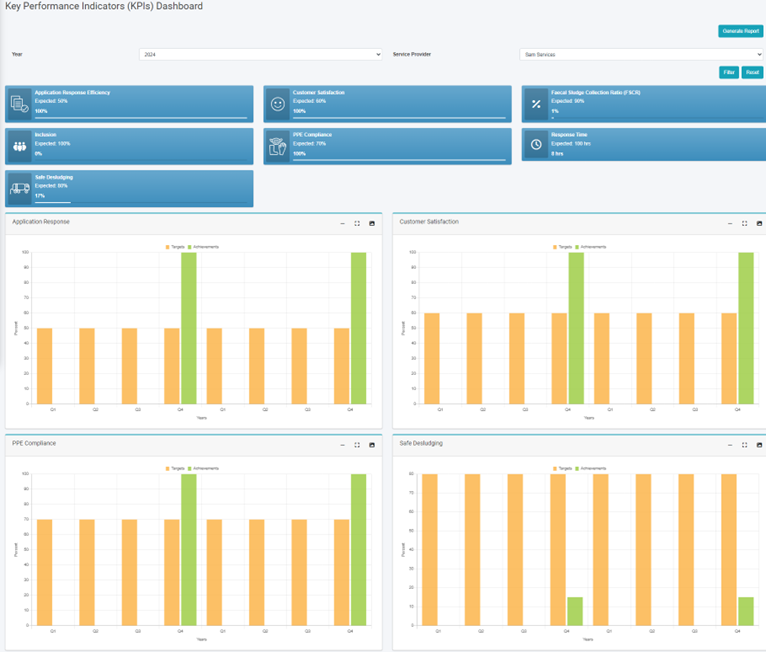
<span style="font-size: 10.0pt; line-height: 150%; font-family: Symbol; mso-fareast-font-family: Symbol; mso-bidi-font-family: Symbol;"><span style="mso-list: Ignore;">·<span style="font: 7.0pt 'Times New Roman';"> </span></span></span>The filter can be used to visualize the dashboard with the chosen data.
![](http://152.42.244.158/knowledge-product/uploads/images/gallery/2025-02/embedded-image-gdfb51iq.png)

<span style="font-size: 11.0pt; line-height: 107%; font-family: 'Calibri',sans-serif; mso-ascii-theme-font: minor-latin; mso-fareast-font-family: Calibri; mso-fareast-theme-font: minor-latin; mso-hansi-theme-font: minor-latin; mso-bidi-font-family: Mangal; mso-bidi-theme-font: minor-bidi; mso-ansi-language: EN-US; mso-fareast-language: EN-US; mso-bidi-language: AR-SA;">Figure 13- </span><span style="font-size: 11.0pt; line-height: 107%; font-family: 'Calibri',sans-serif; mso-ascii-theme-font: minor-latin; mso-fareast-font-family: Calibri; mso-fareast-theme-font: minor-latin; mso-hansi-theme-font: minor-latin; mso-bidi-font-family: Mangal; mso-bidi-theme-font: minor-bidi; mso-ansi-language: EN-US; mso-fareast-language: EN-US; mso-bidi-language: AR-SA;"><span style="mso-no-proof: yes;">6</span></span><span style="font-size: 11.0pt; line-height: 107%; font-family: 'Calibri',sans-serif; mso-ascii-theme-font: minor-latin; mso-fareast-font-family: Calibri; mso-fareast-theme-font: minor-latin; mso-hansi-theme-font: minor-latin; mso-bidi-font-family: Mangal; mso-bidi-theme-font: minor-bidi; mso-ansi-language: EN-US; mso-fareast-language: EN-US; mso-bidi-language: AR-SA;"> KPI Dashboard (Filter Year)</span>

# 13.5 KPI Target

13.5.1 Navigation to KPI Target

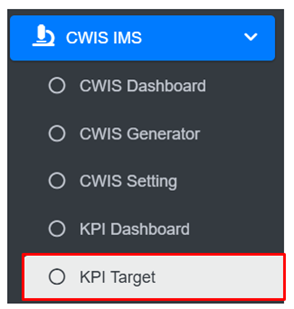
• Open the sidebar and click on ‘CWIS IMS’ to expand.  
• Select the KPI Target.
![](http://152.42.244.158/knowledge-product/uploads/images/gallery/2025-02/embedded-image-wodtkdbk.png)

• This redirects to the KPI Target page.

**Overview:**

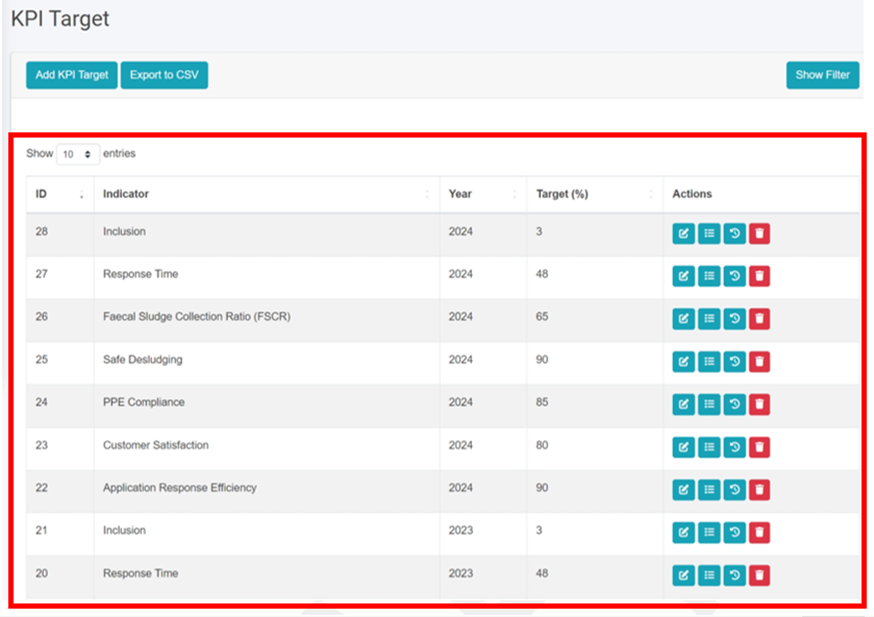
**•**  The KPI Target Page lists all the attribute records stored in the module and provides different Filters, Actions and Tools that can be used according to the requirements. For more details (refer to section 5 Filters, section 6 Actions and section 8 Tools).
![](http://152.42.244.158/knowledge-product/uploads/images/gallery/2025-02/embedded-image-ykrvjkbz.png)

<span style="font-size: 11.0pt; line-height: 107%; font-family: 'Calibri',sans-serif; mso-ascii-theme-font: minor-latin; mso-fareast-font-family: Calibri; mso-fareast-theme-font: minor-latin; mso-hansi-theme-font: minor-latin; mso-bidi-font-family: Mangal; mso-bidi-theme-font: minor-bidi; mso-ansi-language: EN-US; mso-fareast-language: EN-US; mso-bidi-language: AR-SA;">Figure 13-7 List KPI Target</span>

<span style="font-size: 11.0pt; line-height: 107%; font-family: 'Calibri',sans-serif; mso-ascii-theme-font: minor-latin; mso-fareast-font-family: Calibri; mso-fareast-theme-font: minor-latin; mso-hansi-theme-font: minor-latin; mso-bidi-font-family: Mangal; mso-bidi-theme-font: minor-bidi; mso-ansi-language: EN-US; mso-fareast-language: EN-US; mso-bidi-language: AR-SA;">13.5.2 Add KPI Target</span>

<span style="font-family: Symbol; mso-fareast-font-family: Symbol; mso-bidi-font-family: Symbol;"><span style="mso-list: Ignore;">·<span style="font: 7.0pt 'Times New Roman';"> </span></span></span>Click on the ‘***Add KPI Target’*** button.<span style="font-size: 10.0pt; line-height: 150%; mso-fareast-font-family: 'Times New Roman'; mso-bidi-font-family: 'Times New Roman';"><span style="mso-tab-count: 1;"> </span></span>

<span style="font-size: 10.0pt; line-height: 150%; mso-fareast-font-family: 'Times New Roman'; mso-bidi-font-family: 'Times New Roman';"><span style="mso-tab-count: 1;">![](http://152.42.244.158/knowledge-product/uploads/images/gallery/2025-02/embedded-image-ix1tayte.png)</span></span>

<span style="font-size: 10.0pt; line-height: 150%; mso-fareast-font-family: 'Times New Roman'; mso-bidi-font-family: 'Times New Roman';"><span style="mso-tab-count: 1;">• This redirects to the Add KPI Target form page.</span></span>

<span style="font-size: 10.0pt; line-height: 150%; mso-fareast-font-family: 'Times New Roman'; mso-bidi-font-family: 'Times New Roman';"><span style="mso-tab-count: 1;">![](http://152.42.244.158/knowledge-product/uploads/images/gallery/2025-02/embedded-image-xh1ba3yc.png)</span></span>

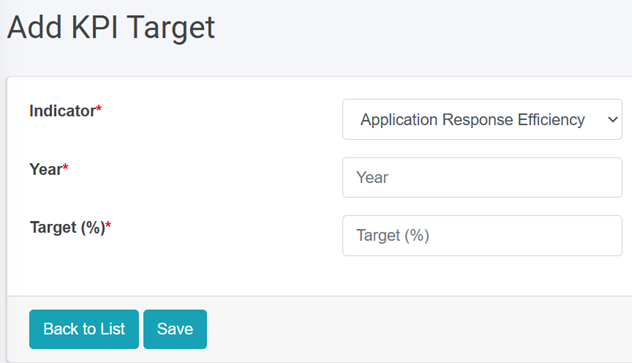
<span style="font-size: 10.0pt; line-height: 150%; mso-fareast-font-family: 'Times New Roman'; mso-bidi-font-family: 'Times New Roman';"><span style="mso-tab-count: 1;">Figure 13-8 Add KPI Target</span></span>

<span style="font-size: 10.0pt; line-height: 150%; mso-fareast-font-family: 'Times New Roman'; mso-bidi-font-family: 'Times New Roman';"><span style="mso-tab-count: 1;">• After filling out the form click Save and make sure a pop-up message is displayed, refer to section 7.1 Save for more details.</span></span>

- <span style="font-size: 10.0pt; line-height: 150%; mso-fareast-font-family: 'Times New Roman'; mso-bidi-font-family: 'Times New Roman';"><span style="mso-tab-count: 1;">If a mandatory field is left out or any form failed validation during the form submission a validation message box will be prompted, refer to section 7.2 Validation Message Box for more details.  
    </span></span>

<span style="font-size: 10.0pt; line-height: 150%; mso-fareast-font-family: 'Times New Roman'; mso-bidi-font-family: 'Times New Roman';"><span style="mso-tab-count: 1;">Overview:  
• The Add KPI Target page consists of information that is explained below:  
• Indicator – The user must choose Indicator which is available in options from the dropdown  
• Year- The year that indicator was used (Do not use the same year more than once for the same indicator)  
• Target (%)- The annual target set for the selected indicator.  
</span></span>