# PT/CT IMS

PHISS is another core module of the IMIS, designed to empower municipalities in monitoring and addressing public health and sanitation challenges. PHISS enables the collection and maintenance of water sample data from various sources, including groundwater, surface water, and treated wastewater, to ensure compliance with water contamination standards. This functionality directly aligns with the CWIS objective of monitoring environmental outcomes associated with sanitation systems. Additionally, PHISS records and tracks cases of waterborne diseases across the city, providing municipalities with crucial data to understand and mitigate public health risks.

# Introduction

  
PHISS effectively tracks spatial and attribute data on waterborne disease hotspots, including cases of diarrhea, cholera, dysentery, and typhoid, along with associated fatalities. Integrated with UDSS, it enables municipal authorities to analyze disease prevalence, identify causes, and implement strategic interventions for resource allocation and risk reduction in vulnerable areas.

One of the standout features of PHISS is its ability to maintain spatial and attribute data related to hotspot areas where waterborne diseases, such as diarrhea, cholera, dysentery, and typhoid, have been detected. The system also tracks fatalities linked to these diseases, offering a comprehensive overview of the impact on affected households and populations. By integrating this information with the UDSS municipal authorities can conduct detailed analyses of disease prevalence and its underlying causes. This data-driven approach enables strategic planning, targeted interventions, and efficient allocation of resources to reduce health risks in vulnerable areas.

Water sample data and waterborne cases data maintained by PHISS help municipality to monitor the CWIS indicators (i) Water contamination compliance of the water sources such as groundwater, surface water and treated wastewater, and (ii) Incidence of faecal-oral pathway diseases (e.g. diarrhea, cholera, dysentery and typhoid). With this information, municipalities can assess the effectiveness of sanitation systems in protecting public health and identify areas requiring urgent attention. By addressing these indicators, PHISS supports municipalities in achieving CWIS objectives, ensuring safe water quality and reducing the prevalence of sanitation-related diseases. The data export tools under PHISS allow users to export data in CSV, Shape and KML format where applicable.

# 12.1 Public / Community Toilets

12.1.1 Navigation to Public / Community Toilets

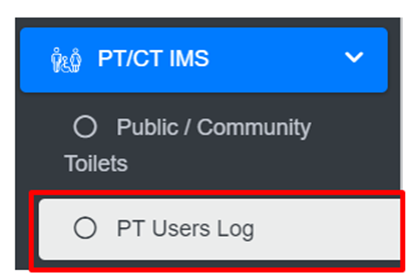
<span style="font-family: Symbol; mso-fareast-font-family: Symbol; mso-bidi-font-family: Symbol;"><span style="mso-list: Ignore;">·<span style="font: 7.0pt 'Times New Roman';"> </span></span></span>Open the sidebar and click on ‘***PT/CT IMS’*** to expand.

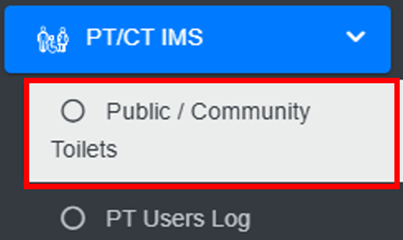
<span style="font-family: Symbol; mso-fareast-font-family: Symbol; mso-bidi-font-family: Symbol;"><span style="mso-list: Ignore;">·<span style="font: 7.0pt 'Times New Roman';"> </span></span></span>Select the ***Public / Community Toilets*.**

**![](http://152.42.244.158/knowledge-product/uploads/images/gallery/2025-02/embedded-image-4gddudcj.png)**
**Overview:**

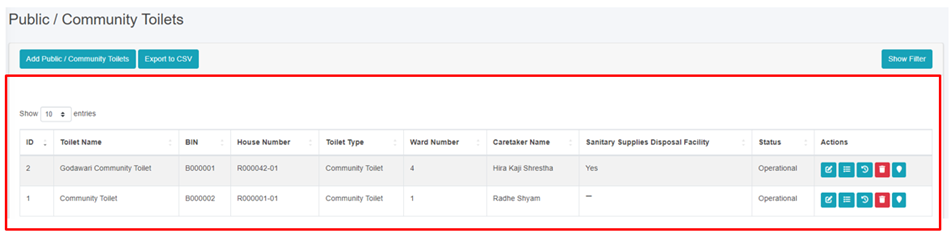
<span style="font-family: Symbol; mso-fareast-font-family: Symbol; mso-bidi-font-family: Symbol;"><span style="mso-list: Ignore;">·<span style="font: 7.0pt 'Times New Roman';"> </span></span></span>The Public / Community Toilets Page lists all the attribute records stored in the module and provides different Filters, Actions, and Tools that can be used according to the requirements. For more details (refer to section 5 Filters, section 6 Actions, and section 8 Tools).
![](http://152.42.244.158/knowledge-product/uploads/images/gallery/2025-02/embedded-image-9ehu0oko.png)

12.2 Add Public / Community Toilets

<span style="font-family: Symbol; mso-fareast-font-family: Symbol; mso-bidi-font-family: Symbol;"><span style="mso-list: Ignore;">·<span style="font: 7.0pt 'Times New Roman';"> </span></span></span>Click on the ‘***Add Public / Community Toilets’*** button.

![](http://152.42.244.158/knowledge-product/uploads/images/gallery/2025-02/embedded-image-eevxdzd9.png)

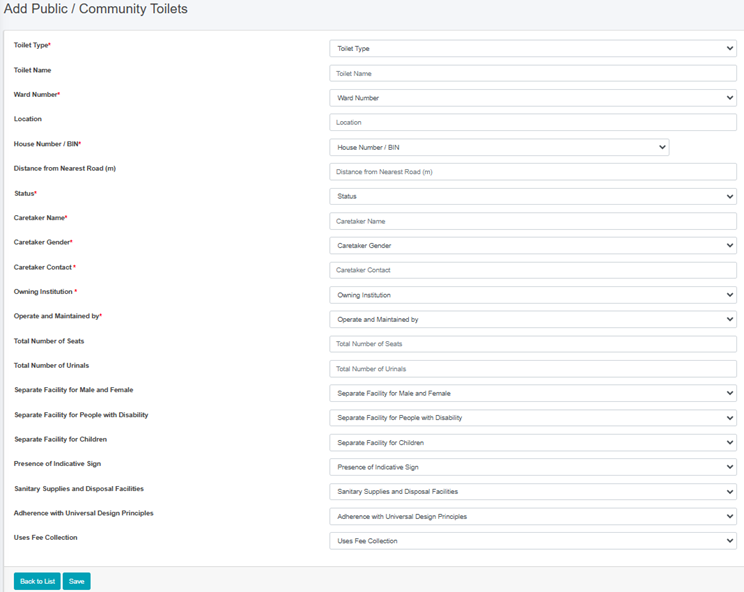
<span style="font-family: Symbol; mso-fareast-font-family: Symbol; mso-bidi-font-family: Symbol;"><span style="mso-list: Ignore;">·<span style="font: 7.0pt 'Times New Roman';"> </span></span></span>User will be redirected to the following page:
![](http://152.42.244.158/knowledge-product/uploads/images/gallery/2025-02/embedded-image-aqrdlfzj.png)

Figure 12- <span style="mso-no-proof: yes;">2</span> Add new Public / Community Toilets

• After filling out the form click Save, and make sure a pop-up message is displayed, refer to section 7.1 Save for more details.   
• If a mandatory form field is left out or any form failed validation during the form submission a validation message box will be prompted, refer to section 7.2 Validation Message Box for more details.

**Overview:**

<span class="IMIS-para-bulletChar"><span style="font-size: 12.0pt; line-height: 150%;">The Add New Public / Community Toilet page consists of different form fields that capture information, as explained below</span></span>:

<span style="font-family: Symbol; mso-fareast-font-family: Symbol; mso-bidi-font-family: Symbol;"><span style="mso-list: Ignore;">·<span style="font: 7.0pt 'Times New Roman';"> </span></span></span>Toilet Type: Type of toilet such as “Public Toilet" or “Community Toilet”.

<span style="font-family: 'Courier New'; mso-fareast-font-family: 'Courier New';"><span style="mso-list: Ignore;">o<span style="font: 7.0pt 'Times New Roman';"> </span></span></span>Public Toilets (PT) is for the use of floating population/public in places such as markets, train stations, or other public areas and are used by mostly undefined users.

<span style="font-family: 'Courier New'; mso-fareast-font-family: 'Courier New';"><span style="mso-list: Ignore;">o<span style="font: 7.0pt 'Times New Roman';"> </span></span></span>Community Toilet (CT) are shared toilet facilities provided for a defined group of residents or an entire settlement/community. It is normally located in or near the community area and used by almost all community members.

<span style="font-family: Symbol; mso-fareast-font-family: Symbol; mso-bidi-font-family: Symbol;"><span style="mso-list: Ignore;">·<span style="font: 7.0pt 'Times New Roman';"> </span></span></span>Toilet Name: Name given to the toilet.

<span style="font-family: Symbol; mso-fareast-font-family: Symbol; mso-bidi-font-family: Symbol;"><span style="mso-list: Ignore;">·<span style="font: 7.0pt 'Times New Roman';"> </span></span></span>Ward Number: Ward number where the toilet is located.

<span style="font-family: Symbol; mso-fareast-font-family: Symbol; mso-bidi-font-family: Symbol;"><span style="mso-list: Ignore;">·<span style="font: 7.0pt 'Times New Roman';"> </span></span></span>Location: Name of the location where the toilet is located.

<span style="font-family: Symbol; mso-fareast-font-family: Symbol; mso-bidi-font-family: Symbol;"><span style="mso-list: Ignore;">·<span style="font: 7.0pt 'Times New Roman';"> </span></span></span>House Number/BIN: The house number identifies the building where the toilet is located and serves as its unique identifier, particularly for the building that houses the septic tank. The dropdown menu displays only the codes that are maintained in the Buildings sub-module of the Building IMS module. Additionally, it will show only buildings related to the selected toilet type. Once a building is added, it will no longer appear in the dropdown menu the next time you add a form.

<span style="font-family: Symbol; mso-fareast-font-family: Symbol; mso-bidi-font-family: Symbol;"><span style="mso-list: Ignore;">·<span style="font: 7.0pt 'Times New Roman';"> </span></span></span>Distance from Nearest Road (m): Distance from the nearest road to where the toilet is situated.

<span style="font-family: Symbol; mso-fareast-font-family: Symbol; mso-bidi-font-family: Symbol;"><span style="mso-list: Ignore;">·<span style="font: 7.0pt 'Times New Roman';"> </span></span></span>Status: Indicating the operational status of the toilet.

<span style="font-family: Symbol; mso-fareast-font-family: Symbol; mso-bidi-font-family: Symbol;"><span style="mso-list: Ignore;">·<span style="font: 7.0pt 'Times New Roman';"> </span></span></span>Caretaker Name: Full name of the caretaker of the toilet.

<span style="font-family: Symbol; mso-fareast-font-family: Symbol; mso-bidi-font-family: Symbol;"><span style="mso-list: Ignore;">·<span style="font: 7.0pt 'Times New Roman';"> </span></span></span>Caretaker Gender: The gender of the caretaker.

<span style="font-family: Symbol; mso-fareast-font-family: Symbol; mso-bidi-font-family: Symbol;"><span style="mso-list: Ignore;">·<span style="font: 7.0pt 'Times New Roman';"> </span></span></span>Caretaker Contact: The contact number of the Caretaker of the toilet.

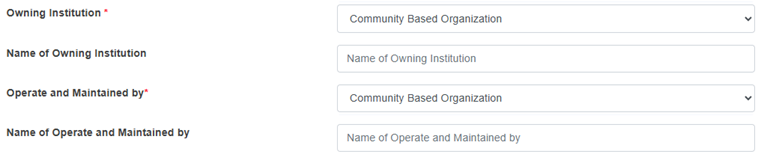
<span style="font-family: Symbol; mso-fareast-font-family: Symbol; mso-bidi-font-family: Symbol;"><span style="mso-list: Ignore;">·<span style="font: 7.0pt 'Times New Roman';"> </span></span></span>Owning Institution: <span style="mso-spacerun: yes;"> </span>The selected owning institution in the form dynamically adds the field shown below:

<span style="font-family: 'Courier New'; mso-fareast-font-family: 'Courier New';"><span style="mso-list: Ignore;">o<span style="font: 7.0pt 'Times New Roman';"> </span></span></span>Name of Owning Institution: Name of the owning institution that owns the toilet.
![](http://152.42.244.158/knowledge-product/uploads/images/gallery/2025-02/embedded-image-z1btp2j7.png)

<span style="font-family: Symbol; mso-fareast-font-family: Symbol; mso-bidi-font-family: Symbol;"><span style="mso-list: Ignore;">·<span style="font: 7.0pt 'Times New Roman';"> </span></span></span>Operate and Maintained by: The selected operate and maintained by the form dynamically adds the field shown below:

<span style="font-family: 'Courier New'; mso-fareast-font-family: 'Courier New';"><span style="mso-list: Ignore;">o<span style="font: 7.0pt 'Times New Roman';"> </span></span></span>Name of Operate and Maintained by: Name of the operator and maintainer that operates the toilet.

<span style="font-family: Symbol; mso-fareast-font-family: Symbol; mso-bidi-font-family: Symbol;"><span style="mso-list: Ignore;">·<span style="font: 7.0pt 'Times New Roman';"> </span></span></span>Total Number of Seats: The total number of toilet seats in the public toilet or the community toilet.
<span style="font-family: Symbol; mso-fareast-font-family: Symbol; mso-bidi-font-family: Symbol;"><span style="mso-list: Ignore;">·<span style="font: 7.0pt 'Times New Roman';"> </span></span></span>Total Number of Urinals: The total number of urinals in the public toilet or the community toilet.

![](http://152.42.244.158/knowledge-product/uploads/images/gallery/2025-02/embedded-image-oqlewifz.png)

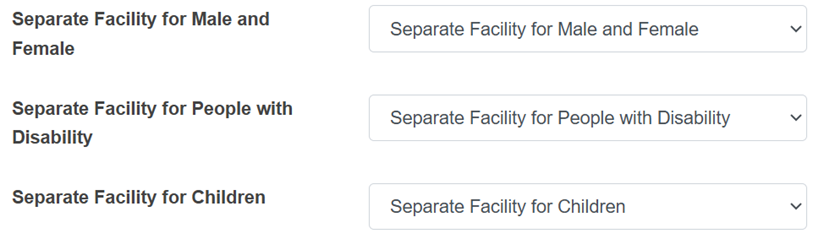
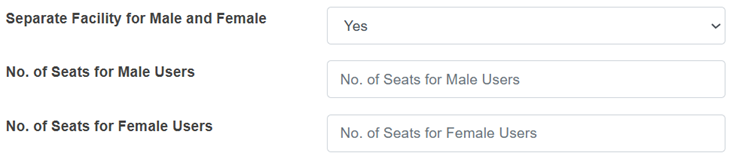
<span style="font-family: Symbol; mso-fareast-font-family: Symbol; mso-bidi-font-family: Symbol;"><span style="mso-list: Ignore;">·<span style="font: 7.0pt 'Times New Roman';"> </span></span></span>Separate Facility for Male and Female: Indicates whether or not the toilet has separate facilities for males and females.

<span style="font-family: 'Courier New'; mso-fareast-font-family: 'Courier New';"><span style="mso-list: Ignore;">o<span style="font: 7.0pt 'Times New Roman';"> </span></span></span>If “Yes” is selected, the form dynamically adds two new fields as shown below:
![](http://152.42.244.158/knowledge-product/uploads/images/gallery/2025-02/embedded-image-klzyeukx.png)

<span style="font-family: 'Courier New'; mso-fareast-font-family: 'Courier New';"><span style="mso-list: Ignore;">o<span style="font: 7.0pt 'Times New Roman';"> </span></span></span>No. of Seats for Male Users: Number of toilet seats available for male users of the public toilet. It takes numeric value only.

<span style="font-family: 'Courier New'; mso-fareast-font-family: 'Courier New';"><span style="mso-list: Ignore;">o<span style="font: 7.0pt 'Times New Roman';"> </span></span></span>No. of Seats Female Users: Number of toilet seats available for female users of the public toilet. It takes numeric value only.

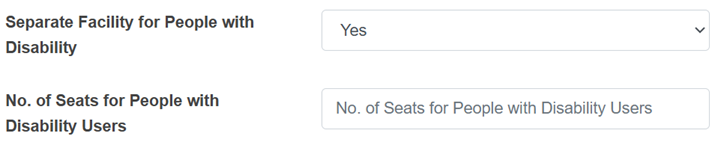
<span style="font-family: Symbol; mso-fareast-font-family: Symbol; mso-bidi-font-family: Symbol;"><span style="mso-list: Ignore;">·<span style="font: 7.0pt 'Times New Roman';"> </span></span></span>Separate Facility for People with Disability: Indicates whether or not the toilet has facilities for the differently abled people.

<span style="font-family: 'Courier New'; mso-fareast-font-family: 'Courier New';"><span style="mso-list: Ignore;">o<span style="font: 7.0pt 'Times New Roman';"> </span></span></span>If “Yes” is selected, the field shown below is added:
![](http://152.42.244.158/knowledge-product/uploads/images/gallery/2025-02/embedded-image-bzha8n7z.png)

<span style="font-family: Symbol; mso-fareast-font-family: Symbol; mso-bidi-font-family: Symbol;"><span style="mso-list: Ignore;">·<span style="font: 7.0pt 'Times New Roman';"> </span></span></span>No. of Seats for People with Disability: Number of seats available for differently abled people in the public toilet. It takes numeric values only.

<span style="font-family: Symbol; mso-fareast-font-family: Symbol; mso-bidi-font-family: Symbol;"><span style="mso-list: Ignore;">·<span style="font: 7.0pt 'Times New Roman';"> </span></span></span>Separate Facility for Children: Indicates whether or not the toilet has facilities for children.

<span style="font-family: Symbol; mso-fareast-font-family: Symbol; mso-bidi-font-family: Symbol;"><span style="mso-list: Ignore;">·<span style="font: 7.0pt 'Times New Roman';"> </span></span></span>Presence of Indicative Sign: Indicates whether or not the toilet has an indicative sign.

<span style="font-family: Symbol; mso-fareast-font-family: Symbol; mso-bidi-font-family: Symbol;"><span style="mso-list: Ignore;">·<span style="font: 7.0pt 'Times New Roman';"> </span></span></span>Sanitary Supplies and Disposal: Indicates whether or not the toilet has sanitary supplies and disposal facilities.

<span style="font-family: Symbol; mso-fareast-font-family: Symbol; mso-bidi-font-family: Symbol;"><span style="mso-list: Ignore;">·<span style="font: 7.0pt 'Times New Roman';"> </span></span></span>Adherence with Universal Design Principles: Indicates whether the toilet adheres to the universal design principles.

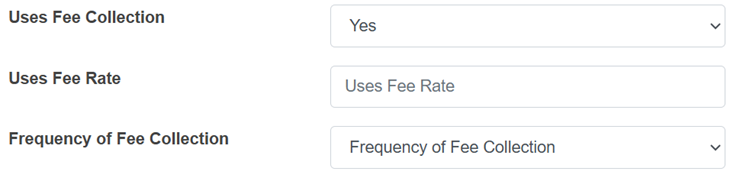
<span style="font-family: Symbol; mso-fareast-font-family: Symbol; mso-bidi-font-family: Symbol;"><span style="mso-list: Ignore;">·<span style="font: 7.0pt 'Times New Roman';"> </span></span></span>Uses Fee Collection: Indicates whether a fee is collected for using the toilet. If the user selects “Yes” the form adds two input labels as shown below:
![](http://152.42.244.158/knowledge-product/uploads/images/gallery/2025-02/embedded-image-we0irax0.png)

<span style="font-family: 'Courier New'; mso-fareast-font-family: 'Courier New';"><span style="mso-list: Ignore;">o<span style="font: 7.0pt 'Times New Roman';"> </span></span></span>Uses Fee Rate: The fee collected for using the toilet.

<span style="font-family: 'Courier New'; mso-fareast-font-family: 'Courier New';"><span style="mso-list: Ignore;">o<span style="font: 7.0pt 'Times New Roman';"> </span></span></span>Frequency of Fee Collected: The options for the frequency of the fee collected for public toilets is per use and for community toilets is weekly, half monthly, monthly, quarterly, and yearly.

**Note:**

<span style="font-family: Symbol; mso-fareast-font-family: Symbol; mso-bidi-font-family: Symbol;"><span style="mso-list: Ignore;">·<span style="font: 7.0pt 'Times New Roman';"> </span></span></span>Deletion of public toilet data is not permitted when in use with the PT Users Module.

<span style="font-size: 11.0pt; line-height: 107%; font-family: 'Calibri',sans-serif; mso-ascii-theme-font: minor-latin; mso-fareast-font-family: Calibri; mso-fareast-theme-font: minor-latin; mso-hansi-theme-font: minor-latin; mso-bidi-font-family: Mangal; mso-bidi-theme-font: minor-bidi; mso-ansi-language: EN-US; mso-fareast-language: EN-US; mso-bidi-language: AR-SA;">Deletion of community toilet data is not permitted when it is associated with building data. </span>

# 12.3 PT Users Log

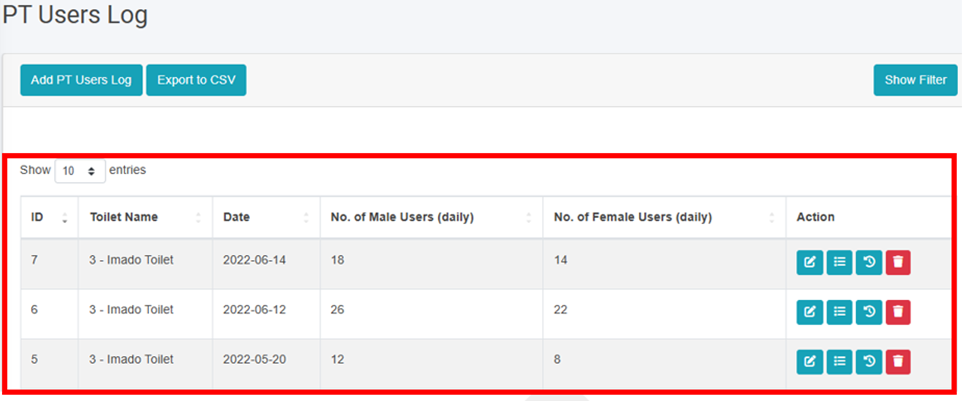
The PT Users Log sub-module maintains the information regarding the total number of users of the toilets on a daily basis.

12.3.1 Navigation to PT Users Log

<span style="font-family: Symbol; mso-fareast-font-family: Symbol; mso-bidi-font-family: Symbol;"><span style="mso-list: Ignore;">·<span style="font: 7.0pt 'Times New Roman';"> </span></span></span>Open the sidebar and click on ‘***PT IMS’*** to expand.

<span style="font-family: Symbol; mso-fareast-font-family: Symbol; mso-bidi-font-family: Symbol;"><span style="mso-list: Ignore;">·<span style="font: 7.0pt 'Times New Roman';"> </span></span></span>Select the ***PT Users*** ***Log***.

![](http://152.42.244.158/knowledge-product/uploads/images/gallery/2025-02/embedded-image-wfx3pyl7.png)

**Overview:**

The PT Users Log Page lists the records stored in the module and provides different Filters, Actions, and Tools that can be used according to the requirements. For more details (refer to section 5 Filters, section 6 Actions and section 8 Tools).
![](http://152.42.244.158/knowledge-product/uploads/images/gallery/2025-02/embedded-image-io8rwire.png)

<span style="font-size: 11.0pt; line-height: 107%; font-family: 'Calibri',sans-serif; mso-ascii-theme-font: minor-latin; mso-fareast-font-family: Calibri; mso-fareast-theme-font: minor-latin; mso-hansi-theme-font: minor-latin; mso-bidi-font-family: Mangal; mso-bidi-theme-font: minor-bidi; mso-ansi-language: EN-US; mso-fareast-language: EN-US; mso-bidi-language: AR-SA;">Figure 12- </span><span style="font-size: 11.0pt; line-height: 107%; font-family: 'Calibri',sans-serif; mso-ascii-theme-font: minor-latin; mso-fareast-font-family: Calibri; mso-fareast-theme-font: minor-latin; mso-hansi-theme-font: minor-latin; mso-bidi-font-family: Mangal; mso-bidi-theme-font: minor-bidi; mso-ansi-language: EN-US; mso-fareast-language: EN-US; mso-bidi-language: AR-SA;"><span style="mso-no-proof: yes;">3</span></span><span style="font-size: 11.0pt; line-height: 107%; font-family: 'Calibri',sans-serif; mso-ascii-theme-font: minor-latin; mso-fareast-font-family: Calibri; mso-fareast-theme-font: minor-latin; mso-hansi-theme-font: minor-latin; mso-bidi-font-family: Mangal; mso-bidi-theme-font: minor-bidi; mso-ansi-language: EN-US; mso-fareast-language: EN-US; mso-bidi-language: AR-SA;"> List of PT Users Log</span>

<span style="font-size: 11.0pt; line-height: 107%; font-family: 'Calibri',sans-serif; mso-ascii-theme-font: minor-latin; mso-fareast-font-family: Calibri; mso-fareast-theme-font: minor-latin; mso-hansi-theme-font: minor-latin; mso-bidi-font-family: Mangal; mso-bidi-theme-font: minor-bidi; mso-ansi-language: EN-US; mso-fareast-language: EN-US; mso-bidi-language: AR-SA;">12.3.2 Add New PT Users Log</span>

<span style="font-family: Symbol; mso-fareast-font-family: Symbol; mso-bidi-font-family: Symbol;"><span style="mso-list: Ignore;">·<span style="font: 7.0pt 'Times New Roman';"> </span></span></span>Click on the ‘***Add*** ***PT Users Log’*** button.
![](http://152.42.244.158/knowledge-product/uploads/images/gallery/2025-02/embedded-image-h8atgvvj.png)

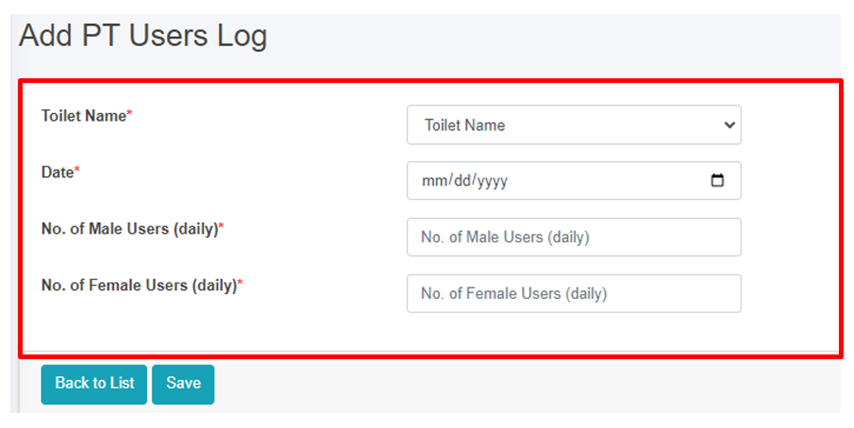
• User will be redirected to the following page:
![](http://152.42.244.158/knowledge-product/uploads/images/gallery/2025-02/embedded-image-uvzua14i.png)

Figure 12- <span style="mso-no-proof: yes;">4</span> Add new PT Users Log

• After filling out the form click Save, and make sure a pop-up message is displayed, refer to section 7.1 Save for more details.  
• If a mandatory field is left out or any form failed validation during the form submission a validation message box will be prompted, refer to section 7.2 Validation Message Box for more details.

Overview:  
The Add New PT Users Log page consists of information as explained below:  
• Toilet Name – The user must select either a toilet name or ID if the name is not available.   
• Date - The date this form is being filled.  
• No. of Male Users(daily) - Total number of male users for that day.   
• No. of Female Users(daily) - Total number of female users for that day.   
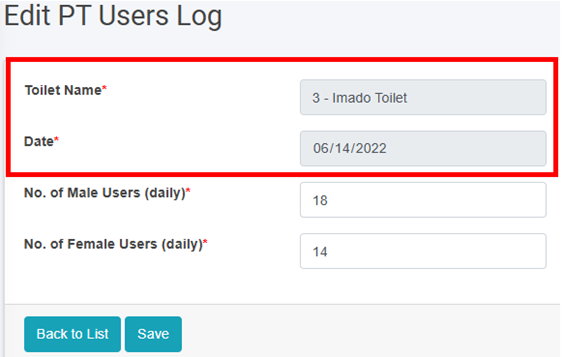
• When the user Edits the information of the PT/CT Users Log the First two fields cannot be changed. If the user wants to make changes to the first two fields, the user will have to delete the information and add new records.
![](http://152.42.244.158/knowledge-product/uploads/images/gallery/2025-02/embedded-image-nb0i9wwb.png)

<span style="font-size: 11.0pt; line-height: 107%; font-family: 'Calibri',sans-serif; mso-ascii-theme-font: minor-latin; mso-fareast-font-family: Calibri; mso-fareast-theme-font: minor-latin; mso-hansi-theme-font: minor-latin; mso-bidi-font-family: Mangal; mso-bidi-theme-font: minor-bidi; mso-ansi-language: EN-US; mso-fareast-language: EN-US; mso-bidi-language: AR-SA;">Figure 12- </span><span style="font-size: 11.0pt; line-height: 107%; font-family: 'Calibri',sans-serif; mso-ascii-theme-font: minor-latin; mso-fareast-font-family: Calibri; mso-fareast-theme-font: minor-latin; mso-hansi-theme-font: minor-latin; mso-bidi-font-family: Mangal; mso-bidi-theme-font: minor-bidi; mso-ansi-language: EN-US; mso-fareast-language: EN-US; mso-bidi-language: AR-SA;"><span style="mso-no-proof: yes;">5</span></span><span style="font-size: 11.0pt; line-height: 107%; font-family: 'Calibri',sans-serif; mso-ascii-theme-font: minor-latin; mso-fareast-font-family: Calibri; mso-fareast-theme-font: minor-latin; mso-hansi-theme-font: minor-latin; mso-bidi-font-family: Mangal; mso-bidi-theme-font: minor-bidi; mso-ansi-language: EN-US; mso-fareast-language: EN-US; mso-bidi-language: AR-SA; mso-no-proof: yes;"> </span><span style="font-size: 11.0pt; line-height: 107%; font-family: 'Calibri',sans-serif; mso-ascii-theme-font: minor-latin; mso-fareast-font-family: Calibri; mso-fareast-theme-font: minor-latin; mso-hansi-theme-font: minor-latin; mso-bidi-font-family: Mangal; mso-bidi-theme-font: minor-bidi; mso-ansi-language: EN-US; mso-fareast-language: EN-US; mso-bidi-language: AR-SA;"><span style="mso-spacerun: yes;"> </span>Edit User Information</span>