# Public Health ISS

PHISS is a core IMIS module designed to help municipalities monitor and address public health and sanitation challenges. It facilitates the collection and maintenance of water sample data from groundwater, surface water, and treated wastewater, ensuring compliance with water contamination standards and supporting CWIS environmental monitoring objectives.
PHISS also tracks waterborne disease cases (e.g., diarrhea, cholera, dysentery, typhoid) and identifies hotspot areas, including associated fatalities, enabling municipalities to conduct spatial analysis and implement targeted interventions.
The module supports CWIS indicators by monitoring:

Water contamination compliance across different water sources.
Incidence of faecal-oral diseases to assess sanitation system effectiveness.

PHISS provides data export tools for CSV, Shape, and KML formats, allowing municipalities to utilize the data for strategic planning and resource allocation to reduce public health risks.

# Introduction to Public Health ISS

<span style="mso-fareast-language: JA;">PHISS is another core module of the IMIS, designed to empower municipalities in monitoring and addressing public health and sanitation challenges. PHISS enables the collection and maintenance of water sample data from various sources, including groundwater, surface water, and treated wastewater, to ensure compliance with water contamination standards. This functionality directly aligns with the CWIS objective of monitoring environmental outcomes associated with sanitation systems. Additionally, PHISS records and tracks cases of waterborne diseases across the city, providing municipalities with crucial data to understand and mitigate public health risks.</span>

<span style="mso-fareast-language: JA;">One of the standout features of PHISS is its ability to maintain spatial and attribute data related to hotspot areas where waterborne diseases, such as diarrhea, cholera, dysentery, and typhoid, have been detected. The system also tracks fatalities linked to these diseases, offering a comprehensive overview of the impact on affected households and populations. By integrating this information with the UDSS municipal authorities can conduct detailed analyses of disease prevalence and its underlying causes. This data-driven approach enables strategic planning, targeted interventions, and efficient allocation of resources to reduce health risks in vulnerable areas.</span>

<span style="mso-fareast-language: JA;">Water sample data and waterborne cases data maintained by PHISS helps municipality to monitor the CWIS indicators (i) Water contamination compliance of the water sources such as groundwater, surface water and treated wastewater, and (ii) Incidence of fecal-oral pathway diseases (e.g. diarrhea, cholera, dysentery and typhoid). With this information, municipalities can assess the effectiveness of sanitation systems in protecting public health and identify areas requiring urgent attention. By addressing these indicators, PHISS supports municipalities in achieving CWIS objectives, ensuring safe water quality and reducing the prevalence of sanitation-related diseases. The data export tools under PHISS allow users to export data in CSV, Shape and KML format where applicable.</span>

# 19.1 Water Samples

Water Samples sub-module maintains the information regarding the water quality testing with a focus on coliform bacteria levels as an initial indicator of potential water contamination. This module records the spatial location where the samples were taken.

19.1.1 Navigation to Water Samples

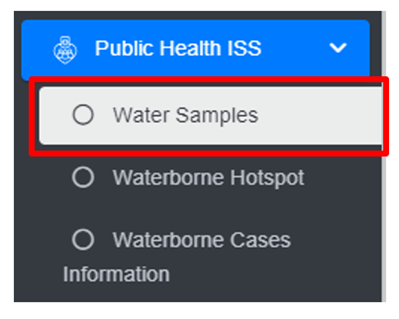
<span style="font-family: Symbol; mso-fareast-font-family: Symbol; mso-bidi-font-family: Symbol;"><span style="mso-list: Ignore;">·<span style="font: 7.0pt 'Times New Roman';"> </span></span></span>Open the sidebar and click on ***Public health ISS*** to expand.

<span style="font-family: Symbol; mso-fareast-font-family: Symbol; mso-bidi-font-family: Symbol;"><span style="mso-list: Ignore;">·<span style="font: 7.0pt 'Times New Roman';"> </span></span></span>Select the ***Water Samples***.

![](http://152.42.244.158/knowledge-product/uploads/images/gallery/2025-02/embedded-image-4zqfpdb0.png)

• This redirects to the Water Samples page.

**Overview:**

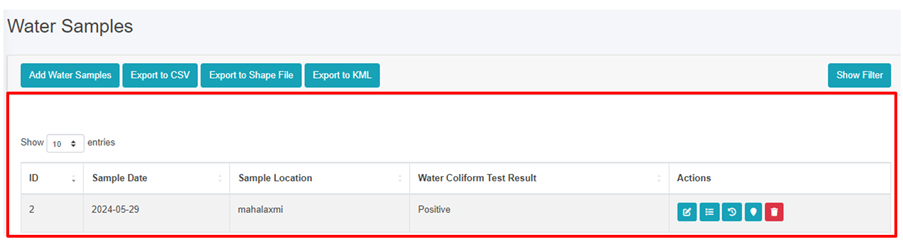
The Water Samples page lists all the attribute records stored in the module and provides different Filters, Actions and Tools that can be used according to the requirements. For more details (refer to section 5 Filters, section 6 Actions and section 8 Tools).
![](http://152.42.244.158/knowledge-product/uploads/images/gallery/2025-02/embedded-image-vvvmi2s0.png)

<span style="font-size: 11.0pt; line-height: 107%; font-family: 'Calibri',sans-serif; mso-ascii-theme-font: minor-latin; mso-fareast-font-family: Calibri; mso-fareast-theme-font: minor-latin; mso-hansi-theme-font: minor-latin; mso-bidi-font-family: Mangal; mso-bidi-theme-font: minor-bidi; mso-ansi-language: EN-US; mso-fareast-language: EN-US; mso-bidi-language: AR-SA;">Figure 19-1 List of Water Samples</span>

<span style="font-size: 11.0pt; line-height: 107%; font-family: 'Calibri',sans-serif; mso-ascii-theme-font: minor-latin; mso-fareast-font-family: Calibri; mso-fareast-theme-font: minor-latin; mso-hansi-theme-font: minor-latin; mso-bidi-font-family: Mangal; mso-bidi-theme-font: minor-bidi; mso-ansi-language: EN-US; mso-fareast-language: EN-US; mso-bidi-language: AR-SA;">19.1.2 Add Water Samples</span>

<span style="font-family: Symbol; mso-fareast-font-family: Symbol; mso-bidi-font-family: Symbol;"><span style="mso-list: Ignore;">·<span style="font: 7.0pt 'Times New Roman';"> </span></span></span>Click on the ***‘Add Water Samples’*** button.

![](http://152.42.244.158/knowledge-product/uploads/images/gallery/2025-02/embedded-image-z0xfp2yc.png)

<span style="font-family: Symbol; mso-fareast-font-family: Symbol; mso-bidi-font-family: Symbol;"><span style="mso-list: Ignore;">·<span style="font: 7.0pt 'Times New Roman';"> </span></span></span>This redirects to **Add Water Samples** form page.

![](http://152.42.244.158/knowledge-product/uploads/images/gallery/2025-02/embedded-image-nuhcbtfe.png)

Figure 19-2 Add Water Samples

<span style="mso-bidi-font-size: 18.0pt; line-height: 150%; font-family: Symbol; mso-fareast-font-family: Symbol; mso-bidi-font-family: Symbol; color: windowtext;"><span style="mso-list: Ignore;">·<span style="font: 7.0pt 'Times New Roman';"> </span></span></span>After filling out the form click **Save**, and make sure a pop-up message is displayed<span class="wacimagecontainer"><span style="mso-no-proof: yes;">, refer to section 7.1 Save for more details</span></span><span class="normaltextrun"><span style="color: black; background: white;">.</span></span>

- <span style="font-size: 11.0pt; line-height: 107%; font-family: 'Calibri',sans-serif; mso-ascii-theme-font: minor-latin; mso-fareast-font-family: Calibri; mso-fareast-theme-font: minor-latin; mso-hansi-theme-font: minor-latin; mso-bidi-font-family: Mangal; mso-bidi-theme-font: minor-bidi; mso-ansi-language: EN-US; mso-fareast-language: EN-US; mso-bidi-language: AR-SA;">If a mandatory field is left out <span class="normaltextrun"><span style="color: black; background: white;">or any form failed validation during the form submission a validation message box will be prompted, refer to section 7.2 Validation Message Box for more details.</span></span></span>

**Overview:**

The add water samples page consists of information that is explained below:

<span style="font-family: Symbol; mso-fareast-font-family: Symbol; mso-bidi-font-family: Symbol;"><span style="mso-list: Ignore;">·<span style="font: 7.0pt 'Times New Roman';"> </span></span></span>Sample Date – The sample collected date.

<span style="font-family: Symbol; mso-fareast-font-family: Symbol; mso-bidi-font-family: Symbol;"><span style="mso-list: Ignore;">·<span style="font: 7.0pt 'Times New Roman';"> </span></span></span>Sample Location – The name of the location from which the sample was collected.

<span style="font-family: Symbol; mso-fareast-font-family: Symbol; mso-bidi-font-family: Symbol;"><span style="mso-list: Ignore;">·<span style="font: 7.0pt 'Times New Roman';"> </span></span></span>Water Coliform Test Result - Select the water coliform test result as: positive or negative.

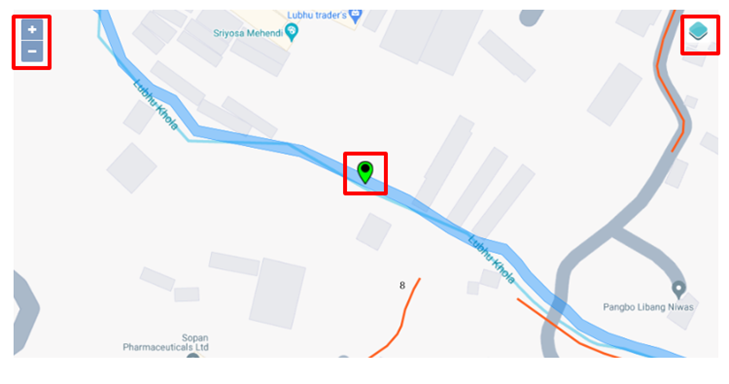
<span style="font-family: Symbol; mso-fareast-font-family: Symbol; mso-bidi-font-family: Symbol;"><span style="mso-list: Ignore;">·<span style="font: 7.0pt 'Times New Roman';"> </span></span></span>Click to set Latitude and Longitude - Find the water sample location on the map and pin a marker on the map by clicking on that location. This will mark the spatial location of the water sample in the map with latitude and longitude.

<span style="font-family: 'Courier New'; mso-fareast-font-family: 'Courier New';"><span style="mso-list: Ignore;">o<span style="font: 7.0pt 'Times New Roman';"> </span></span></span>The top left corner displays the zoom-in and out button

<span style="font-family: 'Courier New'; mso-fareast-font-family: 'Courier New';"><span style="mso-list: Ignore;">o<span style="font: 7.0pt 'Times New Roman';"> </span></span></span>The top right corner tab displays the Layers and Base maps
![](http://152.42.244.158/knowledge-product/uploads/images/gallery/2025-02/embedded-image-0bx8ljog.png)

# 19.2 Waterborne Hotspot

The Waterborne Hotspot is responsible for maintaining data relevant to hotspot identification in a city. Its primary objective is to retain knowledge of diseases spread through contaminated water.

19.2.1 Navigation to Waterborne Hotspot

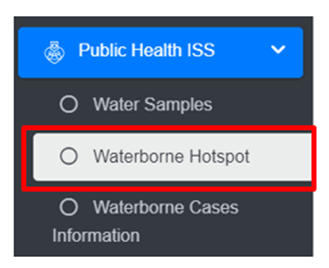
<span style="font-family: Symbol; mso-fareast-font-family: Symbol; mso-bidi-font-family: Symbol;"><span style="mso-list: Ignore;">·<span style="font: 7.0pt 'Times New Roman';"> </span></span></span>Open the sidebar and click on ***Public Health ISS***.

<span style="font-family: Symbol; mso-fareast-font-family: Symbol; mso-bidi-font-family: Symbol;"><span style="mso-list: Ignore;">·<span style="font: 7.0pt 'Times New Roman';"> </span></span></span>Select the ***Waterborne Hotspot***.

![](http://152.42.244.158/knowledge-product/uploads/images/gallery/2025-02/embedded-image-nj9drtrd.png)

<span style="font-family: Symbol; mso-fareast-font-family: Symbol; mso-bidi-font-family: Symbol;"><span style="mso-list: Ignore;">·<span style="font: 7.0pt 'Times New Roman';"> </span></span></span>This redirects to the **Waterborne Hotspot** page.

**Overview:**

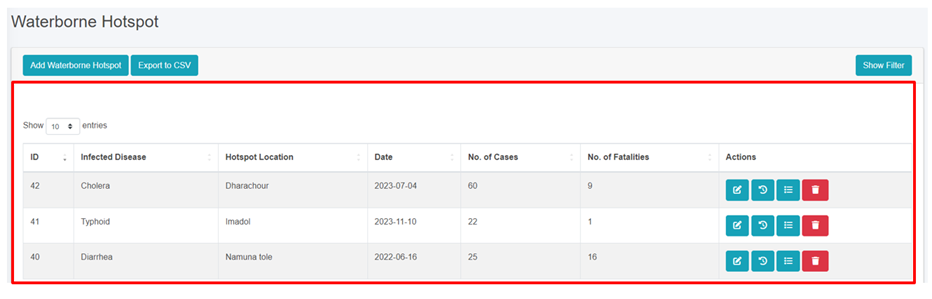
The Waterborne Hotspot page lists all the attribute records stored in the module and provides different Filters, Actions and Tools that can be used according to the requirements. For more details (refer to section 5 Filters, section 6 Actions and section 8 Tools).
![](http://152.42.244.158/knowledge-product/uploads/images/gallery/2025-02/embedded-image-htvhwrfp.png)

<span style="font-size: 11.0pt; line-height: 107%; font-family: 'Calibri',sans-serif; mso-ascii-theme-font: minor-latin; mso-fareast-font-family: Calibri; mso-fareast-theme-font: minor-latin; mso-hansi-theme-font: minor-latin; mso-bidi-font-family: Mangal; mso-bidi-theme-font: minor-bidi; mso-ansi-language: EN-US; mso-fareast-language: EN-US; mso-bidi-language: AR-SA;">Figure 19- 3 Waterborne Hotspot Page</span>

<span style="font-size: 11.0pt; line-height: 107%; font-family: 'Calibri',sans-serif; mso-ascii-theme-font: minor-latin; mso-fareast-font-family: Calibri; mso-fareast-theme-font: minor-latin; mso-hansi-theme-font: minor-latin; mso-bidi-font-family: Mangal; mso-bidi-theme-font: minor-bidi; mso-ansi-language: EN-US; mso-fareast-language: EN-US; mso-bidi-language: AR-SA;">19.2.2 Add New Waterborne Hotspot</span>

<span style="font-family: Symbol; mso-fareast-font-family: Symbol; mso-bidi-font-family: Symbol;"><span style="mso-list: Ignore;">·<span style="font: 7.0pt 'Times New Roman';"> </span></span></span>Click on the ***Add Waterborne Hotspot*** button.
![](http://152.42.244.158/knowledge-product/uploads/images/gallery/2025-02/embedded-image-16xnzi4p.png)

[![part1.gif](http://152.42.244.158/knowledge-product/uploads/images/gallery/2025-02/part1.gif)](http://152.42.244.158/knowledge-product/uploads/images/gallery/2025-02/part1.gif)

[![part2.gif](http://152.42.244.158/knowledge-product/uploads/images/gallery/2025-02/part2.gif)](http://152.42.244.158/knowledge-product/uploads/images/gallery/2025-02/part2.gif)
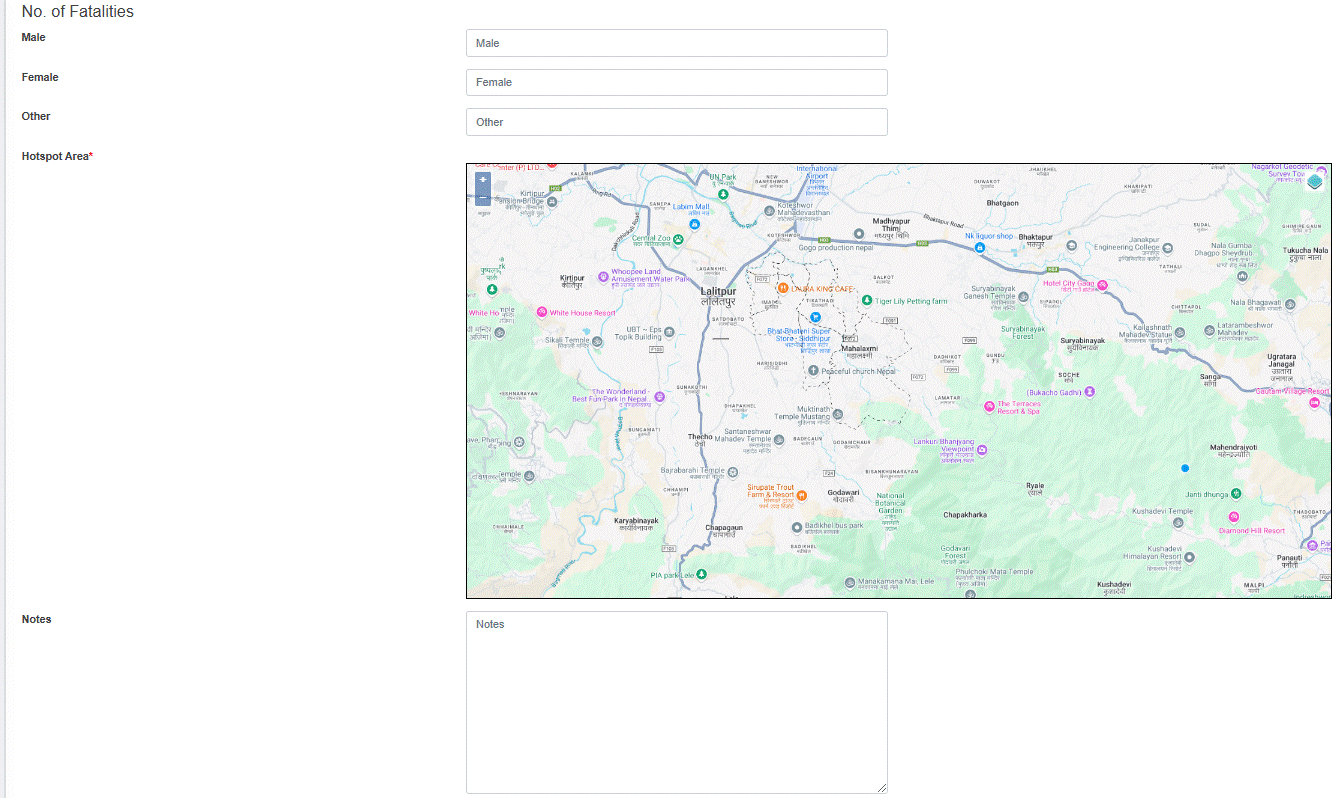
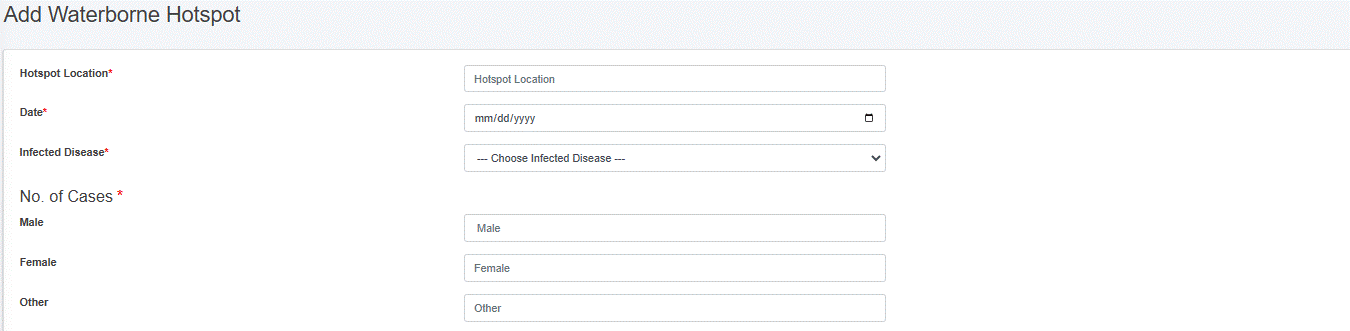
Figure 19- 4 Waterborne Hotspot form

<span style="font-family: Symbol; mso-fareast-font-family: Symbol; mso-bidi-font-family: Symbol;"><span style="mso-list: Ignore;">·<span style="font: 7.0pt 'Times New Roman';"> </span></span></span><span class="normaltextrun"><span style="color: black; background: white;">After filling out the form, click </span></span><span class="wacimagecontainer">***<span style="mso-no-proof: yes;">Save</span>****<span style="mso-no-proof: yes;"> </span>*<span style="mso-no-proof: yes;">and make sure a pop-up message is displayed, refer to section 7.1 Save for more details</span></span><span class="normaltextrun"><span style="color: black; background: white;">.</span></span>

- <span style="font-size: 11.0pt; line-height: 107%; font-family: 'Calibri',sans-serif; mso-ascii-theme-font: minor-latin; mso-fareast-font-family: Calibri; mso-fareast-theme-font: minor-latin; mso-hansi-theme-font: minor-latin; mso-bidi-font-family: Mangal; mso-bidi-theme-font: minor-bidi; mso-ansi-language: EN-US; mso-fareast-language: EN-US; mso-bidi-language: AR-SA;">If</span><span style="font-size: 10.0pt; line-height: 107%; font-family: 'Calibri',sans-serif; mso-ascii-theme-font: minor-latin; mso-fareast-font-family: 'Times New Roman'; mso-hansi-theme-font: minor-latin; mso-bidi-font-family: 'Times New Roman'; mso-ansi-language: EN-US; mso-fareast-language: EN-US; mso-bidi-language: AR-SA;"> </span><span class="normaltextrun"><span style="font-size: 11.0pt; line-height: 107%; font-family: 'Calibri',sans-serif; mso-ascii-theme-font: minor-latin; mso-fareast-font-family: Calibri; mso-fareast-theme-font: minor-latin; mso-hansi-theme-font: minor-latin; mso-bidi-font-family: Mangal; mso-bidi-theme-font: minor-bidi; color: black; background: white; mso-ansi-language: EN-US; mso-fareast-language: EN-US; mso-bidi-language: AR-SA;">a mandatory form field is left out or any form failed validation during the form submission a validation message box will be prompted, refer to section 7.2 Validation Message Box for more details.</span></span>

**Overview**

<span class="normaltextrun">The ***Add Waterborne Hotspot*** page consists of different form fields that capture different information which are explained below:</span><span class="eop"> </span>

<span style="font-family: Symbol; mso-fareast-font-family: Symbol; mso-bidi-font-family: Symbol;"><span style="mso-list: Ignore;">·<span style="font: 7.0pt 'Times New Roman';"> </span></span></span>Hotspot Location: Hotspot location name.

<span style="font-family: Symbol; mso-fareast-font-family: Symbol; mso-bidi-font-family: Symbol;"><span style="mso-list: Ignore;">·<span style="font: 7.0pt 'Times New Roman';"> </span></span></span>Date: The date when hotspot locations were identified.

<span style="font-family: Symbol; mso-fareast-font-family: Symbol; mso-bidi-font-family: Symbol;"><span style="mso-list: Ignore;">·<span style="font: 7.0pt 'Times New Roman';"> </span></span></span>Infected Disease: Select the name of the disease.

<span style="font-family: Symbol; mso-fareast-font-family: Symbol; mso-bidi-font-family: Symbol;"><span style="mso-list: Ignore;">·<span style="font: 7.0pt 'Times New Roman';"> </span></span></span>No of Cases: Number of cases (Male, Female, Other) reported.

<span style="font-family: Symbol; mso-fareast-font-family: Symbol; mso-bidi-font-family: Symbol;"><span style="mso-list: Ignore;">·<span style="font: 7.0pt 'Times New Roman';"> </span></span></span>No of Fatalities: Number of fatalities (Male, Female, Other) reported. There is a validation that the number of fatalities must be less than the number of cases.

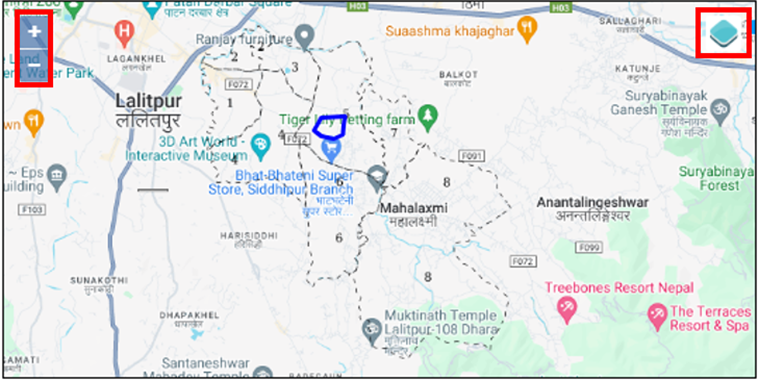
<span style="font-family: Symbol; mso-fareast-font-family: Symbol; mso-bidi-font-family: Symbol;"><span style="mso-list: Ignore;">·<span style="font: 7.0pt 'Times New Roman';"> </span></span></span>Hotspot Area: Choose the location where the hotspots of waterborne diseases are detected, and draw the corresponding area on the map.

<span style="font-family: 'Courier New'; mso-fareast-font-family: 'Courier New';"><span style="mso-list: Ignore;">o<span style="font: 7.0pt 'Times New Roman';"> </span></span></span>The top left corner displays the zoom-in and out button

<span style="font-family: 'Courier New'; mso-fareast-font-family: 'Courier New';"><span style="mso-list: Ignore;">o<span style="font: 7.0pt 'Times New Roman';"> </span></span></span>The top right corner tab displays the Layers and Base maps
![](http://152.42.244.158/knowledge-product/uploads/images/gallery/2025-02/embedded-image-sekdhect.png)

<span style="font-family: Symbol; mso-fareast-font-family: Symbol; mso-bidi-font-family: Symbol;"><span style="mso-list: Ignore;">·<span style="font: 7.0pt 'Times New Roman';"> </span></span></span>Notes: Additional notes on information.

- <span style="font-size: 11.0pt; line-height: 107%; font-family: 'Calibri',sans-serif; mso-ascii-theme-font: minor-latin; mso-fareast-font-family: Calibri; mso-fareast-theme-font: minor-latin; mso-hansi-theme-font: minor-latin; mso-bidi-font-family: Mangal; mso-bidi-theme-font: minor-bidi; mso-ansi-language: EN-US; mso-fareast-language: EN-US; mso-bidi-language: AR-SA;">Users can save the form by clicking the save.</span>

# 19.3 Waterborne Cases Information

<span style="color: windowtext;">The Waterborne Cases Information Sub Module maintains data relevant to Yearly Waterborne cases information. Its primary objective is to retain knowledge of diseases spread through contaminated water.</span>

<span style="color: windowtext;">19.3.1 Navigation to Waterborne Cases Information </span>

<span style="font-size: 14.0pt; line-height: 150%; font-family: Symbol; mso-fareast-font-family: Symbol; mso-bidi-font-family: Symbol;"><span style="mso-list: Ignore;">·<span style="font: 7.0pt 'Times New Roman';"> </span></span></span>Open the sidebar and click on ***Public Health ISS***.

<span style="font-size: 14.0pt; line-height: 150%; font-family: Symbol; mso-fareast-font-family: Symbol; mso-bidi-font-family: Symbol;"><span style="mso-list: Ignore;">·<span style="font: 7.0pt 'Times New Roman';"> </span></span></span><span style="color: black; mso-themecolor: text1;">Select the</span> ***Waterborne Cases Information***<span style="color: black; mso-themecolor: text1;">.</span>

<span style="color: black; mso-themecolor: text1;">![](http://152.42.244.158/knowledge-product/uploads/images/gallery/2025-02/embedded-image-ktkwwoem.png)</span>

**Overview**

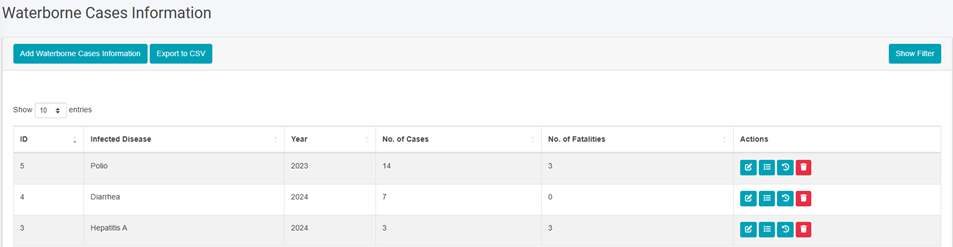
The Waterborne Cases Information page lists all the attribute records stored in the module and provides different Filters, Actions and Tools that can be used according to the requirements. For more details (refer to section 5 Filters, section 6 Actions and section 8 Tools).
![](http://152.42.244.158/knowledge-product/uploads/images/gallery/2025-02/embedded-image-fgkqglnr.png)

<span style="font-size: 11.0pt; line-height: 107%; font-family: 'Calibri',sans-serif; mso-ascii-theme-font: minor-latin; mso-fareast-font-family: Calibri; mso-fareast-theme-font: minor-latin; mso-hansi-theme-font: minor-latin; mso-bidi-font-family: Mangal; mso-bidi-theme-font: minor-bidi; mso-ansi-language: EN-US; mso-fareast-language: EN-US; mso-bidi-language: AR-SA;">Figure 19- 5 Waterborne Cases Information Page</span>

19.3.2 Add Waterborne Cases Information

<span style="font-family: Symbol; mso-fareast-font-family: Symbol; mso-bidi-font-family: Symbol;"><span style="mso-list: Ignore;">·<span style="font: 7.0pt 'Times New Roman';"> </span></span></span>Click on ***Add Waterborne Cases Information*** button.
![](http://152.42.244.158/knowledge-product/uploads/images/gallery/2025-02/embedded-image-itdla7n3.png)

![](http://152.42.244.158/knowledge-product/uploads/images/gallery/2025-02/embedded-image-dzujewtf.png)

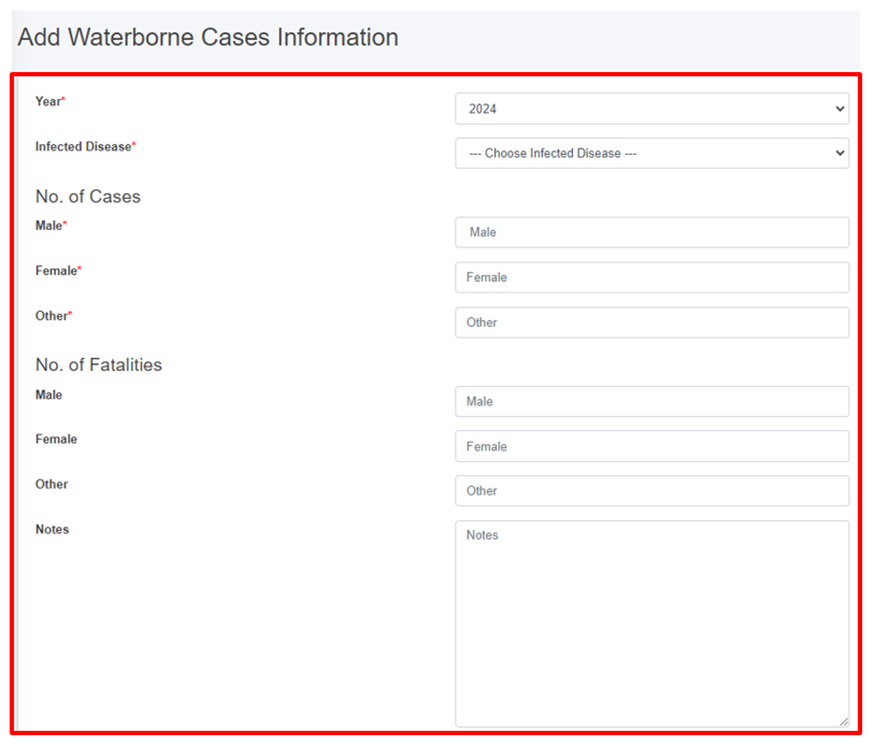
<span style="font-size: 11.0pt; line-height: 107%; font-family: 'Calibri',sans-serif; mso-ascii-theme-font: minor-latin; mso-fareast-font-family: Calibri; mso-fareast-theme-font: minor-latin; mso-hansi-theme-font: minor-latin; mso-bidi-font-family: Mangal; mso-bidi-theme-font: minor-bidi; mso-ansi-language: EN-US; mso-fareast-language: EN-US; mso-bidi-language: AR-SA;">Figure 19- 6 Waterborne Cases Information form</span>

<span class="normaltextrun"><span style="font-family: Symbol; mso-fareast-font-family: Symbol; mso-bidi-font-family: Symbol; color: black;"><span style="mso-list: Ignore;">·<span style="font: 7.0pt 'Times New Roman';"> </span></span></span></span><span class="normaltextrun"><span style="color: black; background: white;">After filling out the form, click </span></span><span class="wacimagecontainer">***<span style="mso-no-proof: yes;">Save</span>****<span style="mso-no-proof: yes;"> </span>*<span style="mso-no-proof: yes;">and make sure a pop-up message is displayed, refer to section 7.1 Save for more details</span></span><span class="normaltextrun"><span style="color: black; background: white;">.</span></span>

- <span style="font-size: 11.0pt; line-height: 107%; font-family: 'Calibri',sans-serif; mso-ascii-theme-font: minor-latin; mso-fareast-font-family: Calibri; mso-fareast-theme-font: minor-latin; mso-hansi-theme-font: minor-latin; mso-bidi-font-family: Mangal; mso-bidi-theme-font: minor-bidi; mso-ansi-language: EN-US; mso-fareast-language: EN-US; mso-bidi-language: AR-SA;"><span class="normaltextrun"><span style="font-size: 11.0pt; line-height: 107%; font-family: 'Calibri',sans-serif; mso-ascii-theme-font: minor-latin; mso-fareast-font-family: Calibri; mso-fareast-theme-font: minor-latin; mso-hansi-theme-font: minor-latin; mso-bidi-font-family: Mangal; mso-bidi-theme-font: minor-bidi; color: black; background: white; mso-ansi-language: EN-US; mso-fareast-language: EN-US; mso-bidi-language: AR-SA;">If a mandatory field is left out or any form failed validation during the form submission a validation message box will be prompted, refer to section 7.2 Validation Message Box for more details.</span></span></span>

**Overview:**

<span style="font-family: Symbol; mso-fareast-font-family: Symbol; mso-bidi-font-family: Symbol;"><span style="mso-list: Ignore;">·<span style="font: 7.0pt 'Times New Roman';"> </span></span></span>Year: The year when the diseases’ cases were identified.

<span style="font-family: Symbol; mso-fareast-font-family: Symbol; mso-bidi-font-family: Symbol;"><span style="mso-list: Ignore;">·<span style="font: 7.0pt 'Times New Roman';"> </span></span></span>Infected Disease: The name of the infected disease.

<span style="font-family: Symbol; mso-fareast-font-family: Symbol; mso-bidi-font-family: Symbol;"><span style="mso-list: Ignore;">·<span style="font: 7.0pt 'Times New Roman';"> </span></span></span>Number of Cases: Number of cases (Male, Female, Other) reported.

<span style="font-family: Symbol; mso-fareast-font-family: Symbol; mso-bidi-font-family: Symbol;"><span style="mso-list: Ignore;">·<span style="font: 7.0pt 'Times New Roman';"> </span></span></span>Number of Fatalities: Number of fatalities (Male, Female, Other) reported. There is a validation that the number of fatalities must be less than the number of cases.

<span style="font-family: Symbol; mso-fareast-font-family: Symbol; mso-bidi-font-family: Symbol;"><span style="mso-list: Ignore;">·<span style="font: 7.0pt 'Times New Roman';"> </span></span></span>Notes: Additional notes on information.