# 13.2 CWIS Generator

CWIS can be generated through the addition of data on a yearly basis. The system is also capable of generating and compiling the yearly data.

13.2.1 Navigation to CWIS Generator

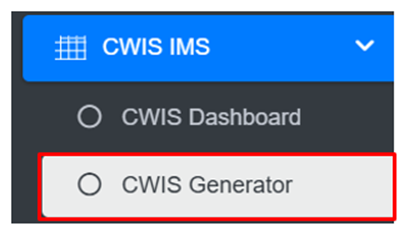
<span style="font-family: Symbol; mso-fareast-font-family: Symbol; mso-bidi-font-family: Symbol;"><span style="mso-list: Ignore;">·<span style="font: 7.0pt 'Times New Roman';"> </span></span></span>Open the sidebar and click on ‘***CWIS IMS’*** to expand.

<span style="font-family: Symbol; mso-fareast-font-family: Symbol; mso-bidi-font-family: Symbol;"><span style="mso-list: Ignore;">·<span style="font: 7.0pt 'Times New Roman';"> </span></span></span>Select the ***CWIS Generator***.

![](http://152.42.244.158/knowledge-product/uploads/images/gallery/2025-02/embedded-image-xxy8htxa.png)

**Overview:**

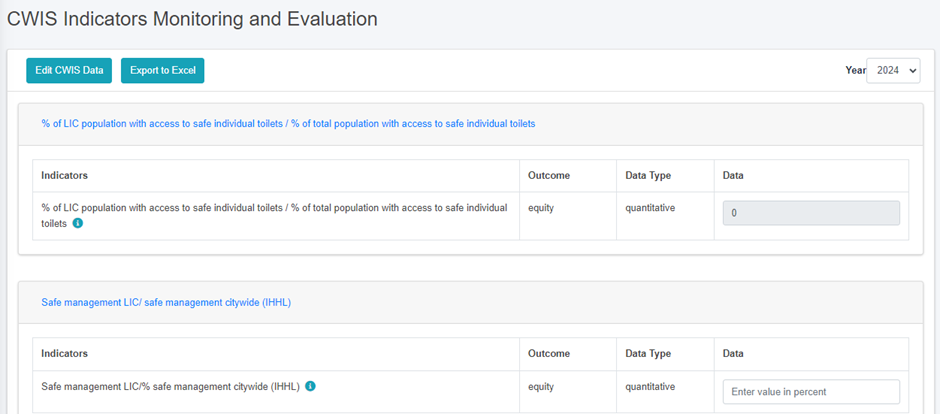
The CWIS Generator page lists all the attribute records stored in the module and provides Filters, and Tools that can be used according to the requirements. For more details (refer to section 5 Filters, and section 8 Tools).  
• Add CWIS Data (refer to section 13.2.2 Add CWIS Data)
![](http://152.42.244.158/knowledge-product/uploads/images/gallery/2025-02/embedded-image-d9tdpgs3.png)

Figure 13 2 CWIS Indicators Monitoring and Evaluation

**Note:**

- <span style="font-size: 11.0pt; line-height: 107%; font-family: 'Calibri',sans-serif; mso-ascii-theme-font: minor-latin; mso-fareast-font-family: Calibri; mso-fareast-theme-font: minor-latin; mso-hansi-theme-font: minor-latin; mso-bidi-font-family: Mangal; mso-bidi-theme-font: minor-bidi; mso-ansi-language: EN-US; mso-fareast-language: EN-US; mso-bidi-language: AR-SA;">The user must add the correct and accurate values in the CWIS Settings Page in order to display the accurate calculation of indicators. Refer to Section 13.2.2 Add CWIS Data for more details.</span>

<span style="font-size: 11.0pt; line-height: 107%; font-family: 'Calibri',sans-serif; mso-ascii-theme-font: minor-latin; mso-fareast-font-family: Calibri; mso-fareast-theme-font: minor-latin; mso-hansi-theme-font: minor-latin; mso-bidi-font-family: Mangal; mso-bidi-theme-font: minor-bidi; mso-ansi-language: EN-US; mso-fareast-language: EN-US; mso-bidi-language: AR-SA;">13.2.2 Add CWIS Data</span>

<span style="font-family: Symbol; mso-fareast-font-family: Symbol; mso-bidi-font-family: Symbol;"><span style="mso-list: Ignore;">·<span style="font: 7.0pt 'Times New Roman';"> </span></span></span>Click on the ***Add CWIS Data*** button to add new CWIS Data and it is also capable of generating the yearly data at the end of the year.

![](http://152.42.244.158/knowledge-product/uploads/images/gallery/2025-02/embedded-image-vxnf6ju4.png)

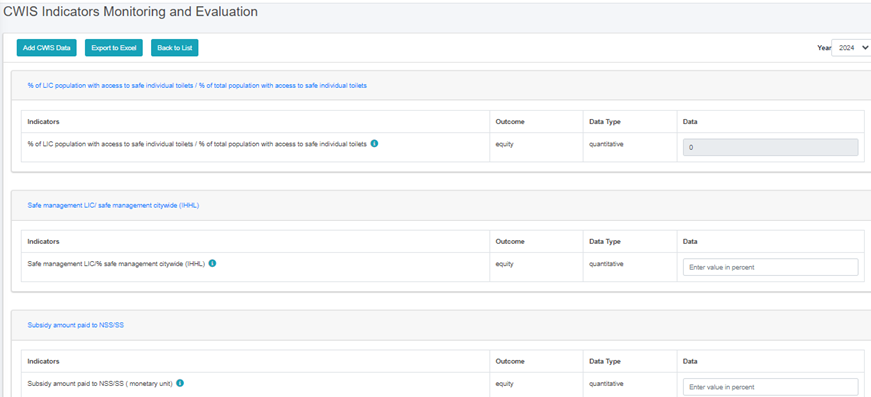
<span style="font-family: Symbol; mso-fareast-font-family: Symbol; mso-bidi-font-family: Symbol;"><span style="mso-list: Ignore;">·<span style="font: 7.0pt 'Times New Roman';"> </span></span></span>This redirects to the ***Data Framework for Monitoring and Evaluation*** form page.
![](http://152.42.244.158/knowledge-product/uploads/images/gallery/2025-02/embedded-image-nnsllm5n.png)

Figure 13‑<span style="mso-no-proof: yes;">3</span><span style="mso-spacerun: yes;"> </span>Add CWIS Data

<span style="font-size: 11.0pt; line-height: 107%; font-family: 'Calibri',sans-serif; mso-ascii-theme-font: minor-latin; mso-fareast-font-family: Calibri; mso-fareast-theme-font: minor-latin; mso-hansi-theme-font: minor-latin; mso-bidi-font-family: Mangal; mso-bidi-theme-font: minor-bidi; mso-ansi-language: EN-US; mso-fareast-language: EN-US; mso-bidi-language: AR-SA;">After filling out the form click ***Save*** <span class="wacimagecontainer"><span style="mso-no-proof: yes;">and make sure a pop-up message is displayed, refer to section 7.1 Save for more details</span></span><span class="normaltextrun"><span style="color: black; background: white;">.</span></span></span>