# 16.1 Property Tax Collection ISS

<span style="color: black; mso-themecolor: text1;">The **Property Tax Collection Information Support System** sub-module imports data via CSV of the tax status of the buildings in the municipality.</span>

<span style="color: black; mso-themecolor: text1;">16.1.1 Navigation to Property Tax Collection ISS</span>

<span style="font-family: Symbol; mso-fareast-font-family: Symbol; mso-bidi-font-family: Symbol;"><span style="mso-list: Ignore;">·<span style="font: 7.0pt 'Times New Roman';"> </span></span></span>Open the sidebar and select ‘***Property Tax Collection ISS’****.*

*![](http://152.42.244.158/knowledge-product/uploads/images/gallery/2025-02/embedded-image-bydfgqrj.png)*

**Overview:**

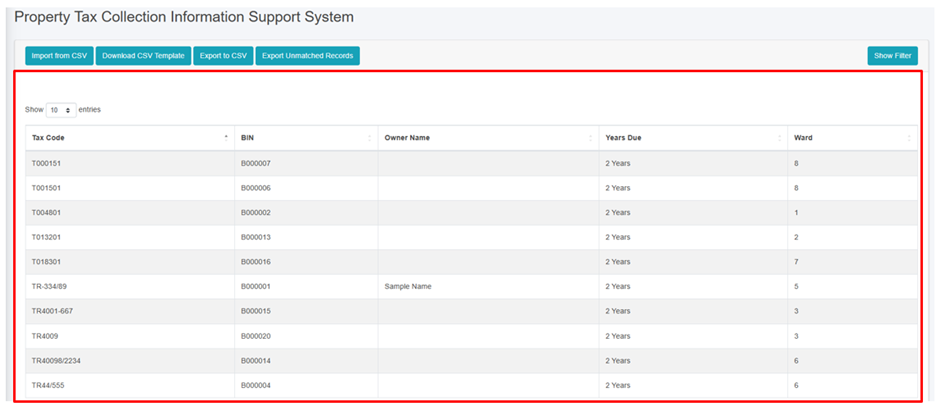
<span style="font-family: Symbol; mso-fareast-font-family: Symbol; mso-bidi-font-family: Symbol;"><span style="mso-list: Ignore;">·<span style="font: 7.0pt 'Times New Roman';"> </span></span></span>The user can view the lists of the building tax payment data including the due years.

<span style="font-family: Symbol; mso-fareast-font-family: Symbol; mso-bidi-font-family: Symbol;"><span style="mso-list: Ignore;">·<span style="font: 7.0pt 'Times New Roman';"> </span></span></span>User can import the data via CSV of building tax payments data by clicking on the ‘***Import from CSV (***<span style="mso-bidi-font-weight: bold; mso-bidi-font-style: italic;">refer to</span> <span style="mso-bidi-font-weight: bold; mso-bidi-font-style: italic;">section</span> 16.1.2 Import Property Tax Collection ISS<span style="mso-bidi-font-weight: bold; mso-bidi-font-style: italic;">)</span>

<span style="font-family: Symbol; mso-fareast-font-family: Symbol; mso-bidi-font-family: Symbol;"><span style="mso-list: Ignore;">·<span style="font: 7.0pt 'Times New Roman';"> </span></span></span><span style="mso-bidi-font-weight: bold; mso-bidi-font-style: italic;">The user can download the CSV Template to import the property tax payments data (refer to section 16.1.3 Download CSV Template).</span>

<span style="font-family: Symbol; mso-fareast-font-family: Symbol; mso-bidi-font-family: Symbol;"><span style="mso-list: Ignore;">·<span style="font: 7.0pt 'Times New Roman';"> </span></span></span>Export the data (refer to section 8 Tools) and filter data (refer to chapter<span class="normaltextrun"> 5 Filters</span>).

![](http://152.42.244.158/knowledge-product/uploads/images/gallery/2025-02/embedded-image-v6x9gxaw.png)

<span style="font-size: 11.0pt; line-height: 107%; font-family: 'Calibri',sans-serif; mso-ascii-theme-font: minor-latin; mso-fareast-font-family: Calibri; mso-fareast-theme-font: minor-latin; mso-hansi-theme-font: minor-latin; mso-bidi-font-family: Mangal; mso-bidi-theme-font: minor-bidi; mso-ansi-language: EN-US; mso-fareast-language: EN-US; mso-bidi-language: AR-SA;">Figure 16- </span><span style="font-size: 11.0pt; line-height: 107%; font-family: 'Calibri',sans-serif; mso-ascii-theme-font: minor-latin; mso-fareast-font-family: Calibri; mso-fareast-theme-font: minor-latin; mso-hansi-theme-font: minor-latin; mso-bidi-font-family: Mangal; mso-bidi-theme-font: minor-bidi; mso-ansi-language: EN-US; mso-fareast-language: EN-US; mso-bidi-language: AR-SA;"><span style="mso-no-proof: yes;">1</span></span><span style="font-size: 11.0pt; line-height: 107%; font-family: 'Calibri',sans-serif; mso-ascii-theme-font: minor-latin; mso-fareast-font-family: Calibri; mso-fareast-theme-font: minor-latin; mso-hansi-theme-font: minor-latin; mso-bidi-font-family: Mangal; mso-bidi-theme-font: minor-bidi; mso-ansi-language: EN-US; mso-fareast-language: EN-US; mso-bidi-language: AR-SA;"> List of Property Tax Collection ISS</span>

<span style="font-size: 11.0pt; line-height: 107%; font-family: 'Calibri',sans-serif; mso-ascii-theme-font: minor-latin; mso-fareast-font-family: Calibri; mso-fareast-theme-font: minor-latin; mso-hansi-theme-font: minor-latin; mso-bidi-font-family: Mangal; mso-bidi-theme-font: minor-bidi; mso-ansi-language: EN-US; mso-fareast-language: EN-US; mso-bidi-language: AR-SA;">16.1.2 Import Property Tax Collection ISS </span>

<span style="font-family: Symbol; mso-fareast-font-family: Symbol; mso-bidi-font-family: Symbol; color: black;"><span style="mso-list: Ignore;">·<span style="font: 7.0pt 'Times New Roman';"> </span></span></span>Click on ‘***Import from CSV’*** at the top left of the Property Tax Collection Information Support System page.

![](http://152.42.244.158/knowledge-product/uploads/images/gallery/2025-02/embedded-image-wmlvnlzm.png)

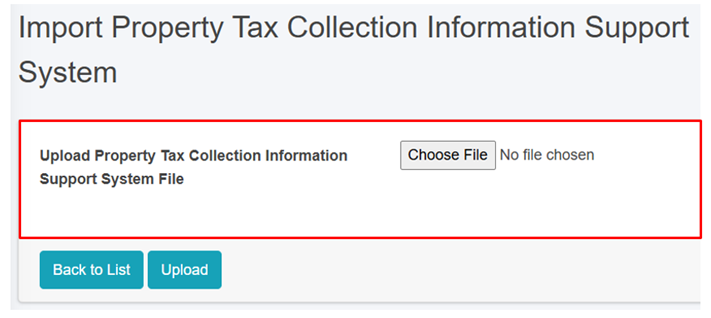
• This redirects to the Import Property Tax Collection Information Support System page.

**<span style="font-size: 12.0pt; font-family: 'Times New Roman',serif; mso-fareast-font-family: 'Times New Roman'; color: black;">Overview: </span>**

<span style="font-family: Symbol; mso-fareast-font-family: Symbol; mso-bidi-font-family: Symbol; color: black; mso-themecolor: text1;"><span style="mso-list: Ignore;">·<span style="font: 7.0pt 'Times New Roman';"> </span></span></span><span style="color: black; mso-themecolor: text1;">The user can upload the tax payment file including the last payment date in csv format for the building tax payment of the building from this module. </span>
![](http://152.42.244.158/knowledge-product/uploads/images/gallery/2025-02/embedded-image-odnau7zg.png)

Figure 16- <span style="mso-no-proof: yes;">2</span> Import Property Tax Collection ISS CSV File

<span style="font-family: Symbol; mso-fareast-font-family: Symbol; mso-bidi-font-family: Symbol;"><span style="mso-list: Ignore;">·<span style="font: 7.0pt 'Times New Roman';"> </span></span></span>Once the user selects the CSV file to be imported, they must click the ***Upload*** button to import the data. The user will then be notified with a pop-up message indicating Successful import, refer to section 7.3 Successfully Imported for more details.

<span style="font-family: Symbol; mso-fareast-font-family: Symbol; mso-bidi-font-family: Symbol;"><span style="mso-list: Ignore;">·<span style="font: 7.0pt 'Times New Roman';"> </span></span></span>The system currently does not allow user to import data from any other format than csv and must the system specified data structure. In case of attempt to import data from other format system will prompt red error message of mismatched format, refer to section 7.4 Import Format Error for more details.

**<span style="font-size: 12.0pt; font-family: 'Times New Roman',serif; mso-fareast-font-family: 'Times New Roman';">Note:</span>**

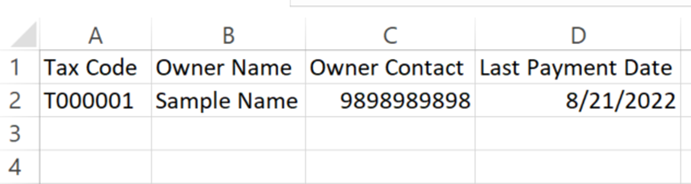
<span style="font-size: 11.0pt; line-height: 107%; font-family: 'Calibri',sans-serif; mso-ascii-theme-font: minor-latin; mso-fareast-font-family: Calibri; mso-fareast-theme-font: minor-latin; mso-hansi-theme-font: minor-latin; mso-bidi-font-family: Mangal; mso-bidi-theme-font: minor-bidi; mso-ansi-language: EN-US; mso-fareast-language: JA; mso-bidi-language: AR-SA;">The format for the **Last Payment Date** must be of mm/dd/yyyy (eg: 8/21/2022 which implies August 21<sup>st</sup> 2022).</span>

<span style="font-size: 11.0pt; line-height: 107%; font-family: 'Calibri',sans-serif; mso-ascii-theme-font: minor-latin; mso-fareast-font-family: Calibri; mso-fareast-theme-font: minor-latin; mso-hansi-theme-font: minor-latin; mso-bidi-font-family: Mangal; mso-bidi-theme-font: minor-bidi; mso-ansi-language: EN-US; mso-fareast-language: JA; mso-bidi-language: AR-SA;">16.1.3 Download CSV Template</span>

<span style="font-family: Symbol; mso-fareast-font-family: Symbol; mso-bidi-font-family: Symbol; mso-fareast-language: JA;"><span style="mso-list: Ignore;">·<span style="font: 7.0pt 'Times New Roman';"> </span></span></span><span style="mso-fareast-language: JA;">Click on the ***‘Download CSV Template’*** button at the top left of the Property Tax Collection Information Support System page.</span>

<span style="mso-fareast-language: JA;">![](http://152.42.244.158/knowledge-product/uploads/images/gallery/2025-02/embedded-image-11wwbegc.png)</span>

**<span style="mso-fareast-language: JA;">Overview:</span>**

<span style="font-family: Symbol; mso-fareast-font-family: Symbol; mso-bidi-font-family: Symbol; mso-fareast-language: JA;"><span style="mso-list: Ignore;">·<span style="font: 7.0pt 'Times New Roman';"> </span></span></span><span style="mso-fareast-language: JA;">A csv template file containing the sample data and required headers will be downloaded, which are essential for importing the csv file.</span>

<span style="font-family: Symbol; mso-fareast-font-family: Symbol; mso-bidi-font-family: Symbol; mso-fareast-language: JA;"><span style="mso-list: Ignore;">·<span style="font: 7.0pt 'Times New Roman';"> </span></span></span><span style="mso-fareast-language: JA;">Download CSV Template is available only in the Property Tax Collection ISS, Water Supply ISS Modules, and Solid Waste ISS module.</span>

<span style="mso-fareast-language: JA;">![](http://152.42.244.158/knowledge-product/uploads/images/gallery/2025-02/embedded-image-lfioonlf.png)</span>

Figure 16- <span style="mso-no-proof: yes;">3</span> Downloaded Property Tax Collection ISS CSV Template