# 18.3.1 General Tools

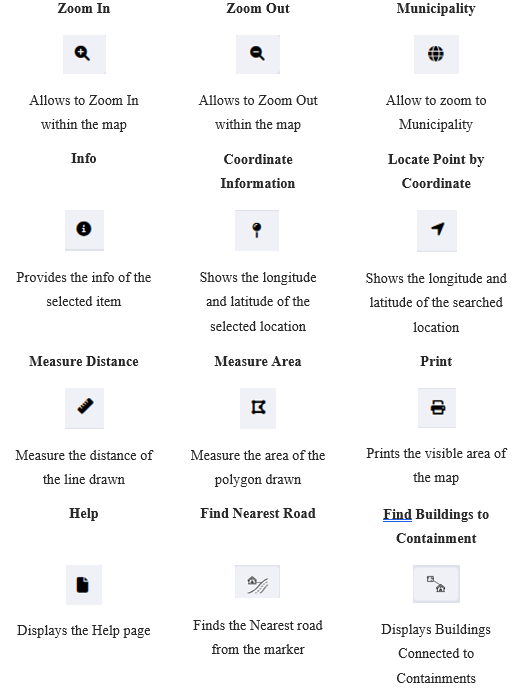
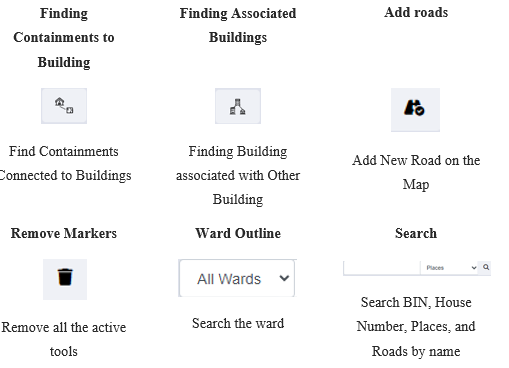
General tools and search functionality are on the header (in the page upper part). These tools are mainly for navigating around the map and performing basic operations e.g., measuring, printing, searching based on House Number, BIN, Places and Roads.

<span style="font-size: 11.0pt; line-height: 107%; font-family: 'Calibri',sans-serif; mso-ascii-theme-font: minor-latin; mso-fareast-font-family: Calibri; mso-fareast-theme-font: minor-latin; mso-hansi-theme-font: minor-latin; mso-bidi-font-family: Mangal; mso-bidi-theme-font: minor-bidi; mso-ansi-language: EN-US; mso-fareast-language: EN-US; mso-bidi-language: AR-SA;">Table 18-<span style="mso-spacerun: yes;"> </span><span style="mso-no-proof: yes;">1</span> General Tools Available on IMIS Web Map</span>

[![image.png](http://152.42.244.158/knowledge-product/uploads/images/gallery/2025-02/scaled-1680-/WG8image.png)](http://152.42.244.158/knowledge-product/uploads/images/gallery/2025-02/WG8image.png)

[![image.png](http://152.42.244.158/knowledge-product/uploads/images/gallery/2025-02/scaled-1680-/vEBimage.png)](http://152.42.244.158/knowledge-product/uploads/images/gallery/2025-02/vEBimage.png)
a) Info

<span style="font-size: 11.0pt; line-height: 150%; font-family: Symbol; mso-fareast-font-family: Symbol; mso-bidi-font-family: Symbol; color: black;"><span style="mso-list: Ignore;">·<span style="font: 7.0pt 'Times New Roman';"> </span></span></span>Zoom to an area of interest using navigation tools such as Zoom In, Zoom Out &amp; Navigate (Pan).

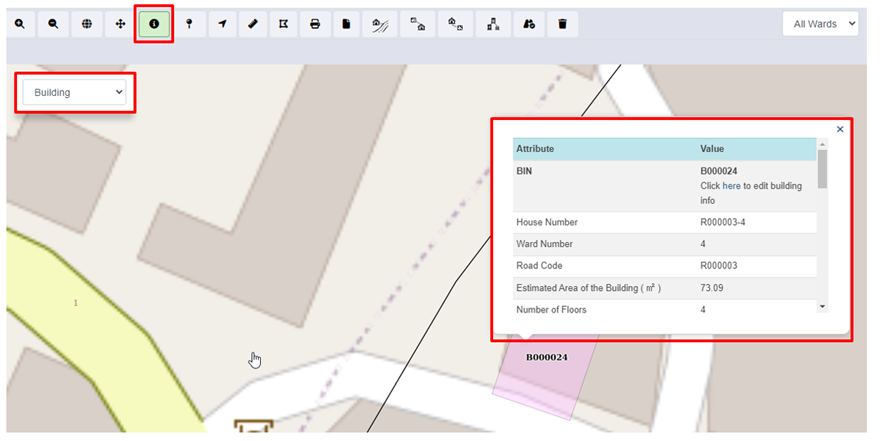
<span style="font-size: 11.0pt; line-height: 150%; font-family: Symbol; mso-fareast-font-family: Symbol; mso-bidi-font-family: Symbol; color: black;"><span style="mso-list: Ignore;">·<span style="font: 7.0pt 'Times New Roman';"> </span></span></span>Click on Info to activate it.

<span style="font-size: 11.0pt; line-height: 150%; font-family: Symbol; mso-fareast-font-family: Symbol; mso-bidi-font-family: Symbol; color: black;"><span style="mso-list: Ignore;">·<span style="font: 7.0pt 'Times New Roman';"> </span></span></span>A pop-up containing a list of layers is displayed.

<span style="font-size: 11.0pt; line-height: 150%; font-family: Symbol; mso-fareast-font-family: Symbol; mso-bidi-font-family: Symbol; color: black;"><span style="mso-list: Ignore;">·<span style="font: 7.0pt 'Times New Roman';"> </span></span></span>Select the desired layer and then click at the desired point location of interest.
![](http://152.42.244.158/knowledge-product/uploads/images/gallery/2025-02/embedded-image-teyhc6fz.png)

<span style="font-size: 11.0pt; line-height: 107%; font-family: 'Calibri',sans-serif; mso-ascii-theme-font: minor-latin; mso-fareast-font-family: Calibri; mso-fareast-theme-font: minor-latin; mso-hansi-theme-font: minor-latin; mso-bidi-font-family: Mangal; mso-bidi-theme-font: minor-bidi; mso-ansi-language: EN-US; mso-fareast-language: EN-US; mso-bidi-language: AR-SA;">Figure 18- </span><span style="font-size: 11.0pt; line-height: 107%; font-family: 'Calibri',sans-serif; mso-ascii-theme-font: minor-latin; mso-fareast-font-family: Calibri; mso-fareast-theme-font: minor-latin; mso-hansi-theme-font: minor-latin; mso-bidi-font-family: Mangal; mso-bidi-theme-font: minor-bidi; mso-ansi-language: EN-US; mso-fareast-language: EN-US; mso-bidi-language: AR-SA;"><span style="mso-no-proof: yes;">3</span></span><span style="font-size: 11.0pt; line-height: 107%; font-family: 'Calibri',sans-serif; mso-ascii-theme-font: minor-latin; mso-fareast-font-family: Calibri; mso-fareast-theme-font: minor-latin; mso-hansi-theme-font: minor-latin; mso-bidi-font-family: Mangal; mso-bidi-theme-font: minor-bidi; mso-ansi-language: EN-US; mso-fareast-language: EN-US; mso-bidi-language: AR-SA;"> Map Info </span>

**Overview:**

<span style="font-family: Symbol; mso-fareast-font-family: Symbol; mso-bidi-font-family: Symbol;"><span style="mso-list: Ignore;">·<span style="font: 7.0pt 'Times New Roman';"> </span></span></span>Users can see the Attributes and Corresponding Values of the desired layer.

- <span style="font-size: 11.0pt; line-height: 107%; font-family: 'Calibri',sans-serif; mso-ascii-theme-font: minor-latin; mso-fareast-font-family: Calibri; mso-fareast-theme-font: minor-latin; mso-hansi-theme-font: minor-latin; mso-bidi-font-family: Mangal; mso-bidi-theme-font: minor-bidi; mso-ansi-language: EN-US; mso-fareast-language: EN-US; mso-bidi-language: AR-SA;">This tool displays detailed attribute information of the selected layer at the point clicked on the Map. If there are no data layers at a clicked point, no information will be returned. Information will be displayed at the bottom of the map.</span>

<span style="mso-fareast-font-family: 'Book Antiqua'; mso-bidi-font-family: 'Book Antiqua';"><span style="mso-list: Ignore;">b)<span style="font: 7.0pt 'Times New Roman';"> </span></span></span>Coordinate Information

<span style="font-size: 11.0pt; line-height: 150%; font-family: Symbol; mso-fareast-font-family: Symbol; mso-bidi-font-family: Symbol; color: black;"><span style="mso-list: Ignore;">·<span style="font: 7.0pt 'Times New Roman';"> </span></span></span>Zoom to an area of interest using navigation tools such as Zoom In, Zoom Out, and Navigate (Pan).

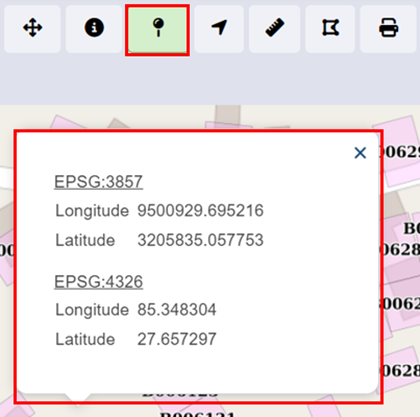
<span style="font-size: 11.0pt; line-height: 150%; font-family: Symbol; mso-fareast-font-family: Symbol; mso-bidi-font-family: Symbol; color: black;"><span style="mso-list: Ignore;">·<span style="font: 7.0pt 'Times New Roman';"> </span></span></span>Click on the ‘**Coordinate Information’** tool to activate it.

<span style="font-size: 11.0pt; line-height: 150%; font-family: Symbol; mso-fareast-font-family: Symbol; mso-bidi-font-family: Symbol; color: black;"><span style="mso-list: Ignore;">·<span style="font: 7.0pt 'Times New Roman';"> </span></span></span>Click on the ‘**Coordinate Information’** tool to deactivate it.

<span style="font-size: 11.0pt; line-height: 150%; font-family: Symbol; mso-fareast-font-family: Symbol; mso-bidi-font-family: Symbol; color: black;"><span style="mso-list: Ignore;">·<span style="font: 7.0pt 'Times New Roman';"> </span></span></span>Click on a location on the map to get coordinate information of that clicked point.
![](http://152.42.244.158/knowledge-product/uploads/images/gallery/2025-02/embedded-image-zua2l7t6.png)

<span style="font-size: 11.0pt; line-height: 107%; font-family: 'Calibri',sans-serif; mso-ascii-theme-font: minor-latin; mso-fareast-font-family: Calibri; mso-fareast-theme-font: minor-latin; mso-hansi-theme-font: minor-latin; mso-bidi-font-family: Mangal; mso-bidi-theme-font: minor-bidi; mso-ansi-language: EN-US; mso-fareast-language: EN-US; mso-bidi-language: AR-SA;">Figure 18- </span><span style="font-size: 11.0pt; line-height: 107%; font-family: 'Calibri',sans-serif; mso-ascii-theme-font: minor-latin; mso-fareast-font-family: Calibri; mso-fareast-theme-font: minor-latin; mso-hansi-theme-font: minor-latin; mso-bidi-font-family: Mangal; mso-bidi-theme-font: minor-bidi; mso-ansi-language: EN-US; mso-fareast-language: EN-US; mso-bidi-language: AR-SA;"><span style="mso-no-proof: yes;">4</span></span><span style="font-size: 11.0pt; line-height: 107%; font-family: 'Calibri',sans-serif; mso-ascii-theme-font: minor-latin; mso-fareast-font-family: Calibri; mso-fareast-theme-font: minor-latin; mso-hansi-theme-font: minor-latin; mso-bidi-font-family: Mangal; mso-bidi-theme-font: minor-bidi; mso-ansi-language: EN-US; mso-fareast-language: EN-US; mso-bidi-language: AR-SA;"> Coordinate Information</span>

**Overview:**

- <span style="font-size: 11.0pt; line-height: 107%; font-family: 'Calibri',sans-serif; mso-ascii-theme-font: minor-latin; mso-fareast-font-family: Calibri; mso-fareast-theme-font: minor-latin; mso-hansi-theme-font: minor-latin; mso-bidi-font-family: Mangal; mso-bidi-theme-font: minor-bidi; mso-ansi-language: EN-US; mso-fareast-language: EN-US; mso-bidi-language: AR-SA;">This tool will provide coordinate information of a clicked point on a map. Coordinates information is provided in two coordinate systems (EPSG: 3857 &amp; EPSG: 4326).</span>

<span style="mso-fareast-font-family: 'Book Antiqua'; mso-bidi-font-family: 'Book Antiqua';"><span style="mso-list: Ignore;">c)<span style="font: 7.0pt 'Times New Roman';"> </span></span></span>Locate Point by Coordinate

<span style="font-size: 11.0pt; mso-bidi-font-size: 12.0pt; line-height: 150%; font-family: Symbol; mso-fareast-font-family: Symbol; mso-bidi-font-family: Symbol; color: black;"><span style="mso-list: Ignore;">·<span style="font: 7.0pt 'Times New Roman';"> </span></span></span>Activate the tool by selecting it.

<span style="font-size: 11.0pt; mso-bidi-font-size: 12.0pt; line-height: 150%; font-family: Symbol; mso-fareast-font-family: Symbol; mso-bidi-font-family: Symbol; color: black;"><span style="mso-list: Ignore;">·<span style="font: 7.0pt 'Times New Roman';"> </span></span></span>Fill in the necessary longitude and latitude information on a point of interest.

<span style="font-size: 11.0pt; mso-bidi-font-size: 12.0pt; line-height: 150%; font-family: Symbol; mso-fareast-font-family: Symbol; mso-bidi-font-family: Symbol; color: black;"><span style="mso-list: Ignore;">·<span style="font: 7.0pt 'Times New Roman';"> </span></span></span>Click on the **Search** button and the point is located on the map.

![](http://152.42.244.158/knowledge-product/uploads/images/gallery/2025-02/embedded-image-ey0rceel.png)

<span style="font-size: 11.0pt; line-height: 107%; font-family: 'Calibri',sans-serif; mso-ascii-theme-font: minor-latin; mso-fareast-font-family: Calibri; mso-fareast-theme-font: minor-latin; mso-hansi-theme-font: minor-latin; mso-bidi-font-family: Mangal; mso-bidi-theme-font: minor-bidi; mso-ansi-language: EN-US; mso-fareast-language: EN-US; mso-bidi-language: AR-SA;">Figure 18- </span><span style="font-size: 11.0pt; line-height: 107%; font-family: 'Calibri',sans-serif; mso-ascii-theme-font: minor-latin; mso-fareast-font-family: Calibri; mso-fareast-theme-font: minor-latin; mso-hansi-theme-font: minor-latin; mso-bidi-font-family: Mangal; mso-bidi-theme-font: minor-bidi; mso-ansi-language: EN-US; mso-fareast-language: EN-US; mso-bidi-language: AR-SA;"><span style="mso-no-proof: yes;">5</span></span><span style="font-size: 11.0pt; line-height: 107%; font-family: 'Calibri',sans-serif; mso-ascii-theme-font: minor-latin; mso-fareast-font-family: Calibri; mso-fareast-theme-font: minor-latin; mso-hansi-theme-font: minor-latin; mso-bidi-font-family: Mangal; mso-bidi-theme-font: minor-bidi; mso-ansi-language: EN-US; mso-fareast-language: EN-US; mso-bidi-language: AR-SA;"> Locate Coordinates by Point</span>

<span style="mso-fareast-font-family: 'Book Antiqua'; mso-bidi-font-family: 'Book Antiqua';"><span style="mso-list: Ignore;">d)<span style="font: 7.0pt 'Times New Roman';"> </span></span></span>Measure Distance

<span style="font-size: 11.0pt; mso-bidi-font-size: 12.0pt; line-height: 150%; font-family: Symbol; mso-fareast-font-family: Symbol; mso-bidi-font-family: Symbol; color: black;"><span style="mso-list: Ignore;">·<span style="font: 7.0pt 'Times New Roman';"> </span></span></span>Zoom to an area of interest using navigation tools such as Zoom In, Zoom Out, and Navigate (Pan).

<span style="font-size: 11.0pt; mso-bidi-font-size: 12.0pt; line-height: 150%; font-family: Symbol; mso-fareast-font-family: Symbol; mso-bidi-font-family: Symbol; color: black;"><span style="mso-list: Ignore;">·<span style="font: 7.0pt 'Times New Roman';"> </span></span></span>Click on the ‘**Measure Distance’** tool to activate it.

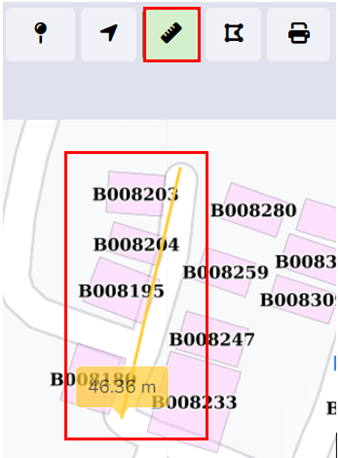
<span style="font-size: 11.0pt; mso-bidi-font-size: 12.0pt; line-height: 150%; font-family: Symbol; mso-fareast-font-family: Symbol; mso-bidi-font-family: Symbol; color: black;"><span style="mso-list: Ignore;">·<span style="font: 7.0pt 'Times New Roman';"> </span></span></span>Click on a location on the map (Start Point of a line) and drag the line appearing on the map to another location (End Point line). Distance information is provided in meters. Double Click to finish.

<span style="font-size: 11.0pt; mso-bidi-font-size: 12.0pt; line-height: 150%; font-family: Symbol; mso-fareast-font-family: Symbol; mso-bidi-font-family: Symbol; color: black;"><span style="mso-list: Ignore;">·<span style="font: 7.0pt 'Times New Roman';"> </span></span></span>Click on ‘**Measure Distance’** again to exit the tool.
![](http://152.42.244.158/knowledge-product/uploads/images/gallery/2025-02/embedded-image-j5qjslkf.png)

<span style="font-size: 11.0pt; line-height: 107%; font-family: 'Calibri',sans-serif; mso-ascii-theme-font: minor-latin; mso-fareast-font-family: Calibri; mso-fareast-theme-font: minor-latin; mso-hansi-theme-font: minor-latin; mso-bidi-font-family: Mangal; mso-bidi-theme-font: minor-bidi; mso-ansi-language: EN-US; mso-fareast-language: EN-US; mso-bidi-language: AR-SA;">Figure 18- </span><span style="font-size: 11.0pt; line-height: 107%; font-family: 'Calibri',sans-serif; mso-ascii-theme-font: minor-latin; mso-fareast-font-family: Calibri; mso-fareast-theme-font: minor-latin; mso-hansi-theme-font: minor-latin; mso-bidi-font-family: Mangal; mso-bidi-theme-font: minor-bidi; mso-ansi-language: EN-US; mso-fareast-language: EN-US; mso-bidi-language: AR-SA;"><span style="mso-no-proof: yes;">6</span></span><span style="font-size: 11.0pt; line-height: 107%; font-family: 'Calibri',sans-serif; mso-ascii-theme-font: minor-latin; mso-fareast-font-family: Calibri; mso-fareast-theme-font: minor-latin; mso-hansi-theme-font: minor-latin; mso-bidi-font-family: Mangal; mso-bidi-theme-font: minor-bidi; mso-ansi-language: EN-US; mso-fareast-language: EN-US; mso-bidi-language: AR-SA;"> Locate Coordinates by Point</span>

**Overview:**

<span style="font-size: 11.0pt; mso-bidi-font-size: 12.0pt; line-height: 150%; font-family: Symbol; mso-fareast-font-family: Symbol; mso-bidi-font-family: Symbol; color: black;"><span style="mso-list: Ignore;">·<span style="font: 7.0pt 'Times New Roman';"> </span></span></span>This tool is useful if the user wants to measure distances on the map. E.g., the user may want to measure how far a building is from a road.

<span style="mso-fareast-font-family: 'Book Antiqua'; mso-bidi-font-family: 'Book Antiqua'; color: black;"><span style="mso-list: Ignore;">e)<span style="font: 7.0pt 'Times New Roman';"> </span></span></span>Measure Area

<span style="font-size: 11.0pt; mso-bidi-font-size: 12.0pt; line-height: 150%; font-family: Symbol; mso-fareast-font-family: Symbol; mso-bidi-font-family: Symbol; color: black;"><span style="mso-list: Ignore;">·<span style="font: 7.0pt 'Times New Roman';"> </span></span></span>Zoom to an area of interest with navigation tools such as Zoom In, Zoom Out, and Navigate (Pan).

<span style="font-size: 11.0pt; mso-bidi-font-size: 12.0pt; line-height: 150%; font-family: Symbol; mso-fareast-font-family: Symbol; mso-bidi-font-family: Symbol; color: black;"><span style="mso-list: Ignore;">·<span style="font: 7.0pt 'Times New Roman';"> </span></span></span>Click on the Measure Area tool to activate it.

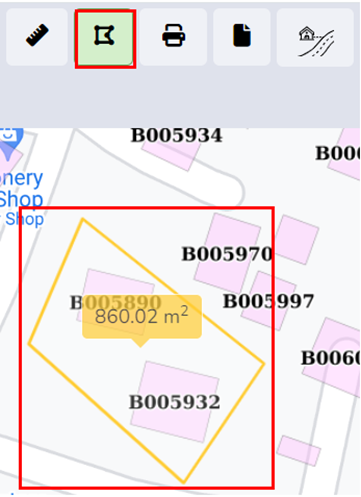
<span style="font-size: 11.0pt; mso-bidi-font-size: 12.0pt; line-height: 150%; font-family: Symbol; mso-fareast-font-family: Symbol; mso-bidi-font-family: Symbol; color: black;"><span style="mso-list: Ignore;">·<span style="font: 7.0pt 'Times New Roman';"> </span></span></span>Click on a series of locations on the map that represent the boundary of an area. Area information is provided in square meters. Double Click to finish.

<span style="font-size: 11.0pt; mso-bidi-font-size: 12.0pt; line-height: 150%; font-family: Symbol; mso-fareast-font-family: Symbol; mso-bidi-font-family: Symbol; color: black;"><span style="mso-list: Ignore;">·<span style="font: 7.0pt 'Times New Roman';"> </span></span></span>Click on Measure Area again to exit the tool.
![](http://152.42.244.158/knowledge-product/uploads/images/gallery/2025-02/embedded-image-hovtrthe.png)

<span style="font-size: 11.0pt; line-height: 107%; font-family: 'Calibri',sans-serif; mso-ascii-theme-font: minor-latin; mso-fareast-font-family: Calibri; mso-fareast-theme-font: minor-latin; mso-hansi-theme-font: minor-latin; mso-bidi-font-family: Mangal; mso-bidi-theme-font: minor-bidi; mso-ansi-language: EN-US; mso-fareast-language: EN-US; mso-bidi-language: AR-SA;">Figure 18- </span><span style="font-size: 11.0pt; line-height: 107%; font-family: 'Calibri',sans-serif; mso-ascii-theme-font: minor-latin; mso-fareast-font-family: Calibri; mso-fareast-theme-font: minor-latin; mso-hansi-theme-font: minor-latin; mso-bidi-font-family: Mangal; mso-bidi-theme-font: minor-bidi; mso-ansi-language: EN-US; mso-fareast-language: EN-US; mso-bidi-language: AR-SA;"><span style="mso-no-proof: yes;">7</span></span><span style="font-size: 11.0pt; line-height: 107%; font-family: 'Calibri',sans-serif; mso-ascii-theme-font: minor-latin; mso-fareast-font-family: Calibri; mso-fareast-theme-font: minor-latin; mso-hansi-theme-font: minor-latin; mso-bidi-font-family: Mangal; mso-bidi-theme-font: minor-bidi; mso-ansi-language: EN-US; mso-fareast-language: EN-US; mso-bidi-language: AR-SA;"> Maps-Measure Area of Polygon</span>

**Overview:**

- <span style="font-size: 11.0pt; line-height: 107%; font-family: 'Calibri',sans-serif; mso-ascii-theme-font: minor-latin; mso-fareast-font-family: Calibri; mso-fareast-theme-font: minor-latin; mso-hansi-theme-font: minor-latin; mso-bidi-font-family: Mangal; mso-bidi-theme-font: minor-bidi; mso-ansi-language: EN-US; mso-fareast-language: EN-US; mso-bidi-language: AR-SA;">This tool is useful if the user wants to measure an area in the map.</span>

<span style="font-size: 11.0pt; line-height: 107%; font-family: 'Calibri',sans-serif; mso-ascii-theme-font: minor-latin; mso-fareast-font-family: Calibri; mso-fareast-theme-font: minor-latin; mso-hansi-theme-font: minor-latin; mso-bidi-font-family: Mangal; mso-bidi-theme-font: minor-bidi; mso-ansi-language: EN-US; mso-fareast-language: EN-US; mso-bidi-language: AR-SA;">f) Print</span>

<span style="font-size: 11.0pt; mso-bidi-font-size: 12.0pt; line-height: 150%; font-family: Symbol; mso-fareast-font-family: Symbol; mso-bidi-font-family: Symbol; color: black;"><span style="mso-list: Ignore;">·<span style="font: 7.0pt 'Times New Roman';"> </span></span></span>Arrange a view on the map as desired and turn on/off data layers as desired.

<span style="font-size: 11.0pt; mso-bidi-font-size: 12.0pt; line-height: 150%; font-family: Symbol; mso-fareast-font-family: Symbol; mso-bidi-font-family: Symbol; color: black;"><span style="mso-list: Ignore;">·<span style="font: 7.0pt 'Times New Roman';"> </span></span></span>Activate the Print tool by clicking it.

<span style="font-size: 11.0pt; mso-bidi-font-size: 12.0pt; line-height: 150%; font-family: Symbol; mso-fareast-font-family: Symbol; mso-bidi-font-family: Symbol; color: black;"><span style="mso-list: Ignore;">·<span style="font: 7.0pt 'Times New Roman';"> </span></span></span>A pop-up will appear where the user needs to enter Title and Comments if any on the displayed output.

<span style="font-size: 11.0pt; mso-bidi-font-size: 12.0pt; line-height: 150%; font-family: Symbol; mso-fareast-font-family: Symbol; mso-bidi-font-family: Symbol; color: black;"><span style="mso-list: Ignore;">·<span style="font: 7.0pt 'Times New Roman';"> </span></span></span>The scale chosen determines the size of the bounding box which will encompass the map’s print boundary. The bounding box can be dragged as required.

<span style="font-size: 11.0pt; mso-bidi-font-size: 12.0pt; line-height: 150%; font-family: Symbol; mso-fareast-font-family: Symbol; mso-bidi-font-family: Symbol; color: black;"><span style="mso-list: Ignore;">·<span style="font: 7.0pt 'Times New Roman';"> </span></span></span>The paper size, DPI, and orientation can also be set as desired, then Click Print.
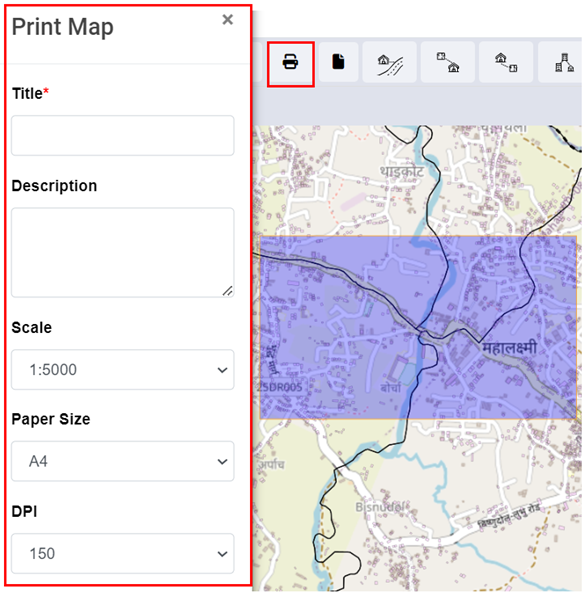
<span style="font-size: 11.0pt; line-height: 107%; font-family: 'Calibri',sans-serif; mso-ascii-theme-font: minor-latin; mso-fareast-font-family: Calibri; mso-fareast-theme-font: minor-latin; mso-hansi-theme-font: minor-latin; mso-bidi-font-family: Mangal; mso-bidi-theme-font: minor-bidi; mso-ansi-language: EN-US; mso-fareast-language: EN-US; mso-bidi-language: AR-SA;">![](http://152.42.244.158/knowledge-product/uploads/images/gallery/2025-02/embedded-image-wufnglyj.png)</span>

<span style="font-size: 11.0pt; line-height: 107%; font-family: 'Calibri',sans-serif; mso-ascii-theme-font: minor-latin; mso-fareast-font-family: Calibri; mso-fareast-theme-font: minor-latin; mso-hansi-theme-font: minor-latin; mso-bidi-font-family: Mangal; mso-bidi-theme-font: minor-bidi; mso-ansi-language: EN-US; mso-fareast-language: EN-US; mso-bidi-language: AR-SA;">Figure 18- <span style="mso-no-proof: yes;">8</span> Map Print</span>

<span style="font-size: 11.0pt; line-height: 107%; font-family: 'Calibri',sans-serif; mso-ascii-theme-font: minor-latin; mso-fareast-font-family: Calibri; mso-fareast-theme-font: minor-latin; mso-hansi-theme-font: minor-latin; mso-bidi-font-family: Mangal; mso-bidi-theme-font: minor-bidi; mso-ansi-language: EN-US; mso-fareast-language: EN-US; mso-bidi-language: AR-SA;">g) Find Nearest Road</span>

<span style="font-size: 11.0pt; mso-bidi-font-size: 12.0pt; line-height: 150%; font-family: Symbol; mso-fareast-font-family: Symbol; mso-bidi-font-family: Symbol; color: black;"><span style="mso-list: Ignore;">·<span style="font: 7.0pt 'Times New Roman';"> </span></span></span>Toggle on building, road, and containment layers with an underlying base layer.

<span style="font-size: 11.0pt; mso-bidi-font-size: 12.0pt; line-height: 150%; font-family: Symbol; mso-fareast-font-family: Symbol; mso-bidi-font-family: Symbol; color: black;"><span style="mso-list: Ignore;">·<span style="font: 7.0pt 'Times New Roman';"> </span></span></span>Activate the Find Nearest Road tool.

<span style="font-size: 11.0pt; mso-bidi-font-size: 12.0pt; line-height: 150%; font-family: Symbol; mso-fareast-font-family: Symbol; mso-bidi-font-family: Symbol; color: black;"><span style="mso-list: Ignore;">·<span style="font: 7.0pt 'Times New Roman';"> </span></span></span>Click any point on the map. The nearest Road will be shown with a Marker. Use the Info tool to get information about the Nearest Road, if needed. Use the Measure Distance tool to get distance information between clicked location and the nearest road, if needed.

<span style="font-size: 11.0pt; mso-bidi-font-size: 12.0pt; line-height: 150%; font-family: Symbol; mso-fareast-font-family: Symbol; mso-bidi-font-family: Symbol; color: black;"><span style="mso-list: Ignore;">·<span style="font: 7.0pt 'Times New Roman';"> </span></span></span>Click the **Remove Markers** tool to get rid of markers from the map.
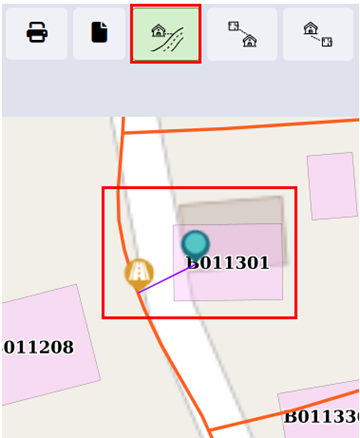
<span style="font-size: 11.0pt; line-height: 107%; font-family: 'Calibri',sans-serif; mso-ascii-theme-font: minor-latin; mso-fareast-font-family: Calibri; mso-fareast-theme-font: minor-latin; mso-hansi-theme-font: minor-latin; mso-bidi-font-family: Mangal; mso-bidi-theme-font: minor-bidi; mso-ansi-language: EN-US; mso-fareast-language: EN-US; mso-bidi-language: AR-SA;">![](http://152.42.244.158/knowledge-product/uploads/images/gallery/2025-02/embedded-image-sfezszii.png)</span>

<span style="font-size: 11.0pt; line-height: 107%; font-family: 'Calibri',sans-serif; mso-ascii-theme-font: minor-latin; mso-fareast-font-family: Calibri; mso-fareast-theme-font: minor-latin; mso-hansi-theme-font: minor-latin; mso-bidi-font-family: Mangal; mso-bidi-theme-font: minor-bidi; mso-ansi-language: EN-US; mso-fareast-language: EN-US; mso-bidi-language: AR-SA;">Figure 18- <span style="mso-no-proof: yes;">9</span> Maps- Nearest Road</span>

**Overview**

- <span style="font-size: 11.0pt; line-height: 107%; font-family: 'Calibri',sans-serif; mso-ascii-theme-font: minor-latin; mso-fareast-font-family: Calibri; mso-fareast-theme-font: minor-latin; mso-hansi-theme-font: minor-latin; mso-bidi-font-family: Mangal; mso-bidi-theme-font: minor-bidi; mso-ansi-language: EN-US; mso-fareast-language: EN-US; mso-bidi-language: AR-SA;">User can **find the nearest road** from the desired location.</span>

<span style="font-size: 11.0pt; line-height: 107%; font-family: 'Calibri',sans-serif; mso-ascii-theme-font: minor-latin; mso-fareast-font-family: Calibri; mso-fareast-theme-font: minor-latin; mso-hansi-theme-font: minor-latin; mso-bidi-font-family: Mangal; mso-bidi-theme-font: minor-bidi; mso-ansi-language: EN-US; mso-fareast-language: EN-US; mso-bidi-language: AR-SA;">h) Find Buildings Connected to Containment</span>

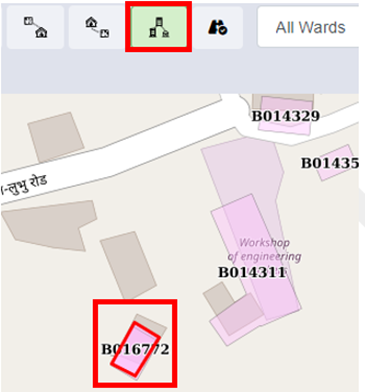
<span style="font-size: 11.0pt; mso-bidi-font-size: 12.0pt; line-height: 150%; font-family: Symbol; mso-fareast-font-family: Symbol; mso-bidi-font-family: Symbol; color: black;"><span style="mso-list: Ignore;">·<span style="font: 7.0pt 'Times New Roman';"> </span></span></span>Activate the tool.<span style="mso-no-proof: yes;"> </span>

<span style="font-size: 11.0pt; mso-bidi-font-size: 12.0pt; line-height: 150%; font-family: Symbol; mso-fareast-font-family: Symbol; mso-bidi-font-family: Symbol; color: black;"><span style="mso-list: Ignore;">·<span style="font: 7.0pt 'Times New Roman';"> </span></span></span>Select the containment for which user want to search the building for the building found is outlined.

<span style="font-size: 11.0pt; mso-bidi-font-size: 12.0pt; line-height: 150%; font-family: Symbol; mso-fareast-font-family: Symbol; mso-bidi-font-family: Symbol; color: black;"><span style="mso-list: Ignore;">·<span style="font: 7.0pt 'Times New Roman';"> </span></span></span>Click the ‘**Remove Markers’** tool to get rid of markers from the map.
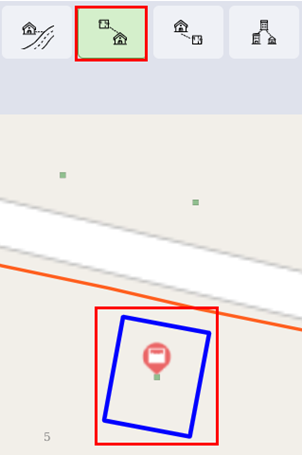
![](http://152.42.244.158/knowledge-product/uploads/images/gallery/2025-02/embedded-image-rfekyupz.png)

<span style="font-size: 11.0pt; line-height: 107%; font-family: 'Calibri',sans-serif; mso-ascii-theme-font: minor-latin; mso-fareast-font-family: Calibri; mso-fareast-theme-font: minor-latin; mso-hansi-theme-font: minor-latin; mso-bidi-font-family: Mangal; mso-bidi-theme-font: minor-bidi; mso-ansi-language: EN-US; mso-fareast-language: EN-US; mso-bidi-language: AR-SA;">Figure 18- </span><span style="font-size: 11.0pt; line-height: 107%; font-family: 'Calibri',sans-serif; mso-ascii-theme-font: minor-latin; mso-fareast-font-family: Calibri; mso-fareast-theme-font: minor-latin; mso-hansi-theme-font: minor-latin; mso-bidi-font-family: Mangal; mso-bidi-theme-font: minor-bidi; mso-ansi-language: EN-US; mso-fareast-language: EN-US; mso-bidi-language: AR-SA;"><span style="mso-no-proof: yes;">10</span></span><span style="font-size: 11.0pt; line-height: 107%; font-family: 'Calibri',sans-serif; mso-ascii-theme-font: minor-latin; mso-fareast-font-family: Calibri; mso-fareast-theme-font: minor-latin; mso-hansi-theme-font: minor-latin; mso-bidi-font-family: Mangal; mso-bidi-theme-font: minor-bidi; mso-ansi-language: EN-US; mso-fareast-language: EN-US; mso-bidi-language: AR-SA;"> Map- Find Buildings to Containments</span><span style="font-size: 12.0pt; line-height: 107%; font-family: 'Calibri',sans-serif; mso-ascii-theme-font: minor-latin; mso-fareast-font-family: 'Times New Roman'; mso-hansi-theme-font: minor-latin; mso-bidi-font-family: 'Times New Roman'; color: #282828; mso-ansi-language: EN-US; mso-fareast-language: EN-US; mso-bidi-language: AR-SA;"> </span>

**Overview:**

- <span style="font-size: 12.0pt; line-height: 107%; font-family: 'Calibri',sans-serif; mso-ascii-theme-font: minor-latin; mso-fareast-font-family: 'Times New Roman'; mso-hansi-theme-font: minor-latin; mso-bidi-font-family: 'Times New Roman'; color: #282828; mso-ansi-language: EN-US; mso-fareast-language: EN-US; mso-bidi-language: AR-SA;"><span style="font-size: 11.0pt; line-height: 107%; font-family: 'Calibri',sans-serif; mso-ascii-theme-font: minor-latin; mso-fareast-font-family: Calibri; mso-fareast-theme-font: minor-latin; mso-hansi-theme-font: minor-latin; mso-bidi-font-family: Mangal; mso-bidi-theme-font: minor-bidi; mso-ansi-language: EN-US; mso-fareast-language: EN-US; mso-bidi-language: AR-SA;">User can find the Buildings connected to Containment.</span></span>

<span style="font-size: 12.0pt; line-height: 107%; font-family: 'Calibri',sans-serif; mso-ascii-theme-font: minor-latin; mso-fareast-font-family: 'Times New Roman'; mso-hansi-theme-font: minor-latin; mso-bidi-font-family: 'Times New Roman'; color: #282828; mso-ansi-language: EN-US; mso-fareast-language: EN-US; mso-bidi-language: AR-SA;">i) Find Containments Connected to Building</span>

<span style="font-size: 11.0pt; mso-bidi-font-size: 12.0pt; line-height: 150%; font-family: Symbol; mso-fareast-font-family: Symbol; mso-bidi-font-family: Symbol; color: black;"><span style="mso-list: Ignore;">·<span style="font: 7.0pt 'Times New Roman';"> </span></span></span>Activate the tool.

<span style="font-size: 11.0pt; mso-bidi-font-size: 12.0pt; line-height: 150%; font-family: Symbol; mso-fareast-font-family: Symbol; mso-bidi-font-family: Symbol; color: black;"><span style="mso-list: Ignore;">·<span style="font: 7.0pt 'Times New Roman';"> </span></span></span>Select the building you want to search for the containment.

<span style="font-size: 11.0pt; mso-bidi-font-size: 12.0pt; line-height: 150%; font-family: Symbol; mso-fareast-font-family: Symbol; mso-bidi-font-family: Symbol; color: black;"><span style="mso-list: Ignore;">·<span style="font: 7.0pt 'Times New Roman';"> </span></span></span>The containment is displayed via markers.

<span style="font-size: 11.0pt; mso-bidi-font-size: 12.0pt; line-height: 150%; font-family: Symbol; mso-fareast-font-family: Symbol; mso-bidi-font-family: Symbol; color: black;"><span style="mso-list: Ignore;">·<span style="font: 7.0pt 'Times New Roman';"> </span></span></span>Click the Remove Markers tool to get rid of markers from the map.<span style="mso-no-proof: yes;"> </span>

<span style="mso-no-proof: yes;">![](http://152.42.244.158/knowledge-product/uploads/images/gallery/2025-02/embedded-image-wzyamnok.png)</span>

<span style="mso-no-proof: yes;"><span style="font-size: 11.0pt; line-height: 107%; font-family: 'Calibri',sans-serif; mso-ascii-theme-font: minor-latin; mso-fareast-font-family: Calibri; mso-fareast-theme-font: minor-latin; mso-hansi-theme-font: minor-latin; mso-bidi-font-family: Mangal; mso-bidi-theme-font: minor-bidi; mso-ansi-language: EN-US; mso-fareast-language: EN-US; mso-bidi-language: AR-SA;">Figure 18- </span><span style="font-size: 11.0pt; line-height: 107%; font-family: 'Calibri',sans-serif; mso-ascii-theme-font: minor-latin; mso-fareast-font-family: Calibri; mso-fareast-theme-font: minor-latin; mso-hansi-theme-font: minor-latin; mso-bidi-font-family: Mangal; mso-bidi-theme-font: minor-bidi; mso-ansi-language: EN-US; mso-fareast-language: EN-US; mso-bidi-language: AR-SA;">11</span><span style="font-size: 11.0pt; line-height: 107%; font-family: 'Calibri',sans-serif; mso-ascii-theme-font: minor-latin; mso-fareast-font-family: Calibri; mso-fareast-theme-font: minor-latin; mso-hansi-theme-font: minor-latin; mso-bidi-font-family: Mangal; mso-bidi-theme-font: minor-bidi; mso-ansi-language: EN-US; mso-fareast-language: EN-US; mso-bidi-language: AR-SA;"> Map- Find Containment to Building</span></span>

**Overview:**

<span style="font-size: 10.0pt; line-height: 150%; font-family: Symbol; mso-fareast-font-family: Symbol; mso-bidi-font-family: Symbol;"><span style="mso-list: Ignore;">·<span style="font: 7.0pt 'Times New Roman';"> </span></span></span>User can find Containments connected to a building.

j) Find Associated Buildings

<span style="font-size: 11.0pt; mso-bidi-font-size: 12.0pt; line-height: 150%; font-family: Symbol; mso-fareast-font-family: Symbol; mso-bidi-font-family: Symbol; color: black;"><span style="mso-list: Ignore;">·<span style="font: 7.0pt 'Times New Roman';"> </span></span></span>Activate the tool.

<span style="font-size: 11.0pt; mso-bidi-font-size: 12.0pt; line-height: 150%; font-family: Symbol; mso-fareast-font-family: Symbol; mso-bidi-font-family: Symbol; color: black;"><span style="mso-list: Ignore;">·<span style="font: 7.0pt 'Times New Roman';"> </span></span></span>Select the main building of which you want to find associated buildings.

<span style="font-size: 11.0pt; mso-bidi-font-size: 12.0pt; line-height: 150%; font-family: Symbol; mso-fareast-font-family: Symbol; mso-bidi-font-family: Symbol; color: black;"><span style="mso-list: Ignore;">·<span style="font: 7.0pt 'Times New Roman';"> </span></span></span>The building is displayed via markers.

<span style="font-size: 11.0pt; mso-bidi-font-size: 12.0pt; line-height: 150%; font-family: Symbol; mso-fareast-font-family: Symbol; mso-bidi-font-family: Symbol; color: black;"><span style="mso-list: Ignore;">·<span style="font: 7.0pt 'Times New Roman';"> </span></span></span>Click the Remove Markers tool to get rid of markers from the map.
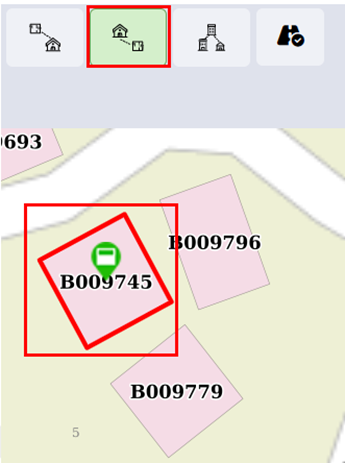
![](http://152.42.244.158/knowledge-product/uploads/images/gallery/2025-02/embedded-image-knexy4us.png)

<span style="font-size: 11.0pt; line-height: 107%; font-family: 'Calibri',sans-serif; mso-ascii-theme-font: minor-latin; mso-fareast-font-family: Calibri; mso-fareast-theme-font: minor-latin; mso-hansi-theme-font: minor-latin; mso-bidi-font-family: Mangal; mso-bidi-theme-font: minor-bidi; mso-ansi-language: EN-US; mso-fareast-language: EN-US; mso-bidi-language: AR-SA;">Figure 18- </span><span style="font-size: 11.0pt; line-height: 107%; font-family: 'Calibri',sans-serif; mso-ascii-theme-font: minor-latin; mso-fareast-font-family: Calibri; mso-fareast-theme-font: minor-latin; mso-hansi-theme-font: minor-latin; mso-bidi-font-family: Mangal; mso-bidi-theme-font: minor-bidi; mso-ansi-language: EN-US; mso-fareast-language: EN-US; mso-bidi-language: AR-SA;"><span style="mso-no-proof: yes;">12</span></span><span style="font-size: 11.0pt; line-height: 107%; font-family: 'Calibri',sans-serif; mso-ascii-theme-font: minor-latin; mso-fareast-font-family: Calibri; mso-fareast-theme-font: minor-latin; mso-hansi-theme-font: minor-latin; mso-bidi-font-family: Mangal; mso-bidi-theme-font: minor-bidi; mso-ansi-language: EN-US; mso-fareast-language: EN-US; mso-bidi-language: AR-SA;"> Map- Find Associated Building</span>

**Overview:**

<span style="font-size: 10.0pt; line-height: 150%; font-family: Symbol; mso-fareast-font-family: Symbol; mso-bidi-font-family: Symbol;"><span style="mso-list: Ignore;">·<span style="font: 7.0pt 'Times New Roman';"> </span></span></span>Users can find the Associated Building.

<span style="font-size: 10.0pt; line-height: 150%; font-family: Symbol; mso-fareast-font-family: Symbol; mso-bidi-font-family: Symbol;"><span style="mso-list: Ignore;">·<span style="font: 7.0pt 'Times New Roman';"> </span></span></span>There can be situations where there are multiple small buildings that serve as auxiliary buildings to the main building. It can be a house-help quarter, guard quarters, or such.

- <span style="font-size: 11.0pt; line-height: 107%; font-family: 'Calibri',sans-serif; mso-ascii-theme-font: minor-latin; mso-fareast-font-family: Calibri; mso-fareast-theme-font: minor-latin; mso-hansi-theme-font: minor-latin; mso-bidi-font-family: Mangal; mso-bidi-theme-font: minor-bidi; mso-ansi-language: EN-US; mso-fareast-language: EN-US; mso-bidi-language: AR-SA;">This tool allows the user to identify all associated buildings of the main building.</span>

<span style="font-size: 11.0pt; line-height: 107%; font-family: 'Calibri',sans-serif; mso-ascii-theme-font: minor-latin; mso-fareast-font-family: Calibri; mso-fareast-theme-font: minor-latin; mso-hansi-theme-font: minor-latin; mso-bidi-font-family: Mangal; mso-bidi-theme-font: minor-bidi; mso-ansi-language: EN-US; mso-fareast-language: EN-US; mso-bidi-language: AR-SA;">k) Add roads</span>

<span style="font-family: Symbol; mso-fareast-font-family: Symbol; mso-bidi-font-family: Symbol; mso-bidi-font-weight: bold;"><span style="mso-list: Ignore;">·<span style="font: 7.0pt 'Times New Roman';"> </span></span></span>Activate the add road tool.

<span style="font-family: Symbol; mso-fareast-font-family: Symbol; mso-bidi-font-family: Symbol; mso-bidi-font-weight: bold;"><span style="mso-list: Ignore;">·<span style="font: 7.0pt 'Times New Roman';"> </span></span></span>A navbar will pop up with tools under the tool row.

![](http://152.42.244.158/knowledge-product/uploads/images/gallery/2025-02/embedded-image-hq5jwatx.png)

Figure 18- <span style="mso-no-proof: yes;">13</span> Map- Add Roads

- <span style="font-size: 11.0pt; line-height: 107%; font-family: 'Calibri',sans-serif; mso-ascii-theme-font: minor-latin; mso-fareast-font-family: Calibri; mso-fareast-theme-font: minor-latin; mso-hansi-theme-font: minor-latin; mso-bidi-font-family: Mangal; mso-bidi-theme-font: minor-bidi; mso-ansi-language: EN-US; mso-fareast-language: EN-US; mso-bidi-language: AR-SA;">For reference chapter 14.2.2</span>

<span style="font-size: 11.0pt; line-height: 107%; font-family: 'Calibri',sans-serif; mso-ascii-theme-font: minor-latin; mso-fareast-font-family: Calibri; mso-fareast-theme-font: minor-latin; mso-hansi-theme-font: minor-latin; mso-bidi-font-family: Mangal; mso-bidi-theme-font: minor-bidi; mso-ansi-language: EN-US; mso-fareast-language: EN-US; mso-bidi-language: AR-SA;">l) Remove Markers</span>

<span style="font-size: 11.0pt; mso-bidi-font-size: 9.0pt; line-height: 150%; font-family: Symbol; mso-fareast-font-family: Symbol; mso-bidi-font-family: Symbol; color: black;"><span style="mso-list: Ignore;">·<span style="font: 7.0pt 'Times New Roman';"> </span></span></span>Click on the **Remove Markers**.

<span style="font-size: 11.0pt; mso-bidi-font-size: 9.0pt; line-height: 150%; font-family: Symbol; mso-fareast-font-family: Symbol; mso-bidi-font-family: Symbol; color: black;"><span style="mso-list: Ignore;">·<span style="font: 7.0pt 'Times New Roman';"> </span></span></span><span style="mso-fareast-font-family: 'Times New Roman'; mso-bidi-font-family: 'Times New Roman';">Markers are removed from the map.</span>

<span style="mso-fareast-font-family: 'Times New Roman'; mso-bidi-font-family: 'Times New Roman';">![](http://152.42.244.158/knowledge-product/uploads/images/gallery/2025-02/embedded-image-fm88tym2.png)</span>

<span style="mso-fareast-font-family: 'Times New Roman'; mso-bidi-font-family: 'Times New Roman';"><span style="font-size: 11.0pt; line-height: 107%; font-family: 'Calibri',sans-serif; mso-ascii-theme-font: minor-latin; mso-fareast-font-family: Calibri; mso-fareast-theme-font: minor-latin; mso-hansi-theme-font: minor-latin; mso-bidi-font-family: Mangal; mso-bidi-theme-font: minor-bidi; mso-ansi-language: EN-US; mso-fareast-language: EN-US; mso-bidi-language: AR-SA;">Figure 18- 14 Map- Remove Marker</span></span>

**Overview:**

<span style="font-size: 11.0pt; mso-bidi-font-size: 12.0pt; line-height: 150%; font-family: Symbol; mso-fareast-font-family: Symbol; mso-bidi-font-family: Symbol; color: black;"><span style="mso-list: Ignore;">·<span style="font: 7.0pt 'Times New Roman';"> </span></span></span>Users can remove markers from the map tools.

- <span style="mso-fareast-font-family: 'Times New Roman'; mso-bidi-font-family: 'Times New Roman';"><span style="font-size: 11.0pt; line-height: 107%; font-family: 'Calibri',sans-serif; mso-ascii-theme-font: minor-latin; mso-fareast-font-family: Calibri; mso-fareast-theme-font: minor-latin; mso-hansi-theme-font: minor-latin; mso-bidi-font-family: Mangal; mso-bidi-theme-font: minor-bidi; mso-ansi-language: EN-US; mso-fareast-language: EN-US; mso-bidi-language: AR-SA;">Some of the tools in Tools TAB (e.g., Find Nearest Road) generate temporary Markers for visualization on the map. This tool is used for removing such Markers.</span></span>

<span style="mso-fareast-font-family: 'Times New Roman'; mso-bidi-font-family: 'Times New Roman';"><span style="font-size: 11.0pt; line-height: 107%; font-family: 'Calibri',sans-serif; mso-ascii-theme-font: minor-latin; mso-fareast-font-family: Calibri; mso-fareast-theme-font: minor-latin; mso-hansi-theme-font: minor-latin; mso-bidi-font-family: Mangal; mso-bidi-theme-font: minor-bidi; mso-ansi-language: EN-US; mso-fareast-language: EN-US; mso-bidi-language: AR-SA;">m) Search</span></span>

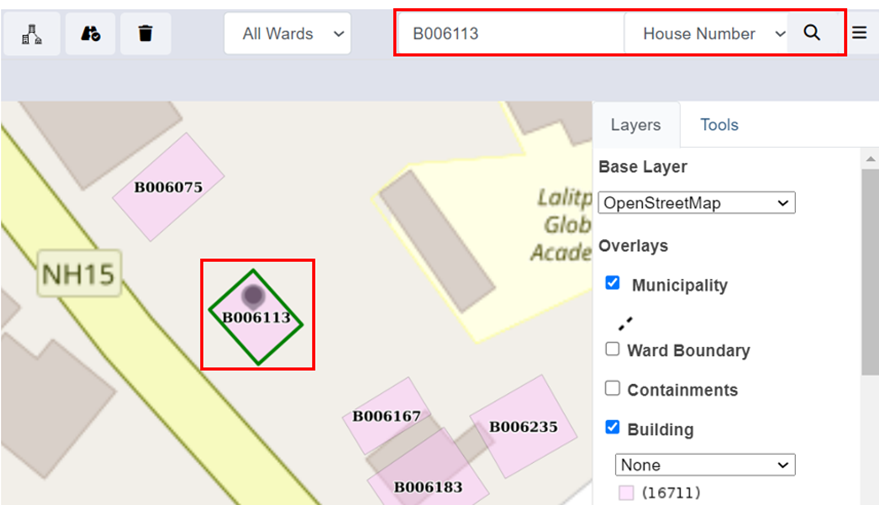
<span style="font-size: 11.0pt; mso-bidi-font-size: 12.0pt; line-height: 150%; font-family: Symbol; mso-fareast-font-family: Symbol; mso-bidi-font-family: Symbol; color: black;"><span style="mso-list: Ignore;">·<span style="font: 7.0pt 'Times New Roman';"> </span></span></span>Choose the desired criteria.

<span style="font-size: 11.0pt; mso-bidi-font-size: 12.0pt; line-height: 150%; font-family: Symbol; mso-fareast-font-family: Symbol; mso-bidi-font-family: Symbol; color: black;"><span style="mso-list: Ignore;">·<span style="font: 7.0pt 'Times New Roman';"> </span></span></span>Type a Code based on which building needs to be located on the map.

<span style="font-size: 11.0pt; mso-bidi-font-size: 12.0pt; line-height: 150%; font-family: Symbol; mso-fareast-font-family: Symbol; mso-bidi-font-family: Symbol; color: black;"><span style="mso-list: Ignore;">·<span style="font: 7.0pt 'Times New Roman';"> </span></span></span>Click the Search button.

![](http://152.42.244.158/knowledge-product/uploads/images/gallery/2025-02/embedded-image-sabcvepi.png)

<span style="font-size: 11.0pt; line-height: 107%; font-family: 'Calibri',sans-serif; mso-ascii-theme-font: minor-latin; mso-fareast-font-family: Calibri; mso-fareast-theme-font: minor-latin; mso-hansi-theme-font: minor-latin; mso-bidi-font-family: Mangal; mso-bidi-theme-font: minor-bidi; mso-ansi-language: EN-US; mso-fareast-language: EN-US; mso-bidi-language: AR-SA;">Figure 18- 15 Map- Search using BIN Code</span>

**Overview:**

<span style="font-size: 11.0pt; mso-bidi-font-size: 12.0pt; line-height: 150%; font-family: Symbol; mso-fareast-font-family: Symbol; mso-bidi-font-family: Symbol; color: black;"><span style="mso-list: Ignore;">·<span style="font: 7.0pt 'Times New Roman';"> </span></span></span>Users can search specific roads, buildings, and places.

<span style="font-size: 11.0pt; mso-bidi-font-size: 12.0pt; line-height: 150%; font-family: Symbol; mso-fareast-font-family: Symbol; mso-bidi-font-family: Symbol; color: black;"><span style="mso-list: Ignore;">·<span style="font: 7.0pt 'Times New Roman';"> </span></span></span>If the user wants to navigate to a specific location (E.g., specific road, specific building based on Holding No.) in the map, search tools are extremely beneficial.

- <span style="font-size: 11.0pt; line-height: 107%; font-family: 'Calibri',sans-serif; mso-ascii-theme-font: minor-latin; mso-fareast-font-family: Calibri; mso-fareast-theme-font: minor-latin; mso-hansi-theme-font: minor-latin; mso-bidi-font-family: Mangal; mso-bidi-theme-font: minor-bidi; mso-ansi-language: EN-US; mso-fareast-language: EN-US; mso-bidi-language: AR-SA;">The search tool provides a criterion to search for a specific building based on criteria such as BIN, Holding No, Tax Code, Landmarks, or Road code. </span>