# 19.1 Water Samples

Water Samples sub-module maintains the information regarding the water quality testing with a focus on coliform bacteria levels as an initial indicator of potential water contamination. This module records the spatial location where the samples were taken.

19.1.1 Navigation to Water Samples

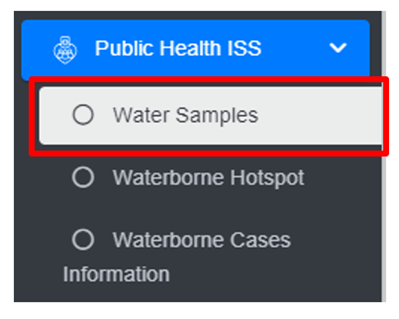
<span style="font-family: Symbol; mso-fareast-font-family: Symbol; mso-bidi-font-family: Symbol;"><span style="mso-list: Ignore;">·<span style="font: 7.0pt 'Times New Roman';"> </span></span></span>Open the sidebar and click on ***Public health ISS*** to expand.

<span style="font-family: Symbol; mso-fareast-font-family: Symbol; mso-bidi-font-family: Symbol;"><span style="mso-list: Ignore;">·<span style="font: 7.0pt 'Times New Roman';"> </span></span></span>Select the ***Water Samples***.

![](http://152.42.244.158/knowledge-product/uploads/images/gallery/2025-02/embedded-image-4zqfpdb0.png)

• This redirects to the Water Samples page.

**Overview:**

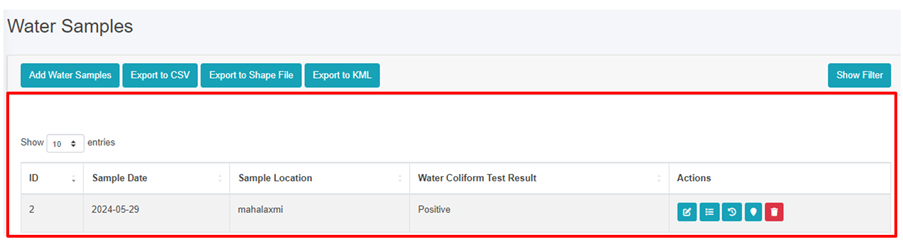
The Water Samples page lists all the attribute records stored in the module and provides different Filters, Actions and Tools that can be used according to the requirements. For more details (refer to section 5 Filters, section 6 Actions and section 8 Tools).
![](http://152.42.244.158/knowledge-product/uploads/images/gallery/2025-02/embedded-image-vvvmi2s0.png)

<span style="font-size: 11.0pt; line-height: 107%; font-family: 'Calibri',sans-serif; mso-ascii-theme-font: minor-latin; mso-fareast-font-family: Calibri; mso-fareast-theme-font: minor-latin; mso-hansi-theme-font: minor-latin; mso-bidi-font-family: Mangal; mso-bidi-theme-font: minor-bidi; mso-ansi-language: EN-US; mso-fareast-language: EN-US; mso-bidi-language: AR-SA;">Figure 19-1 List of Water Samples</span>

<span style="font-size: 11.0pt; line-height: 107%; font-family: 'Calibri',sans-serif; mso-ascii-theme-font: minor-latin; mso-fareast-font-family: Calibri; mso-fareast-theme-font: minor-latin; mso-hansi-theme-font: minor-latin; mso-bidi-font-family: Mangal; mso-bidi-theme-font: minor-bidi; mso-ansi-language: EN-US; mso-fareast-language: EN-US; mso-bidi-language: AR-SA;">19.1.2 Add Water Samples</span>

<span style="font-family: Symbol; mso-fareast-font-family: Symbol; mso-bidi-font-family: Symbol;"><span style="mso-list: Ignore;">·<span style="font: 7.0pt 'Times New Roman';"> </span></span></span>Click on the ***‘Add Water Samples’*** button.

![](http://152.42.244.158/knowledge-product/uploads/images/gallery/2025-02/embedded-image-z0xfp2yc.png)

<span style="font-family: Symbol; mso-fareast-font-family: Symbol; mso-bidi-font-family: Symbol;"><span style="mso-list: Ignore;">·<span style="font: 7.0pt 'Times New Roman';"> </span></span></span>This redirects to **Add Water Samples** form page.

![](http://152.42.244.158/knowledge-product/uploads/images/gallery/2025-02/embedded-image-nuhcbtfe.png)

Figure 19-2 Add Water Samples

<span style="mso-bidi-font-size: 18.0pt; line-height: 150%; font-family: Symbol; mso-fareast-font-family: Symbol; mso-bidi-font-family: Symbol; color: windowtext;"><span style="mso-list: Ignore;">·<span style="font: 7.0pt 'Times New Roman';"> </span></span></span>After filling out the form click **Save**, and make sure a pop-up message is displayed<span class="wacimagecontainer"><span style="mso-no-proof: yes;">, refer to section 7.1 Save for more details</span></span><span class="normaltextrun"><span style="color: black; background: white;">.</span></span>

- <span style="font-size: 11.0pt; line-height: 107%; font-family: 'Calibri',sans-serif; mso-ascii-theme-font: minor-latin; mso-fareast-font-family: Calibri; mso-fareast-theme-font: minor-latin; mso-hansi-theme-font: minor-latin; mso-bidi-font-family: Mangal; mso-bidi-theme-font: minor-bidi; mso-ansi-language: EN-US; mso-fareast-language: EN-US; mso-bidi-language: AR-SA;">If a mandatory field is left out <span class="normaltextrun"><span style="color: black; background: white;">or any form failed validation during the form submission a validation message box will be prompted, refer to section 7.2 Validation Message Box for more details.</span></span></span>

**Overview:**

The add water samples page consists of information that is explained below:

<span style="font-family: Symbol; mso-fareast-font-family: Symbol; mso-bidi-font-family: Symbol;"><span style="mso-list: Ignore;">·<span style="font: 7.0pt 'Times New Roman';"> </span></span></span>Sample Date – The sample collected date.

<span style="font-family: Symbol; mso-fareast-font-family: Symbol; mso-bidi-font-family: Symbol;"><span style="mso-list: Ignore;">·<span style="font: 7.0pt 'Times New Roman';"> </span></span></span>Sample Location – The name of the location from which the sample was collected.

<span style="font-family: Symbol; mso-fareast-font-family: Symbol; mso-bidi-font-family: Symbol;"><span style="mso-list: Ignore;">·<span style="font: 7.0pt 'Times New Roman';"> </span></span></span>Water Coliform Test Result - Select the water coliform test result as: positive or negative.

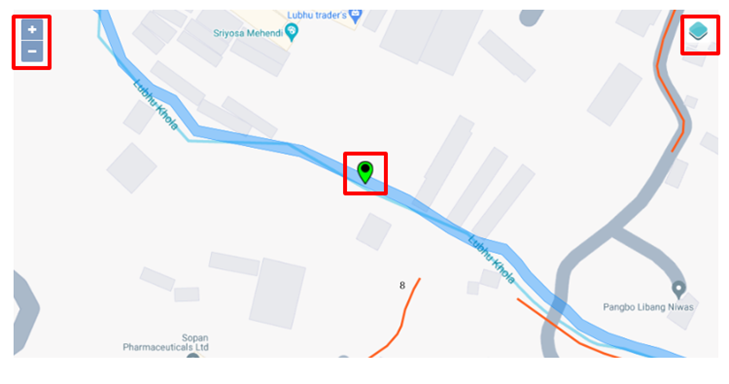
<span style="font-family: Symbol; mso-fareast-font-family: Symbol; mso-bidi-font-family: Symbol;"><span style="mso-list: Ignore;">·<span style="font: 7.0pt 'Times New Roman';"> </span></span></span>Click to set Latitude and Longitude - Find the water sample location on the map and pin a marker on the map by clicking on that location. This will mark the spatial location of the water sample in the map with latitude and longitude.

<span style="font-family: 'Courier New'; mso-fareast-font-family: 'Courier New';"><span style="mso-list: Ignore;">o<span style="font: 7.0pt 'Times New Roman';"> </span></span></span>The top left corner displays the zoom-in and out button

<span style="font-family: 'Courier New'; mso-fareast-font-family: 'Courier New';"><span style="mso-list: Ignore;">o<span style="font: 7.0pt 'Times New Roman';"> </span></span></span>The top right corner tab displays the Layers and Base maps
![](http://152.42.244.158/knowledge-product/uploads/images/gallery/2025-02/embedded-image-0bx8ljog.png)