# 9.3 Building Survey

The **Building Survey** sub-module is dedicated to maintaining information about field surveys conducted to identify and digitize both pre-existing and new buildings in the municipality via the Building Information Collection mobile application. This application captures the building footprint and stores it in the Building Survey list. Users can add the building footprints stored in this module by approving the building and adding the necessary attribute fields as explained in the Add Building section (refer to section 9.2.2 Add Building). A separate detailed user manual is also available for the **[Building Information Collection Mobile App User Manual](http://152.42.244.158/knowledge-product/books/building-information-collection-mobile-app-user-manual "Building Information Collection Mobile App User Manual")**.

9.3.1 Navigation to Building Survey

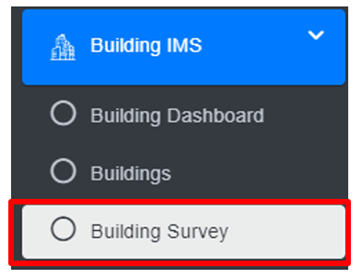
<span style="font-family: Symbol; mso-fareast-font-family: Symbol; mso-bidi-font-family: Symbol;"><span style="mso-list: Ignore;">·<span style="font: 7.0pt 'Times New Roman';"> </span></span></span>Open the sidebar and click on the ***Building IMS*** to expand.

<span style="font-family: Symbol; mso-fareast-font-family: Symbol; mso-bidi-font-family: Symbol;"><span style="mso-list: Ignore;">·<span style="font: 7.0pt 'Times New Roman';"> </span></span></span>Select ***Building Survey.***

**![](http://152.42.244.158/knowledge-product/uploads/images/gallery/2025-02/embedded-image-pas8til3.png)**

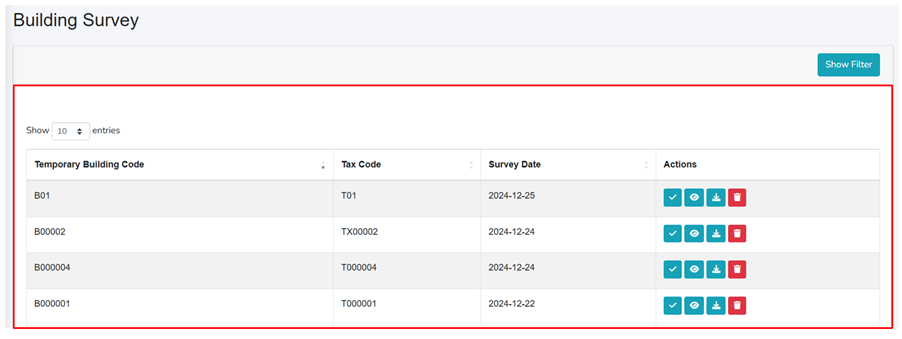
<span style="font-family: Symbol; mso-fareast-font-family: Symbol; mso-bidi-font-family: Symbol;"><span style="mso-list: Ignore;">·<span style="font: 7.0pt 'Times New Roman';"> </span></span></span>This redirects to the **Building Survey** page.

<span style="font-family: Symbol; mso-fareast-font-family: Symbol; mso-bidi-font-family: Symbol;"><span style="mso-list: Ignore;">·<span style="font: 7.0pt 'Times New Roman';"> </span></span></span>The user can see the list of building survey data collected through the mobile application

<span style="font-family: Symbol; mso-fareast-font-family: Symbol; mso-bidi-font-family: Symbol;"><span style="mso-list: Ignore;">·<span style="font: 7.0pt 'Times New Roman';"> </span></span></span>User can add a new building by clicking on the ***Approve*** button in the action column (refer to section 9.3.2 Approve Building Structure).

- <span style="text-indent: -0.25in;"><span style="font-size: 11.0pt; line-height: 107%; font-family: 'Calibri',sans-serif; mso-ascii-theme-font: minor-latin; mso-fareast-font-family: Calibri; mso-fareast-theme-font: minor-latin; mso-hansi-theme-font: minor-latin; mso-bidi-font-family: Mangal; mso-bidi-theme-font: minor-bidi; mso-ansi-language: EN-US; mso-fareast-language: EN-US; mso-bidi-language: AR-SA;">The user can preview the location of the Building (refer to section 9.3.3 Preview Building Location), download the building’s KML File (refer to section 9.3.4 Download Building KML File), delete the building record (refer section 6.3 Delete Record), and filter the data.</span></span>

<span style="text-indent: -0.25in;"><span style="font-size: 11.0pt; line-height: 107%; font-family: 'Calibri',sans-serif; mso-ascii-theme-font: minor-latin; mso-fareast-font-family: Calibri; mso-fareast-theme-font: minor-latin; mso-hansi-theme-font: minor-latin; mso-bidi-font-family: Mangal; mso-bidi-theme-font: minor-bidi; mso-ansi-language: EN-US; mso-fareast-language: EN-US; mso-bidi-language: AR-SA;">![](http://152.42.244.158/knowledge-product/uploads/images/gallery/2025-02/embedded-image-5wlhg6ya.png)</span></span>

**<span style="font-size: 11.0pt; line-height: 107%; font-family: 'Calibri',sans-serif; mso-ascii-theme-font: minor-latin; mso-fareast-font-family: Calibri; mso-fareast-theme-font: minor-latin; mso-hansi-theme-font: minor-latin; mso-bidi-font-family: Mangal; mso-bidi-theme-font: minor-bidi; mso-ansi-language: EN-US; mso-fareast-language: EN-US; mso-bidi-language: AR-SA;">Figure 9- <span style="mso-no-proof: yes;">5</span> Building survey lists</span>**

Refer to **[Building Information Collection Mobile App User Manual](http://152.42.244.158/knowledge-product/books/building-information-collection-mobile-app-user-manual "Building Information Collection Mobile App User Manual")** for detailed instructions for the building footprint survey/ collection process.