# Accessing the IMIS

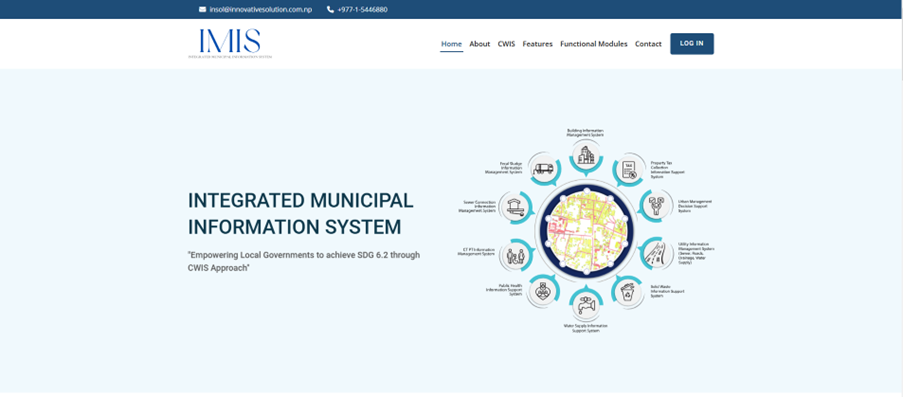
When accessing the IMIS web application through a browser, users are directed to the landing page, which provides a general overview of IMIS. To proceed, users can click on the 'SIGN IN' button, triggering a pop-up where they are prompted to enter their login credentials. The IMIS web application is compatible with all major browsers.

<span style="mso-bookmark: _Toc161926414;"><span style="mso-bookmark: _Toc161925302;"><span style="mso-bookmark: _Toc161148758;"><span style="mso-bookmark: _Toc161145860;"><span style="mso-bookmark: _Toc187848473;"><span style="mso-fareast-font-family: 'Book Antiqua'; mso-bidi-font-family: 'Book Antiqua'; color: black; mso-themecolor: text1; mso-bidi-language: NE;"><span style="mso-list: Ignore;">2.1 </span></span><span style="mso-bidi-language: NE;">Navigation to IMIS Home </span></span></span></span></span></span><span style="mso-bookmark: _Toc187848473;"><span style="mso-bidi-language: NE;">Page</span></span>

- Open any browser to access the **IMIS Web Application**. (For better user experience **Chrome Browser** is recommended)
- <span style="font-size: 11.0pt; line-height: 107%; font-family: 'Calibri',sans-serif; mso-ascii-theme-font: minor-latin; mso-fareast-font-family: Calibri; mso-fareast-theme-font: minor-latin; mso-hansi-theme-font: minor-latin; mso-bidi-font-family: Mangal; mso-bidi-theme-font: minor-bidi; mso-ansi-language: EN-US; mso-fareast-language: EN-US; mso-bidi-language: AR-SA;">Enter the provided IMIS URL to navigate to the Home Page.</span>

<span style="font-size: 11.0pt; line-height: 107%; font-family: 'Calibri',sans-serif; mso-ascii-theme-font: minor-latin; mso-fareast-font-family: Calibri; mso-fareast-theme-font: minor-latin; mso-hansi-theme-font: minor-latin; mso-bidi-font-family: Mangal; mso-bidi-theme-font: minor-bidi; mso-ansi-language: EN-US; mso-fareast-language: EN-US; mso-bidi-language: AR-SA;">![](http://152.42.244.158/knowledge-product/uploads/images/gallery/2025-02/embedded-image-rk9kcydk.png)</span>

**Overview:**

![](http://152.42.244.158/knowledge-product/uploads/images/gallery/2025-02/embedded-image-w5hvxd2c.png)

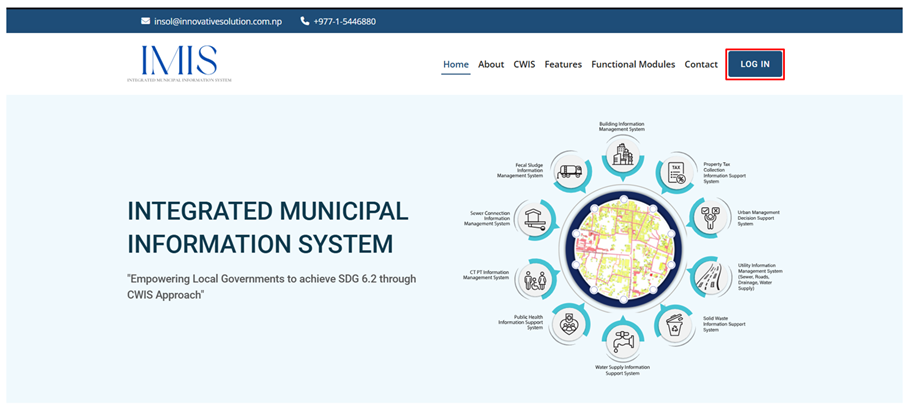
Figure 2- <span style="mso-no-proof: yes;">1</span> IMIS landing Page

The Home Page of IMIS has the following sections:

<span style="font-size: 10.0pt; mso-bidi-font-size: 12.0pt; line-height: 150%; font-family: Symbol; mso-fareast-font-family: Symbol; mso-bidi-font-family: Symbol; color: black;"><span style="mso-list: Ignore;">·<span style="font: 7.0pt 'Times New Roman';"> </span></span></span><span style="color: black;">Home - </span><span style="mso-fareast-font-family: 'Times New Roman'; mso-bidi-font-family: 'Times New Roman';">The “Home” provides the diagrammatic representation of the functional modules of IMIS and serves as the starting point where the website loads.</span>

<span style="font-size: 10.0pt; mso-bidi-font-size: 12.0pt; line-height: 150%; font-family: Symbol; mso-fareast-font-family: Symbol; mso-bidi-font-family: Symbol; color: black;"><span style="mso-list: Ignore;">·<span style="font: 7.0pt 'Times New Roman';"> </span></span></span><span style="mso-fareast-font-family: 'Times New Roman'; mso-bidi-font-family: 'Times New Roman';">About – The “About” contains the short synopsis on IMIS.</span>

<span style="font-size: 10.0pt; mso-bidi-font-size: 12.0pt; line-height: 150%; font-family: Symbol; mso-fareast-font-family: Symbol; mso-bidi-font-family: Symbol; color: black;"><span style="mso-list: Ignore;">·<span style="font: 7.0pt 'Times New Roman';"> </span></span></span><span style="mso-fareast-font-family: 'Times New Roman'; mso-bidi-font-family: 'Times New Roman';">CWIS – The “CWIS” (Citywide Inclusive Sanitation) section provides the brief on what CWIS is, its approach and the CWIS.</span>

<span style="font-size: 10.0pt; mso-bidi-font-size: 12.0pt; line-height: 150%; font-family: Symbol; mso-fareast-font-family: Symbol; mso-bidi-font-family: Symbol; color: black;"><span style="mso-list: Ignore;">·<span style="font: 7.0pt 'Times New Roman';"> </span></span></span><span style="mso-fareast-font-family: 'Times New Roman'; mso-bidi-font-family: 'Times New Roman';">Features – The “Features” section showcases the key functionalities of IMIS </span>

<span style="font-size: 10.0pt; mso-bidi-font-size: 12.0pt; line-height: 150%; font-family: Symbol; mso-fareast-font-family: Symbol; mso-bidi-font-family: Symbol; color: black;"><span style="mso-list: Ignore;">·<span style="font: 7.0pt 'Times New Roman';"> </span></span></span><span style="mso-fareast-font-family: 'Times New Roman'; mso-bidi-font-family: 'Times New Roman';">Functional Modules – The “Functional Modules” highlights the features and functions of each module.</span>

<span style="font-size: 10.0pt; mso-bidi-font-size: 12.0pt; line-height: 150%; font-family: Symbol; mso-fareast-font-family: Symbol; mso-bidi-font-family: Symbol; color: black;"><span style="mso-list: Ignore;">·<span style="font: 7.0pt 'Times New Roman';"> </span></span></span><span style="mso-fareast-font-family: 'Times New Roman'; mso-bidi-font-family: 'Times New Roman';">Contact – The “Contact” provides direct contact with the technical partner of the IMIS</span>

<span style="mso-fareast-font-family: 'Times New Roman'; mso-bidi-font-family: 'Times New Roman';"><span style="font-size: 11.0pt; line-height: 107%; font-family: 'Calibri',sans-serif; mso-ascii-theme-font: minor-latin; mso-fareast-font-family: 'Times New Roman'; mso-hansi-theme-font: minor-latin; mso-bidi-font-family: 'Times New Roman'; mso-ansi-language: EN-US; mso-fareast-language: EN-US; mso-bidi-language: AR-SA;"><span style="font-size: 10.0pt; mso-bidi-font-size: 12.0pt; line-height: 150%; font-family: Symbol; mso-fareast-font-family: Symbol; mso-bidi-font-family: Symbol; color: black;"><span style="mso-list: Ignore;">·<span style="font: 7.0pt 'Times New Roman';"> </span></span></span>LOG IN – The “LOG IN” section is a login portal for registered users or members.</span></span>

<span style="mso-fareast-font-family: 'Times New Roman'; mso-bidi-font-family: 'Times New Roman';"><span style="font-size: 11.0pt; line-height: 107%; font-family: 'Calibri',sans-serif; mso-ascii-theme-font: minor-latin; mso-fareast-font-family: 'Times New Roman'; mso-hansi-theme-font: minor-latin; mso-bidi-font-family: 'Times New Roman'; mso-ansi-language: EN-US; mso-fareast-language: EN-US; mso-bidi-language: AR-SA;">2.2 </span></span><span style="mso-bookmark: _Toc169259036;"><span style="mso-bookmark: _Toc161926415;"><span style="mso-bookmark: _Toc161925303;"><span style="mso-bookmark: _Toc161148759;"><span style="mso-bookmark: _Toc161145861;"><span style="mso-fareast-font-family: 'Book Antiqua'; mso-bidi-font-family: 'Book Antiqua'; color: black; mso-themecolor: text1; mso-bidi-language: NE;"><span style="mso-list: Ignore;"> </span></span><span style="mso-bidi-language: NE;">Log In to IMIS</span></span></span></span></span></span><span style="mso-bidi-language: NE;"> </span>

<span style="font-size: 11.0pt; mso-bidi-font-size: 12.0pt; line-height: 115%; font-family: Symbol; mso-fareast-font-family: Symbol; mso-bidi-font-family: Symbol; color: black;"><span style="mso-list: Ignore;">·<span style="font: 7.0pt 'Times New Roman';"> </span></span></span>Click on the **“*LOG IN”*** button

![](http://152.42.244.158/knowledge-product/uploads/images/gallery/2025-02/embedded-image-izji7ehf.png)

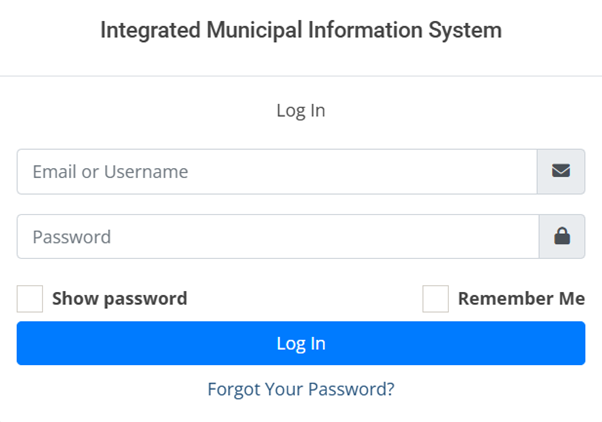
<span style="font-family: Symbol; mso-fareast-font-family: Symbol; mso-bidi-font-family: Symbol; color: black;"><span style="mso-list: Ignore;">·<span style="font: 7.0pt 'Times New Roman';"> </span></span></span>Enter the valid username or email and a password provided, then click on the ***Log In*** button.
![](http://152.42.244.158/knowledge-product/uploads/images/gallery/2025-02/embedded-image-vltnt5es.png)

<span style="font-size: 11.0pt; line-height: 107%; font-family: 'Calibri',sans-serif; mso-ascii-theme-font: minor-latin; mso-fareast-font-family: Calibri; mso-fareast-theme-font: minor-latin; mso-hansi-theme-font: minor-latin; mso-bidi-font-family: Mangal; mso-bidi-theme-font: minor-bidi; mso-ansi-language: EN-US; mso-fareast-language: EN-US; mso-bidi-language: AR-SA;">Figure 2- </span><span style="font-size: 11.0pt; line-height: 107%; font-family: 'Calibri',sans-serif; mso-ascii-theme-font: minor-latin; mso-fareast-font-family: Calibri; mso-fareast-theme-font: minor-latin; mso-hansi-theme-font: minor-latin; mso-bidi-font-family: Mangal; mso-bidi-theme-font: minor-bidi; mso-ansi-language: EN-US; mso-fareast-language: EN-US; mso-bidi-language: AR-SA;"><span style="mso-no-proof: yes;">2</span></span><span style="font-size: 11.0pt; line-height: 107%; font-family: 'Calibri',sans-serif; mso-ascii-theme-font: minor-latin; mso-fareast-font-family: Calibri; mso-fareast-theme-font: minor-latin; mso-hansi-theme-font: minor-latin; mso-bidi-font-family: Mangal; mso-bidi-theme-font: minor-bidi; mso-ansi-language: EN-US; mso-fareast-language: EN-US; mso-bidi-language: AR-SA;"> Login Prompt</span>

**Overview:**

<span style="font-family: Symbol; mso-fareast-font-family: Symbol; mso-bidi-font-family: Symbol; color: black;"><span style="mso-list: Ignore;">·<span style="font: 7.0pt 'Times New Roman';"> </span></span></span>After successfully logging in, the user is redirected to the IMIS Dashboard.

**<span style="font-size: 11.0pt; line-height: 107%; font-family: 'Calibri',sans-serif; mso-ascii-theme-font: minor-latin; mso-fareast-font-family: Calibri; mso-fareast-theme-font: minor-latin; mso-hansi-theme-font: minor-latin; mso-bidi-font-family: Mangal; mso-bidi-theme-font: minor-bidi; mso-ansi-language: EN-US; mso-fareast-language: EN-US; mso-bidi-language: AR-SA;">If the user wants to stay logged in,<span style="mso-spacerun: yes;"> </span>check the “**Remember Me<span style="mso-bidi-font-weight: bold;">”</span>** option (refer to section 2.4 Remember Password</span>**

<span style="mso-bookmark: _Toc169259037;"><span style="mso-bookmark: _Toc161926416;"><span style="mso-bookmark: _Toc161925304;"><span style="mso-bookmark: _Toc161148760;"><span style="mso-bookmark: _Toc161145862;"><span style="mso-fareast-font-family: 'Times New Roman'; mso-bidi-language: NE;">2.3 Resetting Password</span></span></span></span></span></span>

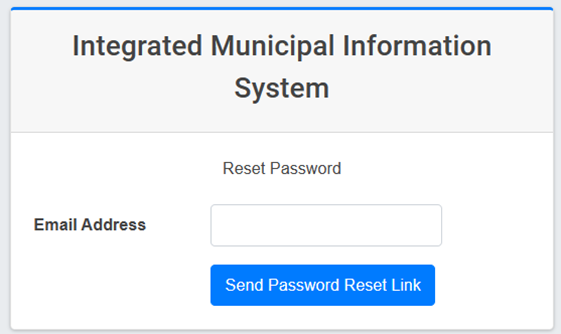
<span style="font-size: 10.0pt; mso-bidi-font-size: 12.0pt; line-height: 150%; font-family: Symbol; mso-fareast-font-family: Symbol; mso-bidi-font-family: Symbol;"><span style="mso-list: Ignore;">·<span style="font: 7.0pt 'Times New Roman';"> </span></span></span>The user can reset their password by Clicking on the ***Forgot Your Password?*** hyperlink.

<span style="font-size: 10.0pt; mso-bidi-font-size: 12.0pt; line-height: 150%; font-family: Symbol; mso-fareast-font-family: Symbol; mso-bidi-font-family: Symbol;"><span style="mso-list: Ignore;">·<span style="font: 7.0pt 'Times New Roman';"> </span></span></span>The Reset Password Page is displayed where the user is prompted to fill in the user’s correct email ID and select the **Send Password Reset Link.**

<span style="font-size: 10.0pt; mso-bidi-font-size: 12.0pt; line-height: 150%; font-family: Symbol; mso-fareast-font-family: Symbol; mso-bidi-font-family: Symbol;"><span style="mso-list: Ignore;">·<span style="font: 7.0pt 'Times New Roman';"> </span></span></span>A link to reset the user’s password is sent to the corresponding email ID.

<span style="font-size: 10.0pt; mso-bidi-font-size: 12.0pt; line-height: 150%; font-family: Symbol; mso-fareast-font-family: Symbol; mso-bidi-font-family: Symbol;"><span style="mso-list: Ignore;">·<span style="font: 7.0pt 'Times New Roman';"> </span></span></span>The user needs to follow that link and reset their password.
![](http://152.42.244.158/knowledge-product/uploads/images/gallery/2025-02/embedded-image-h4rbqolp.png)

<span style="font-size: 11.0pt; line-height: 107%; font-family: 'Calibri',sans-serif; mso-ascii-theme-font: minor-latin; mso-fareast-font-family: Calibri; mso-fareast-theme-font: minor-latin; mso-hansi-theme-font: minor-latin; mso-bidi-font-family: Mangal; mso-bidi-theme-font: minor-bidi; mso-ansi-language: EN-US; mso-fareast-language: EN-US; mso-bidi-language: AR-SA;">Figure 2- </span><span style="font-size: 11.0pt; line-height: 107%; font-family: 'Calibri',sans-serif; mso-ascii-theme-font: minor-latin; mso-fareast-font-family: Calibri; mso-fareast-theme-font: minor-latin; mso-hansi-theme-font: minor-latin; mso-bidi-font-family: Mangal; mso-bidi-theme-font: minor-bidi; mso-ansi-language: EN-US; mso-fareast-language: EN-US; mso-bidi-language: AR-SA;"><span style="mso-no-proof: yes;">3</span></span><span style="font-size: 11.0pt; line-height: 107%; font-family: 'Calibri',sans-serif; mso-ascii-theme-font: minor-latin; mso-fareast-font-family: Calibri; mso-fareast-theme-font: minor-latin; mso-hansi-theme-font: minor-latin; mso-bidi-font-family: Mangal; mso-bidi-theme-font: minor-bidi; mso-ansi-language: EN-US; mso-fareast-language: EN-US; mso-bidi-language: AR-SA;"> Reset Password Prompt</span>

<span style="mso-bookmark: _Ref174109818;"><span style="mso-fareast-language: JA; mso-bidi-language: NE;">2.4 Remember Password</span></span>

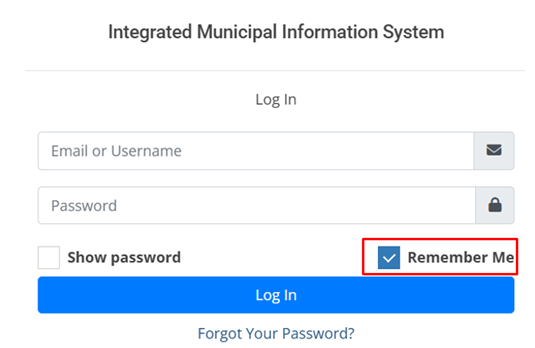
<span style="font-family: Symbol; mso-fareast-font-family: Symbol; mso-bidi-font-family: Symbol; mso-fareast-language: JA;"><span style="mso-list: Ignore;">·<span style="font: 7.0pt 'Times New Roman';"> </span></span></span><span style="mso-fareast-language: JA;">Instead of entering the password repeatedly, the user can save it for convenience.</span>

<span style="font-family: Symbol; mso-fareast-font-family: Symbol; mso-bidi-font-family: Symbol; mso-fareast-language: JA;"><span style="mso-list: Ignore;">·<span style="font: 7.0pt 'Times New Roman';"> </span></span></span><span style="mso-fareast-language: JA;">The user can check the “***Remember Me*** “checkbox which is available on the SIGN IN form.</span>

<span style="mso-fareast-language: JA;">![](http://152.42.244.158/knowledge-product/uploads/images/gallery/2025-02/embedded-image-yjmbkni3.png)</span>

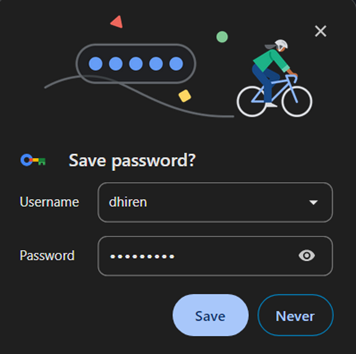
<span style="font-family: Symbol; mso-fareast-font-family: Symbol; mso-bidi-font-family: Symbol; mso-fareast-language: JA;"><span style="mso-list: Ignore;">·<span style="font: 7.0pt 'Times New Roman';"> </span></span></span><span style="mso-fareast-language: JA;">The password will be saved in the user’s browser.</span>

<span style="font-family: Symbol; mso-fareast-font-family: Symbol; mso-bidi-font-family: Symbol; mso-fareast-language: JA;"><span style="mso-list: Ignore;">·<span style="font: 7.0pt 'Times New Roman';"> </span></span></span><span style="mso-fareast-language: JA;">The save password prompt is displayed after the user checks the “***Remember Me***” checkbox and signs in. </span>
<span style="mso-fareast-language: JA;">![](http://152.42.244.158/knowledge-product/uploads/images/gallery/2025-02/embedded-image-usdvf9kp.png)</span>