# Sewer Connection Information Support System (SCIMS)

The SCIMS is a core module that enables the city to maintain information on new sewer connections established between a building and sewer network within the city. This module provides a native mobile application (android) that allows the collection of the unique ID of both the building and the corresponding sewer network through a field survey. The collected building ID as well as sewer ID are maintained by this module, and once approved it is reflected in the BIMS, which updates the sanitation system and utility information of the building.

11.1 Sewer Connection IMS

11.1.1 Navigation to Sewer Connection IMS

<span style="font-family: Symbol; mso-fareast-font-family: Symbol; mso-bidi-font-family: Symbol;"><span style="mso-list: Ignore;">·<span style="font: 7.0pt 'Times New Roman';"> </span></span></span>Open the sidebar and select **‘*Sewer Connection IMS’.***

**![](http://152.42.244.158/knowledge-product/uploads/images/gallery/2025-02/embedded-image-ggzom0l6.png)**
**<span style="color: windowtext;">Overview:</span>**

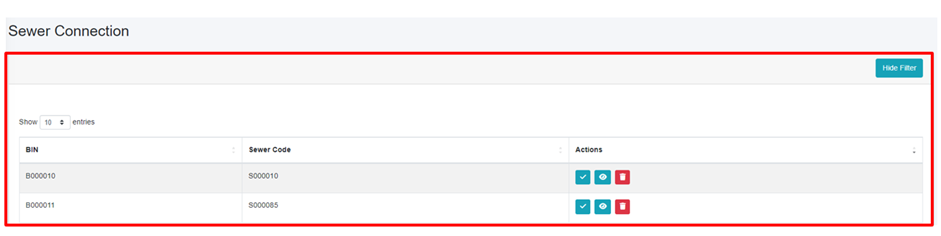
<span style="font-family: Symbol; mso-fareast-font-family: Symbol; mso-bidi-font-family: Symbol;"><span style="mso-list: Ignore;">·<span style="font: 7.0pt 'Times New Roman';"> </span></span></span>The user can see the list of sewer connection data which is collected through mobile application.

<span style="font-family: Symbol; mso-fareast-font-family: Symbol; mso-bidi-font-family: Symbol;"><span style="mso-list: Ignore;">·<span style="font: 7.0pt 'Times New Roman';"> </span></span></span>User can approve sewer connection by clicking on the ***Approve*** button in the action column (refer to section 11.1.2 Approve Sewer Connection).

<span style="font-family: Symbol; mso-fareast-font-family: Symbol; mso-bidi-font-family: Symbol;"><span style="mso-list: Ignore;">·<span style="font: 7.0pt 'Times New Roman';"> </span></span></span>Preview the location of the building (refer to section 11.1.3 Preview Sewer Connected to Building Location).

<span style="font-family: Symbol; mso-fareast-font-family: Symbol; mso-bidi-font-family: Symbol;"><span style="mso-list: Ignore;">·<span style="font: 7.0pt 'Times New Roman';"> </span></span></span>Delete the record if necessary (refer to section 6.3 Delete Record).

<span style="font-family: Symbol; mso-fareast-font-family: Symbol; mso-bidi-font-family: Symbol;"><span style="mso-list: Ignore;">·<span style="font: 7.0pt 'Times New Roman';"> </span></span></span>Filter the data (refer to section 5 Filters).
![](http://152.42.244.158/knowledge-product/uploads/images/gallery/2025-02/embedded-image-hk4n4dcw.png)

Figure 11-1 Sewer Connection Lists

The Building Code (BIN) and Sewer Code are collected via mobile application; after submitting the sewer data from the mobile app, the data is then sent to the web which is displayed in the Sewer Connection module. For detailed instructions on the sewer connection information collection process, refer to the [**Sewer Connection Information Collection Mobile App User Manual.**](http://152.42.244.158/knowledge-product/books/sewer-connection-information-collection-mobile-app-user-manual "Sewer Connection Information Collection Mobile App User Manual")

11.1.2 Approve Sewer Connection

<span style="font-family: Symbol; mso-fareast-font-family: Symbol; mso-bidi-font-family: Symbol; color: black;"><span style="mso-list: Ignore;">·<span style="font: 7.0pt 'Times New Roman';"> </span></span></span>Click on the ***Approve*** button in the Action Column.
![](http://152.42.244.158/knowledge-product/uploads/images/gallery/2025-02/embedded-image-chho1pwr.png)

<span style="mso-fareast-font-family: 'Times New Roman'; mso-bidi-font-family: 'Times New Roman'; mso-bidi-language: NE; mso-no-proof: yes;"> </span>

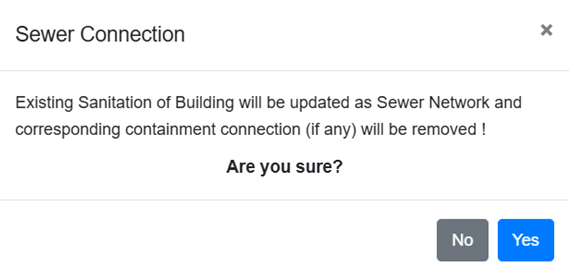
<span style="font-family: Symbol; mso-fareast-font-family: Symbol; mso-bidi-font-family: Symbol;"><span style="mso-list: Ignore;">·<span style="font: 7.0pt 'Times New Roman';"> </span></span></span>Upon clicking the ***“Yes”*** button in the confirmation dialog box, the existing sanitation system status of the building will be updated to a sewer network and any associated containment connections will be removed. If there is a corresponding containment connection, it will be removed. Selecting ***“No”*** will keep the existing record unchanged.<span style="font-family: 'Calibri',sans-serif; mso-bidi-font-family: Mangal; mso-bidi-theme-font: minor-bidi;"> </span>

<span style="font-family: 'Calibri',sans-serif; mso-bidi-font-family: Mangal; mso-bidi-theme-font: minor-bidi;">![](http://152.42.244.158/knowledge-product/uploads/images/gallery/2025-02/embedded-image-xmlwmadj.png)</span>

Figure 11-<span style="mso-spacerun: yes;"> </span><span style="mso-no-proof: yes;">2</span> Confirmation box for approving the sewer connection request

11.1.3 Preview Sewer Connected to Building Location

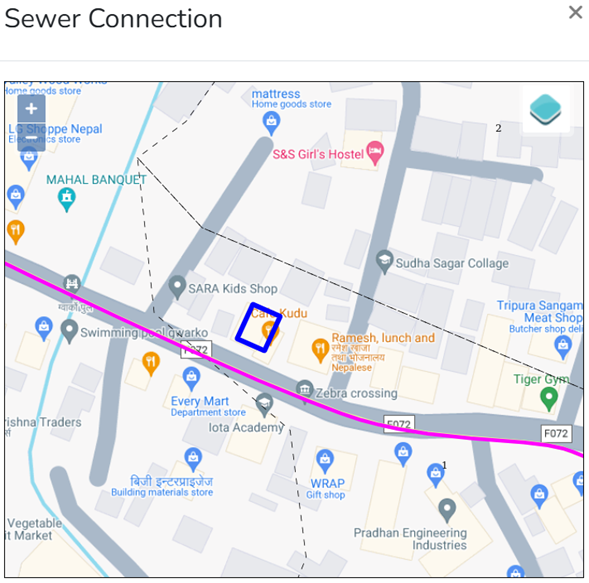
<span style="font-family: Symbol; mso-fareast-font-family: Symbol; mso-bidi-font-family: Symbol; color: black;"><span style="mso-list: Ignore;">·<span style="font: 7.0pt 'Times New Roman';"> </span></span></span>To view the location of the building connected to the sewer click the ***Eye*** button.
![](http://152.42.244.158/knowledge-product/uploads/images/gallery/2025-02/embedded-image-opst7pkw.png)

**Overview:**

**![](http://152.42.244.158/knowledge-product/uploads/images/gallery/2025-02/embedded-image-zkrosulf.png)**

Figure 11-<span style="mso-spacerun: yes;"> </span><span style="mso-no-proof: yes;">3</span> Preview building location (KML viewer)