# Water Supply Information Support System (WSISS)

The WSISS is another value-added module within the IMIS, designed to enhance the management of water supply services and fee collection. The WSISS includes a data importing tool that allows municipalities to upload water supply customer data, including their last fee payment date, in CSV format. Based on this imported data, the WSISS module generates and maintains records of water supply customers along with their fee payment status. It also provides tools to export building data with their water supply service and fee payment statuses and highlights discrepancies by identifying records present in the municipality’s water supply customer database but missing in IMIS.

Using the imported data, the UMDSS in IMIS enables municipal authorities to visualize the water supply fee payment status of buildings in maps of the City within IMIS. This capability allows municipalities to monitor fee collection statuses and assess geographic trends in water supply fee payments. By integrating water supply customer data with building information in IMIS, the WSISS module equips municipal authorities with actionable insights to make informed decisions regarding water supply services.

The visualized data provided by WSISS supports the development of policies aimed at improving water supply fee collection processes, optimizing resource allocation, and enhancing overall service delivery. This integration helps municipalities target areas requiring attention, ensuring more effective and equitable water supply service management.

Currently, as with the PTCISS and SWISS modules, the integration of data into WSISS must be carried out manually on a periodic basis to maintain accuracy.

17.1 Water Supply ISS

The **Water Supply Information Support System** sub-module maintains information on Water Supply Bill Payment data.

17.1.1 Navigation to Water Supply ISS

<span style="font-family: Symbol; mso-fareast-font-family: Symbol; mso-bidi-font-family: Symbol; color: black;"><span style="mso-list: Ignore;">·<span style="font: 7.0pt 'Times New Roman';"> </span></span></span>Open the sidebar and select the ***Water Supply ISS.***

**![](http://152.42.244.158/knowledge-product/uploads/images/gallery/2025-02/embedded-image-z0c55x90.png)**

**Overview:**

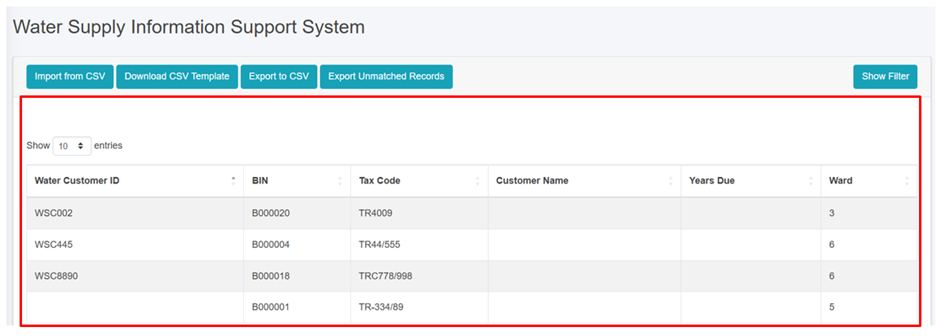
<span style="font-family: Symbol; mso-fareast-font-family: Symbol; mso-bidi-font-family: Symbol;"><span style="mso-list: Ignore;">·<span style="font: 7.0pt 'Times New Roman';"> </span></span></span>The user can view the lists of water supply payment data.

<span style="font-family: Symbol; mso-fareast-font-family: Symbol; mso-bidi-font-family: Symbol;"><span style="mso-list: Ignore;">·<span style="font: 7.0pt 'Times New Roman';"> </span></span></span>User can import the data via CSV of water supply payment data by clicking on the ‘***Import from CSV (***<span style="mso-bidi-font-weight: bold; mso-bidi-font-style: italic;">refer to</span> <span style="mso-bidi-font-weight: bold; mso-bidi-font-style: italic;">section 17.1.2 Import Water Supply ISS)</span>

<span style="font-family: Symbol; mso-fareast-font-family: Symbol; mso-bidi-font-family: Symbol;"><span style="mso-list: Ignore;">·<span style="font: 7.0pt 'Times New Roman';"> </span></span></span><span style="mso-bidi-font-weight: bold; mso-bidi-font-style: italic;">The user can download the CSV Template to import the water supply payment data (refer to section</span> 17.1.3 Download CSV Template<span style="mso-bidi-font-weight: bold; mso-bidi-font-style: italic;">).</span>

<span style="font-family: Symbol; mso-fareast-font-family: Symbol; mso-bidi-font-family: Symbol;"><span style="mso-list: Ignore;">·<span style="font: 7.0pt 'Times New Roman';"> </span></span></span>Export the data (refer to chapter 8 Tools) and filter data (refer to chapter<span class="normaltextrun"><span style="color: black;"> 5 Filters</span></span>).

![](http://152.42.244.158/knowledge-product/uploads/images/gallery/2025-02/embedded-image-4rgpgwhg.png)

<span style="font-size: 11.0pt; line-height: 107%; font-family: 'Calibri',sans-serif; mso-ascii-theme-font: minor-latin; mso-fareast-font-family: Calibri; mso-fareast-theme-font: minor-latin; mso-hansi-theme-font: minor-latin; mso-bidi-font-family: Mangal; mso-bidi-theme-font: minor-bidi; mso-ansi-language: EN-US; mso-fareast-language: EN-US; mso-bidi-language: AR-SA;">Figure 17- </span><span style="font-size: 11.0pt; line-height: 107%; font-family: 'Calibri',sans-serif; mso-ascii-theme-font: minor-latin; mso-fareast-font-family: Calibri; mso-fareast-theme-font: minor-latin; mso-hansi-theme-font: minor-latin; mso-bidi-font-family: Mangal; mso-bidi-theme-font: minor-bidi; mso-ansi-language: EN-US; mso-fareast-language: EN-US; mso-bidi-language: AR-SA;"><span style="mso-no-proof: yes;">1</span></span><span style="font-size: 11.0pt; line-height: 107%; font-family: 'Calibri',sans-serif; mso-ascii-theme-font: minor-latin; mso-fareast-font-family: Calibri; mso-fareast-theme-font: minor-latin; mso-hansi-theme-font: minor-latin; mso-bidi-font-family: Mangal; mso-bidi-theme-font: minor-bidi; mso-ansi-language: EN-US; mso-fareast-language: EN-US; mso-bidi-language: AR-SA;"> List of Water Supply ISS</span>

17.1.2 Import Water Supply ISS

The Water Supply Information Support System List displays key attributes of the imported Water Supply Information Support System data. The Filter tools enable the user to filter out data as required. The Tools provide the user with the ability to import data from csv records and export them in CSV.

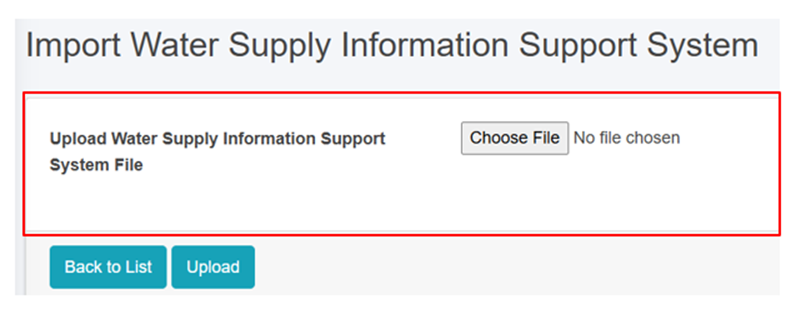
<span style="font-family: Symbol; mso-fareast-font-family: Symbol; mso-bidi-font-family: Symbol; color: black;"><span style="mso-list: Ignore;">·<span style="font: 7.0pt 'Times New Roman';"> </span></span></span>Click on ‘***Import from CSV’*** at the Top Left of the Water Supply Information Support System page.

![](http://152.42.244.158/knowledge-product/uploads/images/gallery/2025-02/embedded-image-aa6zhnzk.png)

**Overview:**

<span style="font-family: Symbol; mso-fareast-font-family: Symbol; mso-bidi-font-family: Symbol;"><span style="mso-list: Ignore;">·<span style="font: 7.0pt 'Times New Roman';"> </span></span></span>The user<span style="letter-spacing: -.4pt;"> </span>can<span style="letter-spacing: -.6pt;"> </span>upload<span style="letter-spacing: -.05pt;"> </span>the water<span style="letter-spacing: .1pt;"> </span>supply<span style="letter-spacing: -.6pt;"> payment </span>data<span style="letter-spacing: -.45pt;"> including the last payment date </span>in<span style="letter-spacing: -.15pt;"> </span>csv<span style="letter-spacing: -.2pt;"> </span>format<span style="letter-spacing: .15pt;"> </span>to<span style="letter-spacing: -.5pt;"> </span>this<span style="letter-spacing: .05pt;"> </span>module.

![](http://152.42.244.158/knowledge-product/uploads/images/gallery/2025-02/embedded-image-lonwe37b.png)

Figure 17- <span style="mso-no-proof: yes;">2</span> <span style="font-family: 'Palatino Linotype',serif; mso-hansi-font-family: 'Book Antiqua'; color: #00579a;">Import<span style="letter-spacing: -.4pt;"> </span>Water<span style="letter-spacing: -.35pt;"> </span>Supply<span style="letter-spacing: .1pt;"> </span>ISS CSV<span style="letter-spacing: .3pt;"> </span>File</span>

<span style="font-family: Symbol; mso-fareast-font-family: Symbol; mso-bidi-font-family: Symbol;"><span style="mso-list: Ignore;">·<span style="font: 7.0pt 'Times New Roman';"> </span></span></span>Once the user selects the CSV file to be imported, they must click the ***Upload*** button to import the data. The user will then be notified with a pop-up message indicating Successful import, refer to section 7.3 Successfully Imported for more details.

<span style="font-family: Symbol; mso-fareast-font-family: Symbol; mso-bidi-font-family: Symbol;"><span style="mso-list: Ignore;">·<span style="font: 7.0pt 'Times New Roman';"> </span></span></span>The system currently does not allow user to import data from any other format than csv and must the system specified data structure. In case of attempt to import data from other format system will prompt red error message of mismatched format, refer to section 7.4 Import Format Error for more details.

**<span style="font-size: 12.0pt; font-family: 'Times New Roman',serif; mso-fareast-font-family: 'Times New Roman';">Note:</span>**

- <span style="font-size: 11.0pt; line-height: 107%; font-family: 'Calibri',sans-serif; mso-ascii-theme-font: minor-latin; mso-fareast-font-family: Calibri; mso-fareast-theme-font: minor-latin; mso-hansi-theme-font: minor-latin; mso-bidi-font-family: Mangal; mso-bidi-theme-font: minor-bidi; mso-ansi-language: EN-US; mso-fareast-language: JA; mso-bidi-language: AR-SA;">The format for the **Last Payment Date** must be of mm/dd/yyyy (eg: 8/21/2022 which implies August 21<sup>st</sup> 2022).</span>

<span style="font-size: 11.0pt; line-height: 107%; font-family: 'Calibri',sans-serif; mso-ascii-theme-font: minor-latin; mso-fareast-font-family: Calibri; mso-fareast-theme-font: minor-latin; mso-hansi-theme-font: minor-latin; mso-bidi-font-family: Mangal; mso-bidi-theme-font: minor-bidi; mso-ansi-language: EN-US; mso-fareast-language: JA; mso-bidi-language: AR-SA;">17.1.3 Download CSV Template</span>

<span style="font-family: Symbol; mso-fareast-font-family: Symbol; mso-bidi-font-family: Symbol; mso-fareast-language: JA;"><span style="mso-list: Ignore;">·<span style="font: 7.0pt 'Times New Roman';"> </span></span></span><span style="mso-fareast-language: JA;">Click on the ***‘Download CSV Template’*** button at the top left of the Water Supply Information Support System page.</span>

<span style="mso-fareast-language: JA;">![](http://152.42.244.158/knowledge-product/uploads/images/gallery/2025-02/embedded-image-acwd9hrm.png)</span>

**<span style="mso-fareast-language: JA;">Overview:</span>**

<span style="font-family: Symbol; mso-fareast-font-family: Symbol; mso-bidi-font-family: Symbol; mso-fareast-language: JA;"><span style="mso-list: Ignore;">·<span style="font: 7.0pt 'Times New Roman';"> </span></span></span><span style="mso-fareast-language: JA;">A csv template file containing the sample data and required headers will be downloaded, which are essential for importing the csv file.</span>

<span style="font-family: Symbol; mso-fareast-font-family: Symbol; mso-bidi-font-family: Symbol; mso-fareast-language: JA;"><span style="mso-list: Ignore;">·<span style="font: 7.0pt 'Times New Roman';"> </span></span></span><span style="mso-fareast-language: JA;">Download CSV Template is available only in the Property Tax Collection ISS and Water Supply ISS Modules, and Solid Waste ISS module.</span>

<span style="mso-fareast-language: JA;">![](http://152.42.244.158/knowledge-product/uploads/images/gallery/2025-02/embedded-image-pz2cvxqg.png)</span>

Figure 17- <span style="mso-no-proof: yes;">3</span> Downloaded Water Supply ISS CSV Template