# Installation Procedure

- Download the APK file in your device and go to **‘Downloads’** folder using the **‘File Manager’**.

[![](http://152.42.244.158/knowledge-product/uploads/images/gallery/2024-05/scaled-1680-/image-1716359418148.png)](http://152.42.244.158/knowledge-product/uploads/images/gallery/2024-05/image-1716359418148.png)[![](http://152.42.244.158/knowledge-product/uploads/images/gallery/2024-05/scaled-1680-/image-1716359175023.png600)](http://152.42.244.158/knowledge-product/uploads/images/gallery/2024-05/image-1716359175023.png) ![](http://152.42.244.158/knowledge-product/media/1f3e222c9b3a79e29bc2836e51ec4f4c.jpg)
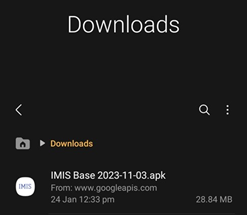
<span class="align-center" style="color: rgb(35, 111, 161);"> ***Figure 1-1 APK file***</span>

- Locate the corresponding **.apk** file and tap on it. The installation process will begin.
- Tap on ‘**INSTALL** button. An “Installing…” progress bar will be displayed.
    
    [![](http://152.42.244.158/knowledge-product/uploads/images/gallery/2024-05/scaled-1680-/image-1716359188853.png)](http://152.42.244.158/knowledge-product/uploads/images/gallery/2024-05/image-1716359188853.png)![](http://152.42.244.158/knowledge-product/media/ee3d7ca1680d583bf1fb3626c4390409.jpg)
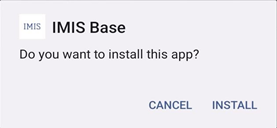
    
    <span style="background-color: rgb(255, 255, 255); color: rgb(35, 111, 161);"> ***Figure 1-2 installation process***</span>
- Tap on ‘**OPEN** button after installation process is completed.
    
    [![](http://152.42.244.158/knowledge-product/uploads/images/gallery/2024-05/scaled-1680-/image-1716359223937.png)](http://152.42.244.158/knowledge-product/uploads/images/gallery/2024-05/image-1716359223937.png)![](http://152.42.244.158/knowledge-product/media/0a5a79fd8897bd18def911e2d1224ad4.jpg)
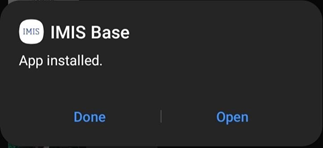
    
    <span style="color: rgb(35, 111, 161);"> ***Figure 1-3***</span>
    
    **Overview:**
- The installed app can also be accessed from App drawer or Launcher.