# Uploading Building Data

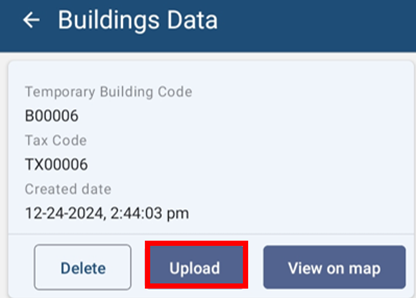
- For uploading building data to IMIS, click ‘UPLOAD’ button.
![](http://152.42.244.158/knowledge-product/uploads/images/gallery/2025-02/embedded-image-mq0vgmwu.png)

![](http://152.42.244.158/knowledge-product/media/0e71512f10992a60a495044ee1712889.jpg)

<span class="align-center" style="color: rgb(53, 152, 219);"> ***Figure 5-5 Building Data Upload***</span>

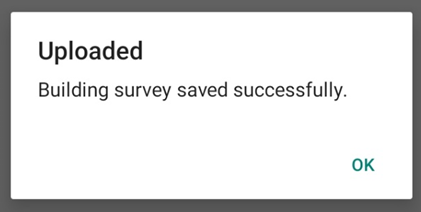
- Once the data has been uploaded to IMIS, a message box will appear. Press **OK** to exit.
    
    ![](http://152.42.244.158/knowledge-product/uploads/images/gallery/2025-02/embedded-image-qk0rbfpe.png)![](http://152.42.244.158/knowledge-product/media/d30f9e3e5e4058521308844c0e1bf8b7.jpg)
    
    <span style="color: rgb(53, 152, 219);"> ***Figure 5-6 Upload Confirmation Box***</span>
    
    ##### **Overview:**
- Once the data has been uploaded, stored data on the local device memory will be removed.

Note:

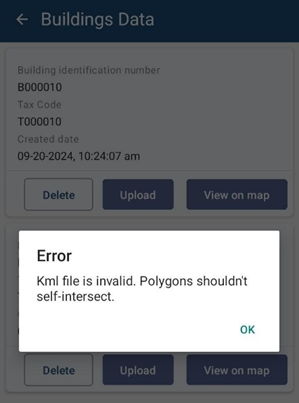
<span style="font-family: Symbol; mso-fareast-font-family: Symbol; mso-bidi-font-family: Symbol; font-weight: normal; mso-bidi-font-weight: bold;"><span style="mso-list: Ignore;">·<span style="font: 7.0pt 'Times New Roman';"> </span></span></span><span style="font-weight: normal; mso-bidi-font-weight: bold;">If the user tends to upload the Building data in which it has the intersected polygon, then the system will notify with a message as:</span>

<span style="font-weight: normal; mso-bidi-font-weight: bold;">![](http://152.42.244.158/knowledge-product/uploads/images/gallery/2025-02/embedded-image-qmqzd1ny.png)</span>

<span style="font-size: 12.0pt; font-family: 'Times New Roman',serif; mso-fareast-font-family: 'Times New Roman'; mso-font-kerning: 0pt; mso-bidi-language: NE; mso-no-proof: yes;"> </span>

<span style="mso-fareast-font-family: 'Times New Roman'; mso-bidi-font-family: 'Times New Roman';"><span class="align-center" style="mso-list: Ignore;">Figure: </span></span>Validation Message of intersected polygon

<span style="font-size: 11.0pt; line-height: 107%; font-family: 'Calibri',sans-serif; mso-ascii-theme-font: minor-latin; mso-fareast-font-family: Calibri; mso-fareast-theme-font: minor-latin; mso-hansi-theme-font: minor-latin; mso-bidi-font-family: Mangal; mso-bidi-theme-font: minor-bidi; mso-ansi-language: EN-US; mso-fareast-language: EN-US; mso-bidi-language: AR-SA; mso-bidi-font-weight: bold;">The user has to delete the intersect polygon data and again collect a new data of the Building polygon by placing each marker on the edge of the building’s plinth and upload the data.</span>