# Collecting Sewer Information


# 4.1 Sewer Map

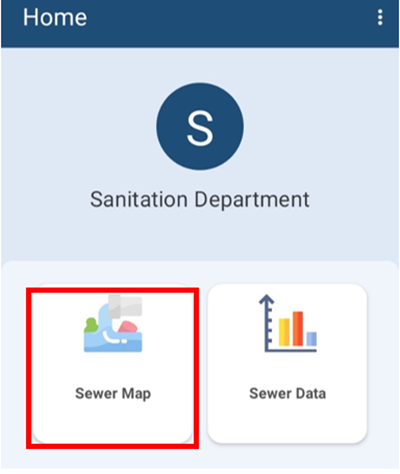
<span style="mso-bookmark: _Toc141355989;"><span style="mso-bookmark: _Toc141193308;">Navigate to Sewer Map.</span></span>

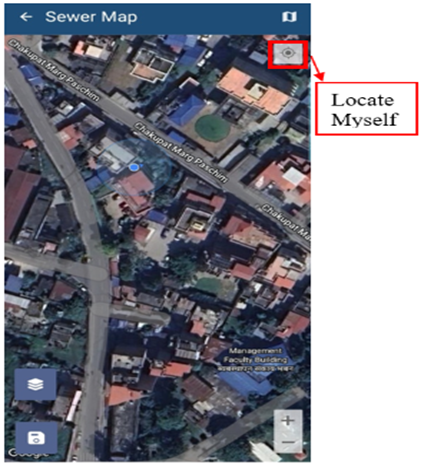
<span style="mso-bookmark: _Toc141355989;"><span style="mso-bookmark: _Toc141193308;"><span style="font-size: 11.0pt; line-height: 107%; font-family: 'Calibri',sans-serif; mso-ascii-theme-font: minor-latin; mso-fareast-font-family: 'Times New Roman'; mso-hansi-theme-font: minor-latin; mso-bidi-font-family: 'Times New Roman'; mso-ansi-language: EN-US; mso-fareast-language: EN-US; mso-bidi-language: AR-SA;">The map interface will be displayed once ‘**Sewer Map’** is selected, where the user can collect sewer information.</span></span></span>

<span style="mso-bookmark: _Toc141355989;"><span style="mso-bookmark: _Toc141193308;"><span style="font-size: 11.0pt; line-height: 107%; font-family: 'Calibri',sans-serif; mso-ascii-theme-font: minor-latin; mso-fareast-font-family: 'Times New Roman'; mso-hansi-theme-font: minor-latin; mso-bidi-font-family: 'Times New Roman'; mso-ansi-language: EN-US; mso-fareast-language: EN-US; mso-bidi-language: AR-SA;">![](http://152.42.244.158/knowledge-product/uploads/images/gallery/2025-02/embedded-image-eow0gjk0.png)</span></span></span>

<span style="mso-bookmark: _Toc141355989;"><span style="mso-bookmark: _Toc141193308;"><span style="font-size: 11.0pt; line-height: 107%; font-family: 'Calibri',sans-serif; mso-ascii-theme-font: minor-latin; mso-fareast-font-family: 'Times New Roman'; mso-hansi-theme-font: minor-latin; mso-bidi-font-family: 'Times New Roman'; mso-ansi-language: EN-US; mso-fareast-language: EN-US; mso-bidi-language: AR-SA;"><span style="font-size: 11.0pt; line-height: 107%; font-family: 'Calibri',sans-serif; mso-ascii-theme-font: minor-latin; mso-fareast-font-family: Calibri; mso-fareast-theme-font: minor-latin; mso-hansi-theme-font: minor-latin; mso-bidi-font-family: Mangal; mso-bidi-theme-font: minor-bidi; mso-ansi-language: EN-US; mso-fareast-language: EN-US; mso-bidi-language: AR-SA;">Figure 4-1 </span></span></span></span><span style="mso-bookmark: _Toc141355989;"><span style="mso-bookmark: _Toc141193308;"><span style="font-size: 11.0pt; line-height: 107%; font-family: 'Calibri',sans-serif; mso-ascii-theme-font: minor-latin; mso-fareast-font-family: 'Times New Roman'; mso-hansi-theme-font: minor-latin; mso-bidi-font-family: 'Times New Roman'; mso-ansi-language: EN-US; mso-fareast-language: EN-US; mso-bidi-language: AR-SA;"><span style="font-size: 11.0pt; line-height: 107%; font-family: 'Calibri',sans-serif; mso-ascii-theme-font: minor-latin; mso-fareast-font-family: Calibri; mso-fareast-theme-font: minor-latin; mso-hansi-theme-font: minor-latin; mso-bidi-font-family: Mangal; mso-bidi-theme-font: minor-bidi; mso-ansi-language: EN-US; mso-fareast-language: EN-US; mso-bidi-language: AR-SA;">Dashboard (Sewer Map)</span></span></span></span>

<span style="mso-bookmark: _Toc141355989;"><span style="mso-bookmark: _Toc141193308;"><span style="font-size: 11.0pt; line-height: 107%; font-family: 'Calibri',sans-serif; mso-ascii-theme-font: minor-latin; mso-fareast-font-family: 'Times New Roman'; mso-hansi-theme-font: minor-latin; mso-bidi-font-family: 'Times New Roman'; mso-ansi-language: EN-US; mso-fareast-language: EN-US; mso-bidi-language: AR-SA;"><span style="font-size: 11.0pt; line-height: 107%; font-family: 'Calibri',sans-serif; mso-ascii-theme-font: minor-latin; mso-fareast-font-family: Calibri; mso-fareast-theme-font: minor-latin; mso-hansi-theme-font: minor-latin; mso-bidi-font-family: Mangal; mso-bidi-theme-font: minor-bidi; mso-ansi-language: EN-US; mso-fareast-language: EN-US; mso-bidi-language: AR-SA;">![](http://152.42.244.158/knowledge-product/uploads/images/gallery/2025-02/embedded-image-7aixamr6.png)</span></span></span></span>

<span style="mso-bookmark: _Toc141355989;"><span style="mso-bookmark: _Toc141193308;"><span style="font-size: 11.0pt; line-height: 107%; font-family: 'Calibri',sans-serif; mso-ascii-theme-font: minor-latin; mso-fareast-font-family: 'Times New Roman'; mso-hansi-theme-font: minor-latin; mso-bidi-font-family: 'Times New Roman'; mso-ansi-language: EN-US; mso-fareast-language: EN-US; mso-bidi-language: AR-SA;"><span style="font-size: 11.0pt; line-height: 107%; font-family: 'Calibri',sans-serif; mso-ascii-theme-font: minor-latin; mso-fareast-font-family: Calibri; mso-fareast-theme-font: minor-latin; mso-hansi-theme-font: minor-latin; mso-bidi-font-family: Mangal; mso-bidi-theme-font: minor-bidi; mso-ansi-language: EN-US; mso-fareast-language: EN-US; mso-bidi-language: AR-SA;">Figure 4-2 Map Interface</span></span></span></span>

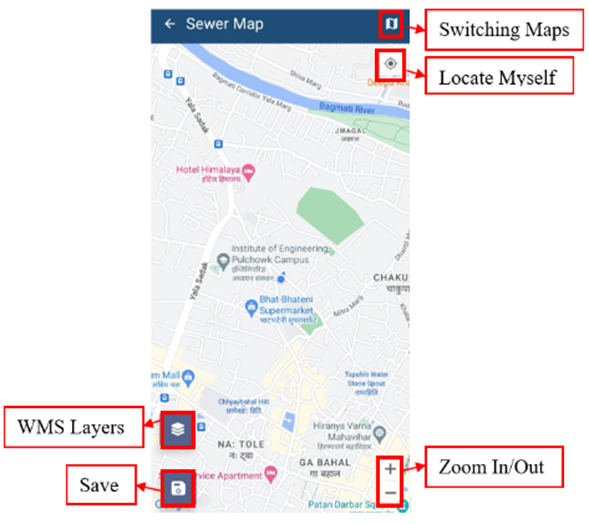
**Tools:**

![](http://152.42.244.158/knowledge-product/uploads/images/gallery/2025-02/embedded-image-1mjvqxta.png)

<span style="mso-fareast-font-family: 'Times New Roman'; mso-bidi-font-family: 'Times New Roman';"><span style="mso-list: Ignore;">Figure 4-3 </span></span>Sewer Map

<span style="font-family: Symbol; mso-fareast-font-family: Symbol; mso-bidi-font-family: Symbol;"><span style="mso-list: Ignore;">·<span style="font: 7.0pt 'Times New Roman';"> </span></span></span>**Clear Map**: Tap to remove the added marker.

<span style="font-family: Symbol; mso-fareast-font-family: Symbol; mso-bidi-font-family: Symbol;"><span style="mso-list: Ignore;">·<span style="font: 7.0pt 'Times New Roman';"> </span></span></span>**Switching Maps**: Tap to toggle among various Google base maps e.g., Street and Satellite.

<span style="font-family: Symbol; mso-fareast-font-family: Symbol; mso-bidi-font-family: Symbol;"><span style="mso-list: Ignore;">·<span style="font: 7.0pt 'Times New Roman';"> </span></span></span>**Locate Myself**: Tap to locate the current position of the user.

<span style="font-family: Symbol; mso-fareast-font-family: Symbol; mso-bidi-font-family: Symbol;"><span style="mso-list: Ignore;">·<span style="font: 7.0pt 'Times New Roman';"> </span></span></span>**Zoom In/Out**: Tap to zoom in and out of the map.

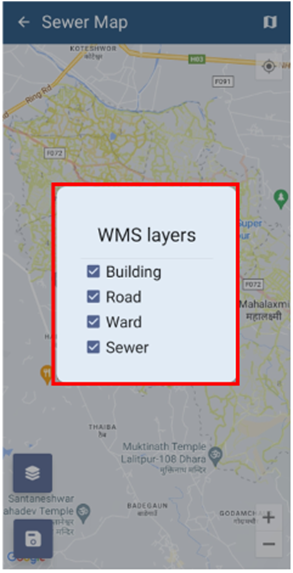
<span style="font-family: Symbol; mso-fareast-font-family: Symbol; mso-bidi-font-family: Symbol;"><span style="mso-list: Ignore;">·<span style="font: 7.0pt 'Times New Roman';"> </span></span></span>**WMS Layers**: Tap to get WMS Layers of the map.<span style="mso-fareast-font-family: 'Times New Roman'; mso-bidi-font-family: 'Times New Roman'; color: black;"> The WMS Layers is a dynamic tool that draws an overlay on the Map. It can display the different layers of data such as Building Data, Road Data, Ward data and Sewer Data. This functionality allows the user to view digitized data stored in the database. When the user taps on the ‘**WMS Layers’**, a pop-up appears prompting them to select the desired layers. Once selected, the corresponding data layers are highlighted on the map.</span>

<span style="mso-fareast-font-family: 'Times New Roman'; mso-bidi-font-family: 'Times New Roman'; color: black;">![](http://152.42.244.158/knowledge-product/uploads/images/gallery/2025-02/embedded-image-f1bpyfli.png)</span>

<span style="mso-fareast-font-family: 'Times New Roman'; mso-bidi-font-family: 'Times New Roman';"><span style="mso-list: Ignore;">Figure 4-4 </span></span>WMS Layer Toggle

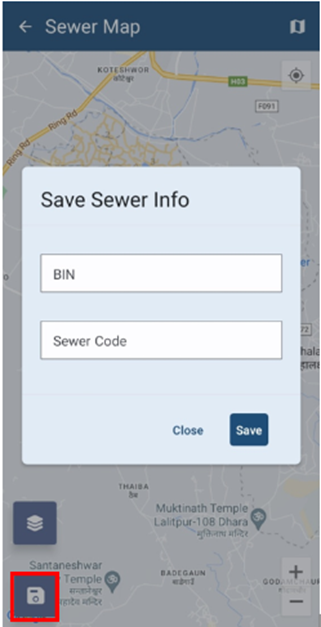
**<span style="font-size: 11.0pt; line-height: 107%; font-family: 'Calibri',sans-serif; mso-ascii-theme-font: minor-latin; mso-fareast-font-family: Calibri; mso-fareast-theme-font: minor-latin; mso-hansi-theme-font: minor-latin; mso-bidi-font-family: Mangal; mso-bidi-theme-font: minor-bidi; mso-ansi-language: EN-US; mso-fareast-language: EN-US; mso-bidi-language: AR-SA;">Save</span>**<span style="font-size: 11.0pt; line-height: 107%; font-family: 'Calibri',sans-serif; mso-ascii-theme-font: minor-latin; mso-fareast-font-family: Calibri; mso-fareast-theme-font: minor-latin; mso-hansi-theme-font: minor-latin; mso-bidi-font-family: Mangal; mso-bidi-theme-font: minor-bidi; mso-ansi-language: EN-US; mso-fareast-language: EN-US; mso-bidi-language: AR-SA;">: Tap the ‘**save’** icon to store the added information.</span>

# 4.2	Sewer Data Collection

<span class="align-left" style="background: white; mso-highlight: white;">Once the map is visible, click the "***Locate Myself***" button to find your exact location. If your location point (blue marker) is not accurate on the map, make sure it is correctly placed by referencing nearby roads and buildings displayed by Google Maps and the WMS layer. If your location is accurately displayed on the map, you can inspect the area around the building’s perimeter, follow the blue marker indicating your current location, look for any pipes or markers that indicate underground utilities, and enter the data of the building's sewer connection accordingly.</span>

<span style="color: black;">The user can also turn the WMS layer on to view the pre-existing buildings.</span>

<span style="font-size: 11.0pt; line-height: 107%; font-family: 'Calibri',sans-serif; mso-ascii-theme-font: minor-latin; mso-fareast-font-family: Calibri; mso-fareast-theme-font: minor-latin; mso-hansi-theme-font: minor-latin; mso-bidi-font-family: Mangal; mso-bidi-theme-font: minor-bidi; background: white; mso-highlight: white; mso-ansi-language: EN-US; mso-fareast-language: EN-US; mso-bidi-language: AR-SA;">When the user taps the save icon, a dialogue box will appear, and the user will need to select the Building Identification Number (BIN) and Sewer Code of the building from the displayed dropdown options, and then tap **'Save'**</span><span style="font-size: 11.0pt; line-height: 107%; font-family: 'Calibri',sans-serif; mso-ascii-theme-font: minor-latin; mso-fareast-font-family: Calibri; mso-fareast-theme-font: minor-latin; mso-hansi-theme-font: minor-latin; mso-bidi-font-family: Mangal; mso-bidi-theme-font: minor-bidi; mso-ansi-language: EN-US; mso-fareast-language: EN-US; mso-bidi-language: AR-SA;">.</span>

<span style="font-size: 11.0pt; line-height: 107%; font-family: 'Calibri',sans-serif; mso-ascii-theme-font: minor-latin; mso-fareast-font-family: Calibri; mso-fareast-theme-font: minor-latin; mso-hansi-theme-font: minor-latin; mso-bidi-font-family: Mangal; mso-bidi-theme-font: minor-bidi; mso-ansi-language: EN-US; mso-fareast-language: EN-US; mso-bidi-language: AR-SA;">![](http://152.42.244.158/knowledge-product/uploads/images/gallery/2025-02/embedded-image-ukauciei.png)</span>

<span class="align-left" style="font-size: 11.0pt; line-height: 107%; font-family: 'Calibri',sans-serif; mso-ascii-theme-font: minor-latin; mso-fareast-font-family: Calibri; mso-fareast-theme-font: minor-latin; mso-hansi-theme-font: minor-latin; mso-bidi-font-family: Mangal; mso-bidi-theme-font: minor-bidi; mso-ansi-language: EN-US; mso-fareast-language: EN-US; mso-bidi-language: AR-SA;">Figure 4-5 Save Button on Map</span>