# Dashboard

<span style="mso-bookmark: _Toc141355986;"><span style="mso-bookmark: _Toc141193305;"><span style="mso-fareast-font-family: 'Times New Roman'; mso-bidi-font-family: 'Times New Roman';"><span style="mso-list: Ignore;">3.1 </span></span>Navigate to Dashboard</span></span>

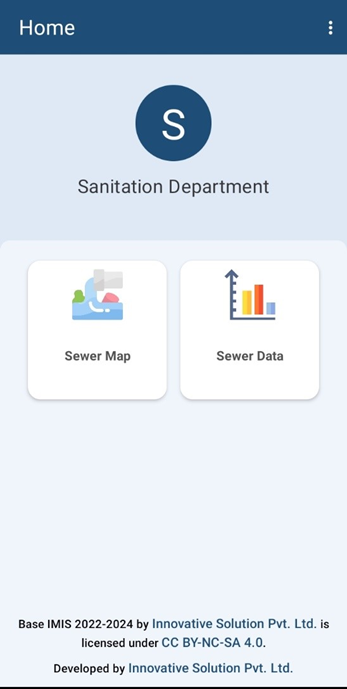
<span style="font-family: Symbol; mso-fareast-font-family: Symbol; mso-bidi-font-family: Symbol;"><span style="mso-list: Ignore;">·<span style="font: 7.0pt 'Times New Roman';"> <span style="color: rgb(0, 0, 0);"> </span></span></span></span><span style="color: rgb(0, 0, 0);">After successful login, a dashboard page is displayed.</span>

- <span style="font-size: 12pt; line-height: 107%; font-family: 'Times New Roman', serif; color: rgb(0, 0, 0);">To collect sewer connection information, a user should select the **'*Sewer Map'***.</span>
- <span style="font-size: 12pt; line-height: 107%; font-family: 'Times New Roman', serif; color: rgb(0, 0, 0);">To review, and upload the collected sewer connection information the user should select **'*Sewer Data'***. </span>
- <span style="font-size: 12pt; line-height: 107%; font-family: 'Times New Roman', serif; color: rgb(0, 0, 0);">Click on the three dots at the top right corner to ***log out***. </span>
<span style="font-size: 12pt; line-height: 107%; font-family: 'Times New Roman', serif; color: rgb(0, 0, 0);">![](http://152.42.244.158/knowledge-product/uploads/images/gallery/2025-02/embedded-image-jyqrgoxt.png)</span>

<span style="font-size: 12pt; line-height: 107%; font-family: 'Times New Roman', serif; color: rgb(0, 0, 0);"><span style="mso-fareast-font-family: 'Times New Roman'; mso-bidi-font-family: 'Times New Roman';"><span style="mso-list: Ignore;">Figure 1-1 </span></span>Dashboard.</span>

Overview:

<span style="font-family: Symbol; mso-fareast-font-family: Symbol; mso-bidi-font-family: Symbol;"><span style="mso-list: Ignore;">·<span style="font: 7.0pt 'Times New Roman';"> </span></span></span>The app provides offline data collection features, as well, where the collected data is stored locally on the user’s device which can be uploaded to the server once online. However, to load the map and other layer features, internet connection is required. Thus, it is recommended to pre-load all map features for the area if internet connection is not available in the field.

<span style="font-family: Symbol; mso-fareast-font-family: Symbol; mso-bidi-font-family: Symbol;"><span style="mso-list: Ignore;">·<span style="font: 7.0pt 'Times New Roman';"> </span></span></span>Once the data is uploaded successfully, it won’t be visible on the user's device.