# Introduction

<span style="mso-bookmark: _Toc141355979;"><span style="mso-bookmark: _Toc141193298;"><span style="mso-fareast-font-family: 'Times New Roman'; mso-bidi-font-family: 'Times New Roman';"><span style="mso-list: Ignore;">1.1 </span></span>Purpose</span></span>

<span style="background: white; mso-highlight: white;">The document's purpose is to guide municipal staff members on the functionalities of the Sewer Information Collection Mobile App of Base IMIS, </span>allows the collection of the unique ID of both the building and the corresponding sewer network through a field survey<span style="background: white; mso-highlight: white;">.</span> The collected building ID as well as sewer ID are maintained by the Sewer Connection Information Support System, and once approved it is reflected in the Building Information Management System, which updates the sanitation system and utility information of the building.<span style="font-size: 10.5pt; line-height: 150%; font-family: 'Quattrocento Sans',sans-serif; mso-fareast-font-family: 'Quattrocento Sans'; mso-bidi-font-family: 'Quattrocento Sans'; color: #444444; background: white; mso-highlight: white;"> </span><span style="background: white; mso-highlight: white;">It details the step-by-step procedure of all the functionalities within the app. </span>The app is a mobile tool designed to help the Municipality digitize, maintain, and update the sewer database. The collected sewer data from this app undergoes a verification process through the Web application of Base IMIS. This process includes adding necessary attribute data to create and maintain a comprehensive dataset of sewers connected to buildings.

<span style="mso-fareast-font-family: 'Times New Roman'; mso-bidi-font-family: 'Times New Roman';"><span style="mso-list: Ignore;">1.2 </span></span>Targeted Audience

Targeted users of this manual are the Infrastructure Department of the Municipality. This manual guide to perform details related to the actual sewer connection network.

<span style="mso-bookmark: _Toc141355981;"><span style="mso-fareast-font-family: 'Times New Roman'; mso-bidi-font-family: 'Times New Roman';"><span style="mso-list: Ignore;">1.3 </span></span>App Installation</span>

An APK file will be made available in a common access location or shared via a link that can be downloaded and installed on your device.

<span style="mso-bookmark: _Toc141355982;"><span style="mso-fareast-font-family: 'Times New Roman'; mso-bidi-font-family: 'Times New Roman'; mso-fareast-language: JA;"><span style="mso-list: Ignore;">1.4 </span></span><span style="mso-fareast-language: JA;">Installation Procedure</span></span>

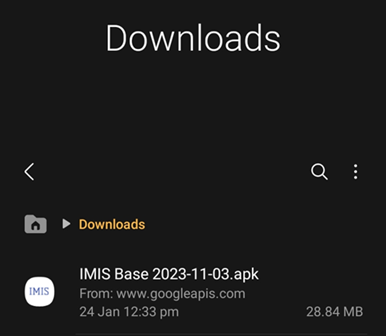
<span style="mso-bookmark: _Toc141355982;"><span style="mso-fareast-language: JA;"><span style="font-family: Symbol; mso-fareast-font-family: Symbol; mso-bidi-font-family: Symbol;"><span style="mso-list: Ignore;">·<span style="font: 7.0pt 'Times New Roman';"> </span></span></span>Download the APK file on your device and go to the **‘Downloads’** folder using the **‘File Manager’**.</span></span>

<span style="mso-bookmark: _Toc141355982;"><span style="mso-fareast-language: JA;">![](http://152.42.244.158/knowledge-product/uploads/images/gallery/2025-02/embedded-image-aigaelvh.png)</span></span>

<span style="mso-bookmark: _Toc141355982;"><span style="mso-fareast-language: JA;"><span style="mso-fareast-font-family: 'Times New Roman'; mso-bidi-font-family: 'Times New Roman';"><span style="mso-list: Ignore;">Figure 1-1 </span></span><span style="mso-spacerun: yes;"> </span>APK file</span></span>

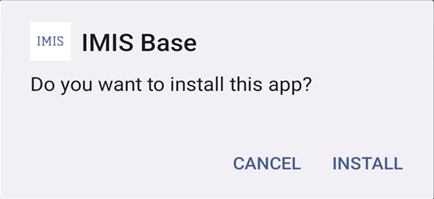
<span style="font-family: Symbol; mso-fareast-font-family: Symbol; mso-bidi-font-family: Symbol;"><span style="mso-list: Ignore;">·<span style="font: 7.0pt 'Times New Roman';"> </span></span></span>Locate the corresponding **.apk** file and tap on it. The installation process will begin.

<span style="font-family: Symbol; mso-fareast-font-family: Symbol; mso-bidi-font-family: Symbol;"><span style="mso-list: Ignore;">·<span style="font: 7.0pt 'Times New Roman';"> </span></span></span>Tap on ‘INSTALL’. An “Installing…” progress bar will be displayed.
<span style="mso-bookmark: _Toc141355982;"><span style="mso-fareast-language: JA;">![](http://152.42.244.158/knowledge-product/uploads/images/gallery/2025-02/embedded-image-99nsuxoj.png)</span></span>

<span style="mso-bookmark: _Toc141355982;"><span style="mso-fareast-language: JA;"><span style="mso-fareast-font-family: 'Times New Roman'; mso-bidi-font-family: 'Times New Roman';"><span style="mso-list: Ignore;">Figure 1-2 </span></span>Installation process</span></span>

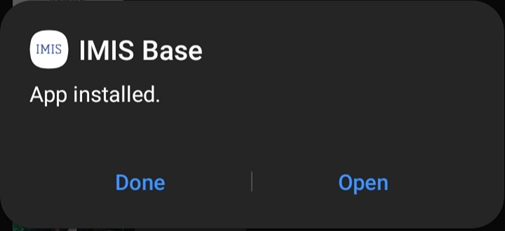
<span style="mso-bookmark: _Toc141355982;"><span style="mso-fareast-language: JA;"><span style="font-family: Symbol; mso-fareast-font-family: Symbol; mso-bidi-font-family: Symbol;"><span style="mso-list: Ignore;">·<span style="font: 7.0pt 'Times New Roman';"> </span></span></span>Tap on the ‘Open’ after the installation process is completed.</span></span>

<span style="mso-bookmark: _Toc141355982;"><span style="mso-fareast-language: JA;">![](http://152.42.244.158/knowledge-product/uploads/images/gallery/2025-02/embedded-image-orlcujcw.png)</span></span>

<span style="mso-bookmark: _Toc141355982;"><span style="mso-fareast-language: JA;"><span style="mso-fareast-font-family: 'Times New Roman'; mso-bidi-font-family: 'Times New Roman';"><span style="mso-list: Ignore;">Figure 1-3 </span></span></span></span>

Overview:

<span style="font-family: Symbol; mso-fareast-font-family: Symbol; mso-bidi-font-family: Symbol;"><span style="mso-list: Ignore;">·<span style="font: 7.0pt 'Times New Roman';"> </span></span></span>The <span style="mso-bidi-font-family: 'Times New Roman'; color: black; mso-themecolor: text1;">installed</span> app can also be accessed from the App drawer or Launcher.